
OneTapLog - 1-Second Diary
Open. Type. Done.
The diary app for people who could never keep a diary.
No friction, no extra screens — just write.
Key Features
From input to timeline, calendar, Gantt chart, and search.

Open and start writing instantly
The keyboard launches the instant you open the app. No date picker, no menus — just write whatever comes to mind in one second. You can also attach photos, videos, voice recordings, and files.
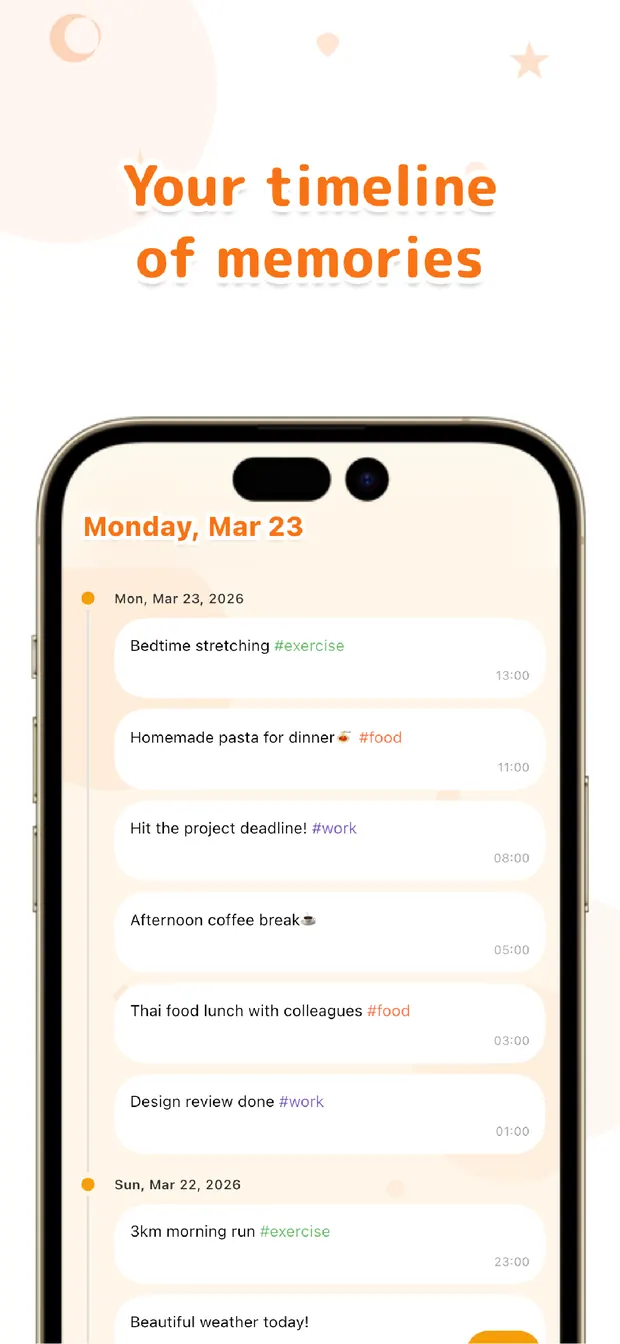
A chat-style timeline
Entries flow in chronological order like a chat. Just like messaging yourself, you can jot down a single line with ease.
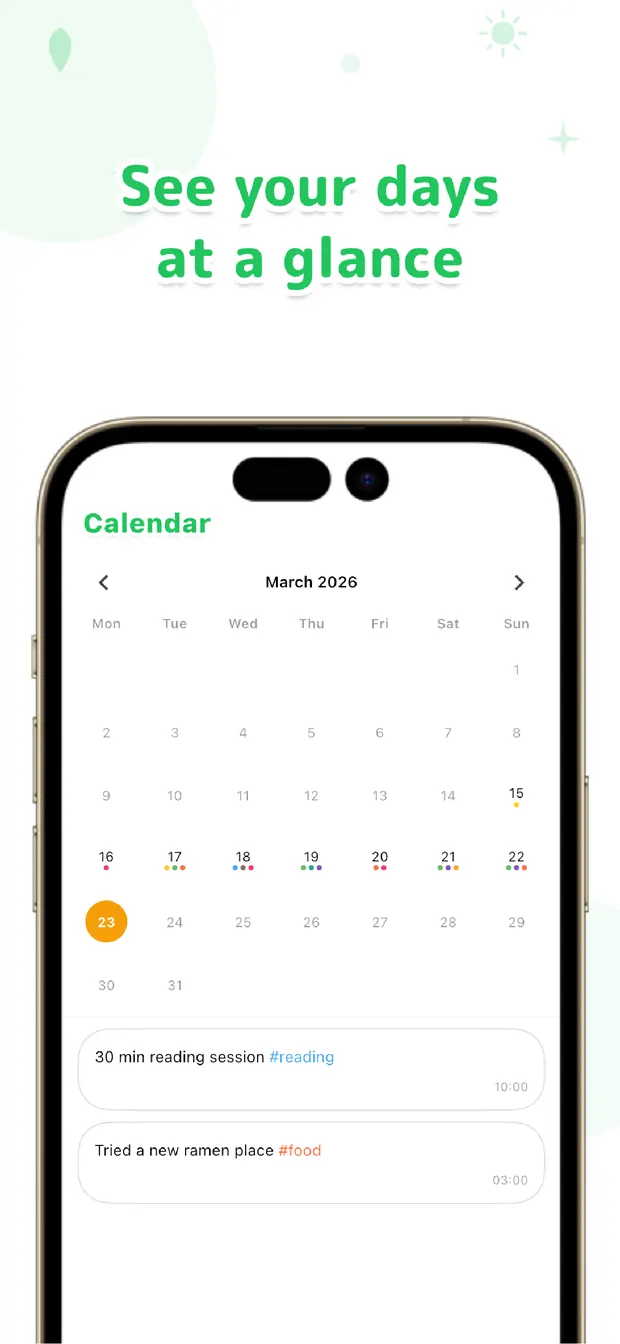
See your days at a glance
A monthly calendar shows which days you wrote and the #tags for each. Revisit your past self in a tap.
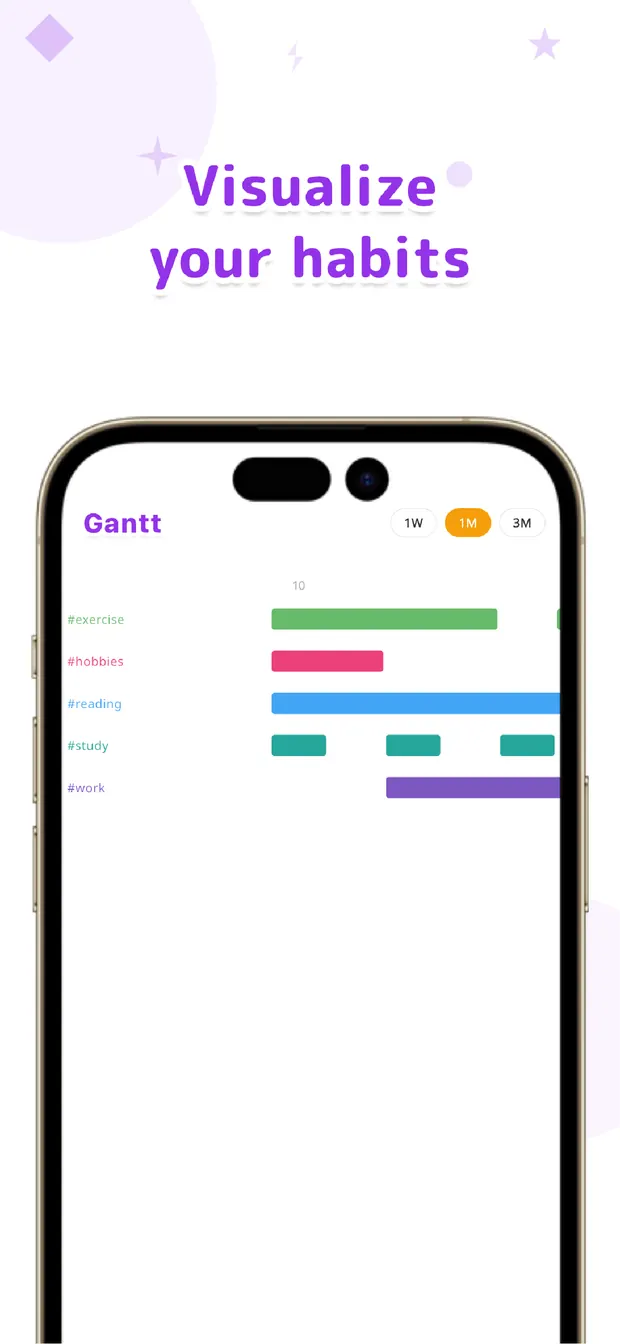
Visualize habits with a Gantt chart
See each #tag's streak across one week, one month, or three months. Spot exactly where the streak broke.
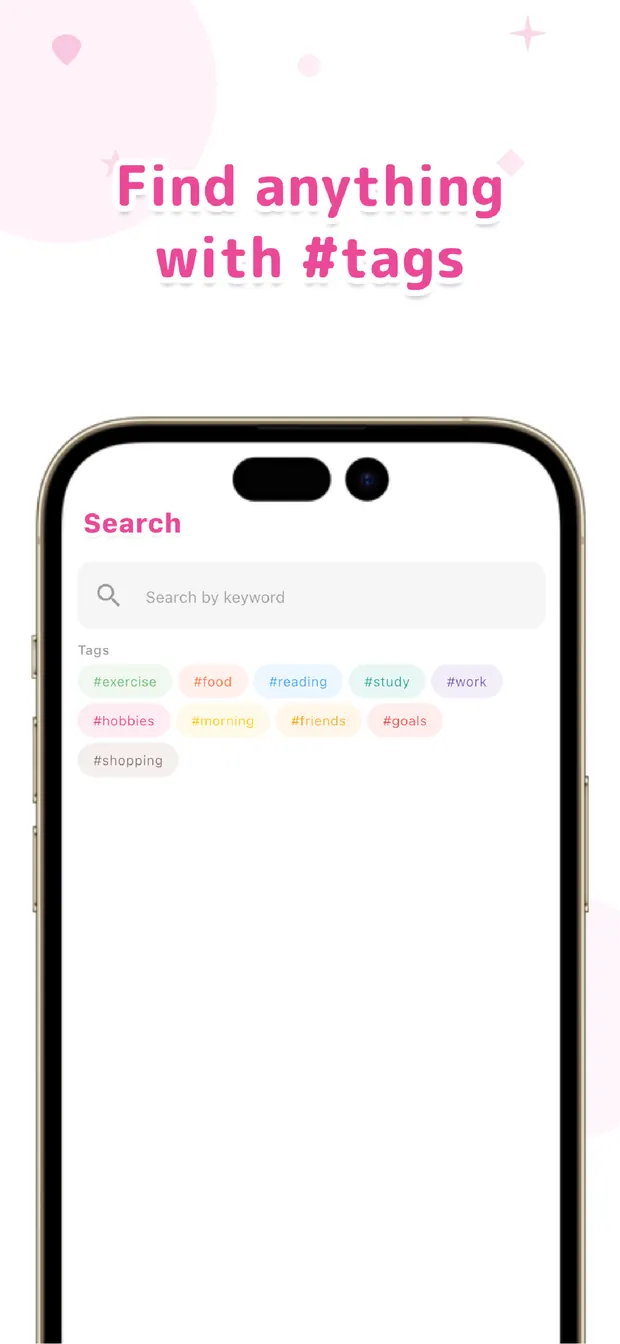
Search by keyword or #tag
Full-text search and #tag filtering find any past entry in an instant.
Ever felt this way?
OneTapLog is designed around the real reasons diaries don't stick.
"I always quit after 3 days."
Every diary app I've tried felt like a chore. Templates, mood pickers, decorations — by the time I'm ready to write, I've lost the urge.
Solved by OneTapLog:
Open the app and you're already writing. With the friction reduced to zero, jotting down a single line becomes effortless enough to actually keep up.
"I want to build a habit."
I'd like to track things like exercise, reading, or mood over time — but I can never tell whether I'm actually keeping it up.
Solved by OneTapLog:
Use #tags as habit markers and the Gantt chart shows your streaks at a glance over one week, one month, or three months. Continuity becomes visible.
How to Use
Logging your day in 3 simple steps.
Open the App
The input field appears instantly. No splash screen, no menu — just start writing.
Type Your Thoughts
Write anything — a quick note, a feeling, what you had for lunch. Add #tags or attach photos if you like.
Tap Send
Done! Your log is saved with an automatic timestamp. Look back anytime on the timeline or calendar.
Pro Plan
Every feature above is free. Go Pro to unlock the extras.
Cloud Sync
Sync across your devices by signing in with Google or Apple.
Auto Backup
Your logs are backed up to the cloud automatically. Never lose a memory.
13 Theme Colors
Personalize your diary with 13 color presets, and remove ads.
The Pro plan is a subscription, available monthly or yearly.
Useful Reads for OneTapLog
Articles on how to keep a diary going and get the most out of OneTapLog.
100 Journal Prompts That Actually Get You Writing
Organized by situation — mornings, evenings, gratitude, stress — plus how to use prompts so the habit sticks.
Read articleWhat Is Journaling? A Guide That Sticks
What journaling does for you, how to start, and how to design the habit so it survives — from the dev team.
Read articleTweet-Style Diary Apps Compared
Post like on social, just for yourself. We compare notes apps, locked accounts, and dedicated private timelines.
Read articleWhy You Can't Keep a Diary — and How to Make It Stick
The real reasons diaries fail and the tricks that make them stick — including the zero-friction "1-second diary" approach.
Read articleHow to Choose a Diary App: An Honest Comparison
We compare the classics — Day One, Daylio — with OneTapLog from a developer's point of view, and what to look for if you want one that sticks.
Read articleHow to Make Habit Tracking Stick
Why habit tracking falls apart, and how #tags plus a Gantt chart make your streaks visible — from a developer's point of view.
Read articleHow to Write a Diary
What to write and three easy formats (one-line, three-line, gratitude) that keep you going.
Read articleThe One-Line Diary
Why one line is exactly why it sticks, what to write, and the easiest way to leave it.
Read articleGratitude Journaling
The effects of a gratitude journal and how to keep it up — just three things before bed.
Read articleWhat Is a Chat-Style Diary App?
Journaling like texting yourself — why a social-feed style diary is so much easier to keep.
Read articleLifelog Apps
Logging your life loosely with text — one line at a time, reviewed with #tags and a calendar.
Read articleA Habit App with a Gantt Chart
See your streaks at a glance — a rare way to visualize habits, grown just by writing.
Read articleFor People Who Forget Ideas Instantly
Why ideas vanish before you write them down, and how to capture them in seconds with zero friction.
Read articleWhen Opening a Notes App Is Too Much Hassle
The hassle that stops you from writing, broken down — and how being ready to write the moment you open it solves it.
Read articleA Food Log That Actually Sticks
Why food logs don't stick, and how one line plus a photo and one tap keeps you going — no calorie entry.
Read articleWhy Logs Fizzle Out After Three Days
The small friction that ends tracking, and the light entrance plus visible streak that keep it going.
Read articleNever Remember Where You Wrote That Note?
Why notes scatter and how to centralize everything in one chronological place, found later with search.
Read articleA Work Log for When You Can't Recall What You Did
Log work in one second on the spot and reconstruct it later with search — material for reports and reviews.
Read articleA Medication Log So You Never Wonder If You Took It
Leave a one-tap, timestamped note the moment you take it, and confirm later instead of relying on memory.
Read articleOne-Handed Baby Logging in Seconds
Jot down feeds, diapers, and sleep one-handed the instant you open the app, with the time added for you.
Read articleSurface "When Did I Do That?" with a Search
Stop trying to remember dates — note what you did and pull up "that day" with search and the calendar.
Read articleWhy "I'll Write It All Down Later" Fails
Why deferred logging never lasts, and why one line on the spot builds a full day on its own.
Read articleA Snacking Log to Track the Habit
Stop fighting willpower — log each snack in one tap and let the calendar make the habit visible.
Read articleA One-Tap Water Log for When You Forget
Type "water," tap send, and let auto timestamps and the timeline show how much you really drank.
Read articleA Sleep Log Without the Effort
Tap once at bedtime and once when you wake — the timestamps build a sleep rhythm on the calendar.
Read articleCondition Notes You Can Look Back On
A few words plus #condition in one tap, and search brings your ups and downs into view.
Read articleStart a Mood Log in One Word
When detailed tracking quits on you, one word plus an emoji puts your ups and downs on the calendar.
Read articleKeep Period Notes Without a Heavy App
Skip the feature-packed trackers — a word, a tag, and the calendar keep period and symptom notes simple.
Read articleA One-Line Training Log That Proves You Kept Going
Why workout logs stall, and how one line plus a tag keeps going while the calendar turns your streak into motivation.
Read articleLog the Urge and Ride It Out While Quitting
One tap when a craving hits gives you something to do while it passes, and the timeline reveals your triggers.
Read articleA Drinking Log to Look Back On Later
One line plus a tag for each drink, and the calendar makes your alcohol-free days and frequency visible.
Read articleJot Small Purchases the Moment You Spend
Skip heavy budgeting apps — note the amount and a tag on the spot and review it later with search.
Read articleNever Forget When You Paid for a Subscription
A dated one-line note the day you pay lets search surface exactly when — no automated tracker needed.
Read articleCapture Your Child's Firsts Before They Fade
One line plus a photo in the moment, dated for you, and the timeline lets you relive each milestone in order.
Read articleThe one-line note habit that keeps you from forgetting errands at the last minute
You remember a reply, a payment, or something to bring — then forget it right when it m…
Read articleHow to see at a glance whether a habit is sticking, using #tags
You want to know whether a habit is actually continuing.
Read articleSee your habits as streak bars with the Gantt view
You want to see “done or not done” as a continuous line, not a number.
Read articleA way to pull together notes scattered across too many apps
Your notes live in the stock app, chat threads, and sticky notes, and you never know wh…
Read articleA “did it” log that quietly builds your self-esteem
You keep feeling you got nothing done today.
Read articleA brain-dump habit for emptying the noise in your head fast
The fragments and half-thoughts pile up and you can't settle.
Read articleThe interruption memo that makes resuming work smooth again
An interruption hits and you can't recall where you left off, so leave one line on the way out.
Read articleHow to solve the blank daily report using your everyday logs
Leave a one-line log as you work, then gather the day with search to build your report.
Read articleHow to keep a read, watched, and bought log you can look back on later
One line and a tag for each book, film, or purchase, then find it again with search.
Read articleAn outings log for keeping the places you went with a photo
A photo and a line on the spot, then look back over where you've been on the calendar.
Read articleA one-handed way to log your pet's meals, bathroom, and health each day
One line, one hand, one tap, and the timeline brings the care record back when the vet asks.
Read articleA life log that puts childcare, chores, and work on one timeline
Keep everything in one place with #tags and review your whole life on a single timeline.
Read articleThe small habits behind people who keep logging without leaning on reminders
Lower the bar, anchor the log to a routine, and let the look-back pull you forward.
Read articleA study log that keeps your memorization streak alive next to your flashcards
One tap with #study the moment you finish, and watch the streak grow on a Gantt view.
Read articleLog the day you memorized a word so you never miss the right time to review
Tap a #memorized note when it clicks, then read your learning days off the calendar.
Read articleThe first step for people who can never build a note-taking habit
Start with one line a day, tied to a routine, with no pressure to be perfect.
Read articleI did nothing today is usually a myth, and seeing your actions proves it
Leave a one-line mark in the moment and let the calendar prove the empty day wrong.
Read articleWhy a memo you can write the instant it opens beats a feature-packed one
Fewer steps between open and write means more thoughts survive. Open, write, done.
Read articleDownload Now for Free
Start your 1-second diary today. No account required, works offline, supports 34 languages.
Frequently Asked Questions
Q. How is OneTapLog different from other diary apps?
The keyboard opens the moment you launch the app, so there's nothing between you and writing. Entries flow into a chat-style timeline, and a Gantt chart lets you visualize habits by #tag — something most diary apps don't offer.
Q. Do I need to create an account?
No. OneTapLog is local-first and works without any sign-up. You only sign in with Google or Apple if you choose the Pro plan's cloud sync and backup.
Q. Does it work offline?
Yes. All your data is stored on your device first, so the app works fully offline. The cloud is only used as a backup when you enable Pro.
Q. What can I attach to an entry?
You can attach photos, videos, voice recordings, and files such as PDFs.
Q. Which platforms are supported?
OneTapLog is available on both iOS and Android, in 34 languages.