MozFace - Auto Face Blur & Mosaic App for Photos and Videos (Fully Offline)
Face blur & mosaic,
done in an instant
Just select a photo or video, and it automatically blurs everyone's faces.
Instead of choosing who to hide, choose who to reveal.
What MozFace Can Do
Fully Automatic Face Detection
The moment you add a photo, AI automatically detects all faces. All processing happens entirely on your device. Your photos are never sent externally.
Tap to Reveal
Every face detected is blurred by default. Just tap the ones you want to unblur. Because you "choose who to reveal" instead of "choosing who to hide," there are zero accidental exposures.
3 Blur Styles
Gaussian (Aesthetic blur), Mosaic (Classic pixelation), and Stamps (12 different emojis). You can also adjust the blur intensity and size with a slider.
Hide more than just faces
with the manual brush
You can freely trace and blur car license plates, addresses, names, and anything else with your finger.
- ✓Freely blur by tracing with your finger
- ✓Brush size is adjustable
- ✓One-tap undo if you make a mistake
Blur anything
Accurately processes only the areas you trace
Now blurs video too
Select a video and MozFace detects every face and blurs it automatically.
When a face moves, the mosaic follows it all the way through.
Faces are tracked as they move
As a face moves through the video, its position is tracked frame by frame and the mosaic moves with it. No need to nudge a box along one frame at a time.
Tap to reveal, same as photos
Every detected face starts out blurred. Tap the thumbnail of a person you want to show and their face is revealed — so nobody gets left exposed by accident.
Hide anything by area and time
For license plates, signs, and anything that is not a face, pick an oval, a rounded rectangle, or a horizontal band. You can also set the time range so it only covers part of the clip.
No upload, not even for video
Detection and export both run on your device. Your video is never sent to an external server, and the finished file saves straight to your gallery.
Perfect for these situations
Social Media
When posting group photos on Instagram or X. Starts with everyone blurred automatically.
Schools & Daycares
Share photos of your child while protecting the privacy of other children.
Flea Market Listings
Quickly hide faces of people caught in the background of your item photos.
Posting video
Before uploading to YouTube or TikTok. Hide passersby who wandered into the shot, with the mosaic tracking them as they move.
Your photos and videos
are yours
From face detection to blurring to video export, all processing is completed on your device.
Neither your photos nor your videos are ever uploaded to an external server.
- ✓No internet required
- ✓Photos and videos never leave your device
- ✓Supports 34 languages
See It in Action
From auto detection to tap-to-reveal — here is how MozFace works.
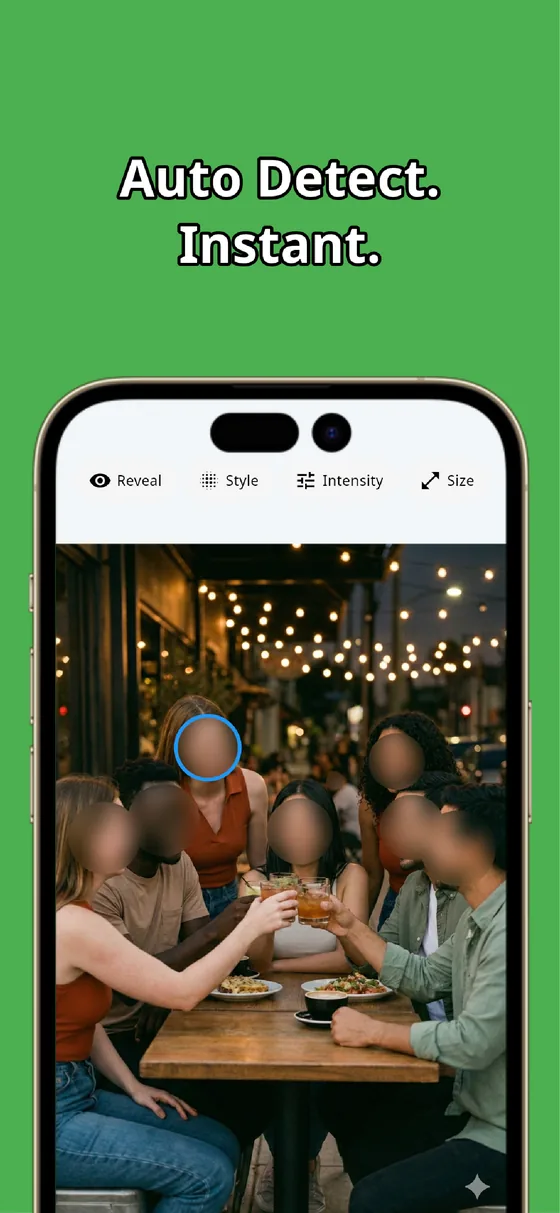
Every face detected automatically
The moment you pick a photo, AI finds and blurs every face — even in a big group shot. No tracing, no selecting one by one, and everything is processed right on your device.
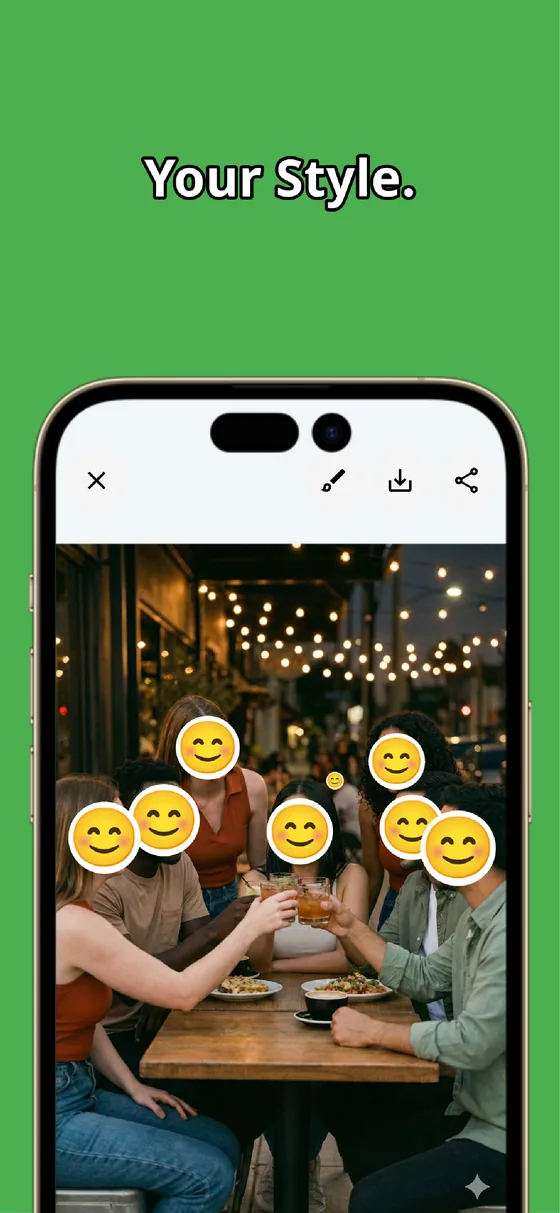
Pick your favorite hiding style
Switch between Gaussian blur, classic mosaic, and fun emoji stamps with one tap. Fine-tune the intensity and size with sliders until it looks just right.
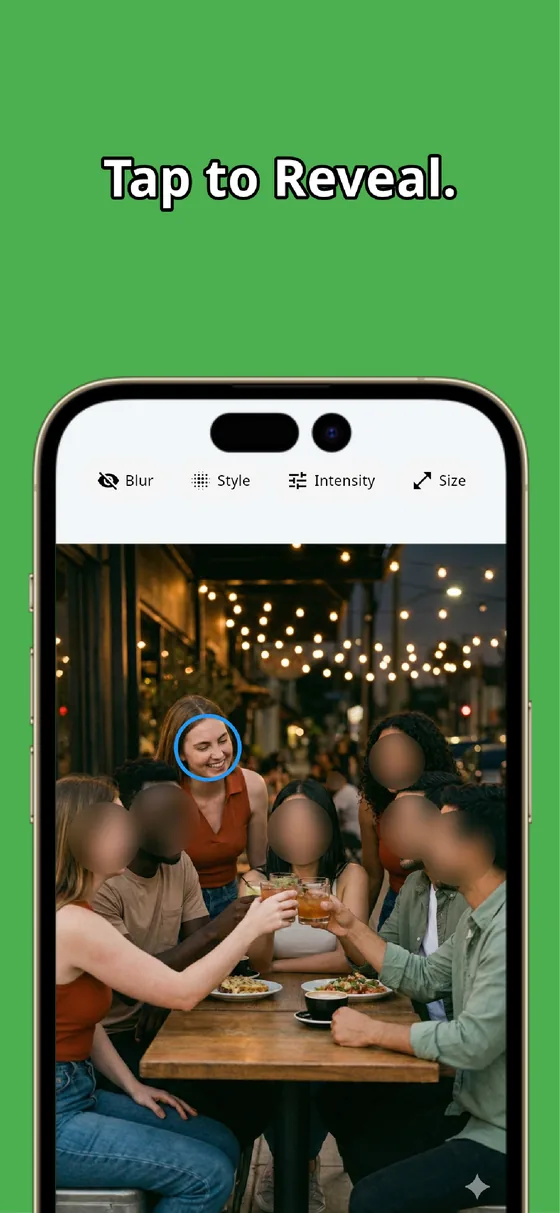
Tap to reveal only who you choose
Everyone starts hidden, so nothing slips through. Tap a face to unblur it — you choose who to show, not who to hide — then save or share straight to social media.
Useful Information for MozFace
We have prepared articles on how to better utilize face mosaic and blurring, in photos and in video.
How to Blur Faces in a Video
Automatic face tracking keeps the mosaic on a moving face. From first import to final export.
Read article →Keeping a Mosaic on a Moving Face
Why keyframing a box by hand goes wrong, and how face tracking stops the mosaic from slipping.
Read article →Blur a Video on iPhone and Android
What the built-in tools can and cannot do, and how to finish the whole job on your phone.
Read article →Hide Faces Before Posting to YouTube or TikTok
Passersby and other people's children in your footage — a checklist for catching them before you upload.
Read article →How to Blur Faces in Photos (iPhone & Android)
What built-in tools can really do, and the easiest way to hide every face just by picking a photo.
Read article →How to Blur Every Face in a Group Photo
Hide everyone in a big crowd at once, then tap to reveal only who you want to show.
Read article →How to Hide Kids' Faces Online Safely
A quick step before you post — protect your child's face and the other kids in the frame.
Read article →Why We Built an Auto Face Blur App
The design decisions behind blurring everyone automatically and revealing only who you choose.
Read article →How to Blur a License Plate or Personal Info
Hide plates, addresses, and names with the manual brush — alongside the faces, in one photo.
Read article →How to Hide Faces on Instagram, Stylishly
Blur and stamps that look natural, and showing only yourself while hiding the others.
Read article →Photo Blur Apps: How to Pick One for Photos, Videos, and Faces
The four types of blur tools compared, and the three things that matter: face detection, video, on-device.
Read article →Face-Hiding Sticker Apps: Cover Every Face Automatically
Stop placing stickers one by one — auto detection covers everyone, and you tap to reveal.
Read article →6 Best Face Blur Apps Compared
Auto detection, ease of use, and platform support across six face blur apps.
Read article →How to Hide Your Address and Name in Mercari Listing Photos
Auto-detect background faces, and cover shipping labels and nameplates with the manual brush.
Read article →How to Hide Other Kids' Faces in Event Photos
Auto-blur everyone in a sports day or recital shot, then reveal only your own child with a tap.
Read article →How to Post on X (Twitter) With Faces Hidden
The X app can't blur faces — blur everyone before posting and reveal only who you want to show.
Read article →How to Remove or Blur Strangers in the Background
Auto-detect multiple background faces at once, without the unnatural scar that painting leaves.
Read article →How to Mosaic and Hide a QR Code or Barcode
A rough mosaic still gets scanned — cover the whole code firmly with the manual brush.
Read article →How to Keep Your Home From Being Revealed in Photos
Location data isn't enough — hide nameplates, addresses, and plates with the manual brush.
Read article →How to Hide a Car License Plate Naturally in Photos
A black box looks unnatural — trace the plate with the manual brush so the number can't be read.
Read article →How to Blur a Name or Phone Number in a Screenshot
Names, numbers, and emails hide in plain sight — cover each field before you share.
Read article →Free Ways to Blur Faces and Plates Compared
Built-in editor, online tool, or dedicated app — an honest comparison of the free options.
Read article →How to Blur the Address on a Shipping Label in Photos
Sweep the whole label with the manual brush so the address and barcode can't be read.
Read article →How to Hide a House Number or Nameplate in Photos
Cover the nameplate, number, and signs so a home photo doesn't reveal where you live.
Read article →How to Blur the Address and Name on Mail in Photos
An envelope shows your name and address — sweep the whole panel so it can't be read.
Read article →How to Hide a Face for a TikTok or Reels Thumbnail
Take one frame, auto-detect the face, pick a style, and save it as a faceless cover image.
Read article →How to Hide Your Face in a Messaging App Profile Photo
Use a photo you like, auto-blur the face, adjust the strength, and crop it into an icon.
Read article →Hiding Your Child's Face Before a Holiday Greeting Card Photo Goes Online
Keep the printed card for close family, and cover the face on any version you share online.
Read article →How to Hide Your Baby's Face Before Posting on Social Media
Share the moment with a soft blur or cute stamp, and keep the original photo untouched.
Read article →How to Mosaic a Face or License Plate on a YouTube Thumbnail
Auto-detect faces and plates, mosaic anything else by hand, and save a clean thumbnail.
Read article →How to Blur Faces and Personal Info in Blog Photos
Auto-blur background faces, cover signs and personal info, and run a pre-publish check.
Read article →How to Blur Employee and Student ID Photos Before Sharing
Cover the face, name, and ID number with a manual brush and keep only what proves the card is valid.
Read article →How to Hide a Ticket QR Code Before Posting It on Social Media
Cover the QR, seat, and booking number so the ticket cannot be scanned and reused.
Read article →How to Blur the Number on an ID Card or Driver License Photo
Mask the number, address, and photo you choose, and leave only the field being checked readable.
Read article →How to Mask Personal Info in a Document or Contract Screenshot
Cover names, addresses, and account numbers across a page and keep only the relevant clause.
Read article →How to Hide a School Name and Kid's Name on a Uniform Photo
Auto-blur faces, then cover the crest and name tag so the photo does not reveal the school.
Read article →How to Hide a Unit Number and Nameplate in Rental Viewing Photos
Cover the unit number and nameplate and auto-blur anyone caught in the background.
Read article →How to Hide the Room and Clutter Behind Your Flea Market Listing Photos
Blur the documents and nameplates behind your item and auto-detect anyone in the background.
Read article →How to Hide Passersby in Your Travel and Sightseeing Photos Before Posting
Auto-detect every stranger at a crowded landmark at once and fine-tune the rest by hand.
Read article →How to Hide Other Diners’ Faces in Your Restaurant and Cafe Photos
Blur the other customers in one step so you can post the dish and the room with no strangers.
Read article →How to Hide People Who Did Not Consent Before Posting a Group Photo on Social Media
Start from all faces hidden, then reveal only the people who are fine being shown.
Read article →The Limits of Hiding Faces With Your Phone’s Built-in Editor, and How to Mosaic Them Properly
An honest look at where the stock editor falls short and what a dedicated mosaic app does better.
Read article →How to Blur Several Faces and License Plates at Once in a Single Photo
Auto-detect and blur every face in one step, then add license plates with the manual brush.
Read article →How to Keep Your Address and Nameplate Out of Pet Photos
Blur the nameplate and house number behind your dog or cat, and auto-detect anyone in the frame.
Read article →Is It True That Mosaic Can Be “Reversed”? How to Hide Things Safely
An honest look at when a weak mosaic can be read back, and how strength and area keep it unreadable.
Read article →Download MozFace
Automatically blur everyone's faces just by selecting a photo or video
Frequently Asked Questions
Q. Are my photos and videos sent externally?
No. MozFace works completely offline. From face detection to blurring to video export, all processing is done entirely on your device. Your photos and videos are never sent to external servers.
Q. Can I change the blur style?
Yes. For photos you can choose from 3 styles: Gaussian (aesthetic frosted glass blur), Mosaic (classic pixelation), and Stamps (12 different emojis). For video there are 2 styles: blur and pixelation. You can also freely adjust the blur intensity and size with a slider.
Q. Can I hide things other than faces?
Yes. You can use the manual brush feature to freely blur car license plates, addresses, names, and anything else by tracing with your finger. You can also adjust the brush size.
Q. Can I blur faces in a video?
Yes. Just as with photos, select a video and MozFace detects the faces in it and blurs them automatically. When a face moves, its position is tracked so the mosaic follows it to the end of the clip — you never have to move a box frame by frame. Tap a face to reveal the people you want to show.
Q. Can I hide things other than faces in a video?
Yes. For license plates, signs, and similar, pick an oval, a rounded rectangle, or a horizontal band and place it by hand. You can also set which seconds of the clip it covers, so you can hide something that only appears partway through. Video mosaics come in two styles: blur and pixelation.
Q. Which platforms are supported?
MozFace is available on both iOS and Android.
What Is MozFace?
MozFace is a photo and video editing app for iOS and Android that automatically detects and blurs every face the moment you select a photo or a video. Instead of choosing whose face to hide, you tap to reveal only the people you want to show. In video, faces are tracked as they move so the mosaic follows them. All face detection, blurring, and video export is processed entirely on the device, so nothing is ever uploaded to an external server.
- Price: Free
- Platforms: iOS, Android
- Media supported: Photos and videos
- Internet connection: Not required — works fully offline
- Blur styles: Photos use Gaussian blur, Mosaic (pixelation), or Stamps (12 emoji designs). Video uses blur or pixelation
- Manual coverage: Photos use a finger-traced brush. Video uses a placed oval, rounded rectangle, or horizontal band, with an optional time range
- Language support: 34 languages
For video, see how to blur faces in a video for a full walkthrough. Want to try before installing? There is also a free online face blur tool that runs entirely in your browser (a simple version for photos where you select areas manually).