We're the OneTapLog team. A lot of people try to build a logging habit by setting up a daily reminder — and for the first week it works. Then something shifts: the alert pops up at a bad moment, you swipe it away, and after enough of those swipes your brain learns to treat it as noise. We've watched this happen to our own habits, so in this article we want to talk about how to keep a log going without depending on reminders to carry you.
Why a reminder you can ignore stops working
A notification only changes behavior while it still feels like an interruption. The trouble is that any alert you see often enough fades into the background. You start dismissing it on autopilot, and once that reflex sets in, more reminders won't bring the habit back — they just become more things to swipe away. Leaning on an external nudge also keeps the habit fragile: the moment the nudge misfires, the whole routine collapses with it.
So instead of asking what will remind you, we think it's more useful to ask a different question: what makes logging so easy that you reach for it on your own? The people who keep going rarely rely on a buzz in their pocket. They've quietly removed the friction that made them put it off.
Drop the bar low enough that no nudge is needed
The first habit is simply making the act of logging trivially small. With OneTapLog, the input field is already waiting the moment you open the app, so you type a few words and send with one tap. There's no screen to navigate, no folder to pick. When a log takes a couple of seconds, you no longer need a reminder to push past resistance, because there's barely any resistance left to push past.
The second habit is tying the log to something you already do. Right after a meal, the moment you sit down at your desk, the second you get home — anchoring a quick note to an action that's already automatic means the trigger lives in your routine, not in your phone's alerts. Add #work or #home and you can pull those moments back later by tag.

Let looking back be the thing that pulls you forward
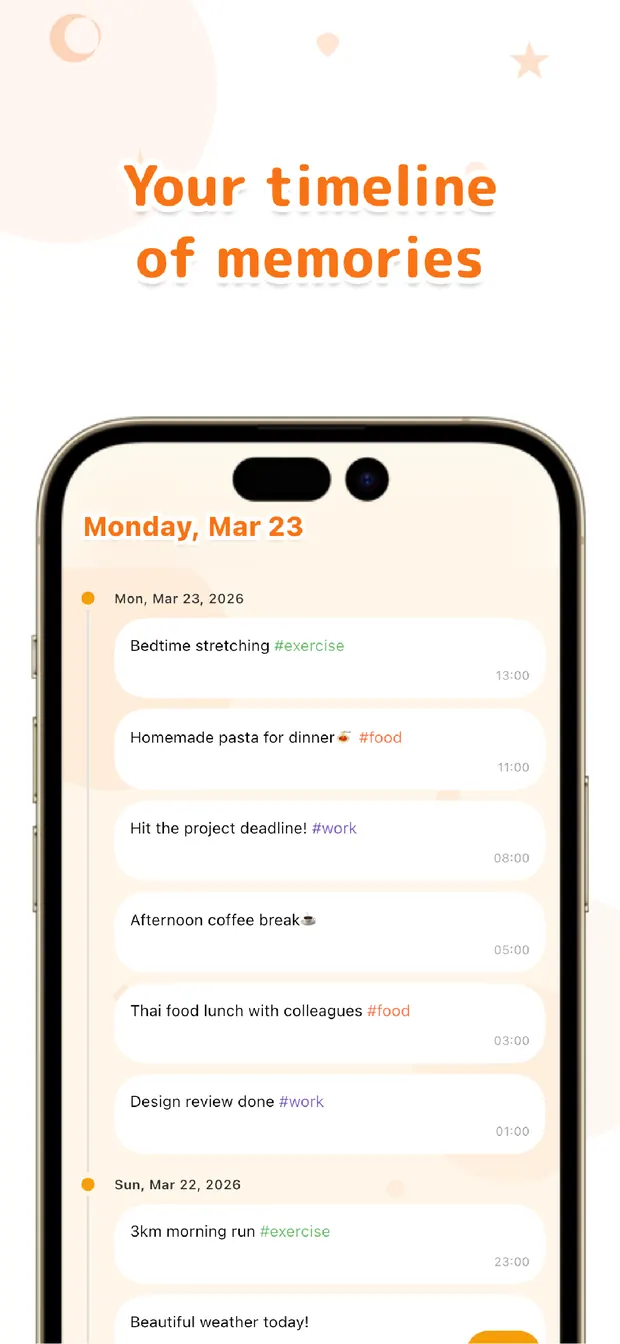
The third habit is the one that quietly outlasts the rest: making the review feel rewarding. When your notes stack up on the timeline, scrolling back through a week becomes its own small payoff. Seeing the line of entries you've left builds a sense of "I've actually kept this up," and that feeling is a far stronger motivator than any alert.
A reminder can only ever say "do it now." A timeline that's filling up says "look how far you've come" — and that's the kind of pull that keeps a habit alive long after the novelty wears off. The goal isn't to remember to log. It's to want to.
If reminders have stopped working for you, the fix probably isn't a louder reminder. It's making the log small enough to do without thinking, hooking it to a routine you already keep, and letting the growing record do the encouraging. Lower the bar, anchor the habit, enjoy the look-back — that combination, in our experience, is what keeps a log going on its own.

OneTapLog
The input field is ready the instant you open it, so a log takes seconds. Anchor it to your routine, then look back with #tags and a timeline. No account, free to start.
Learn more about OneTapLogFrequently asked questions
Why do reminders stop working after a while?
Any alert you see often enough fades into background noise, and you start dismissing it on autopilot. Once that reflex sets in, adding more reminders rarely helps. It works better to make the habit easy enough that you reach for it without a nudge.
How do I keep logging without relying on reminders?
Three things help: lower the effort of logging to almost nothing, tie it to something you already do every day, and let reviewing your past entries feel rewarding. Together they keep the habit going from the inside rather than from an external buzz.
What does anchoring a log to a routine mean?
It means attaching the quick note to an action that's already automatic — right after a meal, when you sit at your desk, or the moment you get home. The existing routine becomes the trigger, so you don't have to remember separately.
How does looking back help me keep going?
When your entries stack up on the timeline, scrolling through them gives a real sense of progress. That feeling of having kept it up is a stronger, longer-lasting motivator than an alert that only says do it now.