We're the team behind OneTapLog. We make a 1-second diary app, and the hardest question in building it was: how do you make recording a habit actually last? Diaries, workouts, reading — the reasons they fizzle out are remarkably alike.
This article covers why habit tracking doesn't stick, and how we tried to solve it through design — specifically, why we deliberately built #tags and a Gantt chart into a diary app. If your habit tracking always ends after a few days, we hope the thinking helps as much as the tool.
The real reason habit tracking doesn't last
Why do people quit habit trackers? When we mapped it out, it came down to two things. First, the recording itself is a chore. Open a dedicated app, pick an item, tick a box — do that every single day and the recording is what collapses first. It's the exact same structure as a diary that doesn't stick.
Second, you can't see the payoff. If you can't tell how much you managed this week or when the streak broke, there's no sense of achievement, and you quietly stop. Building a habit isn't about willpower — it's about designing those two problems away.
Not making recording a separate task: #tags
To kill "recording is a chore," we chose not to make habit tracking a separate feature. In the flow of writing your diary, you just type a #workout or #reading in the text. It's recognized as a tag automatically, and that becomes your habit record.
Writing today's diary already finishes your habit log. There's no separate checklist to open, so you avoid the trap of recording for the sake of recording. The first rule of consistency, we think, is not turning the record into its own task.

Making the streak visible: the Gantt chart
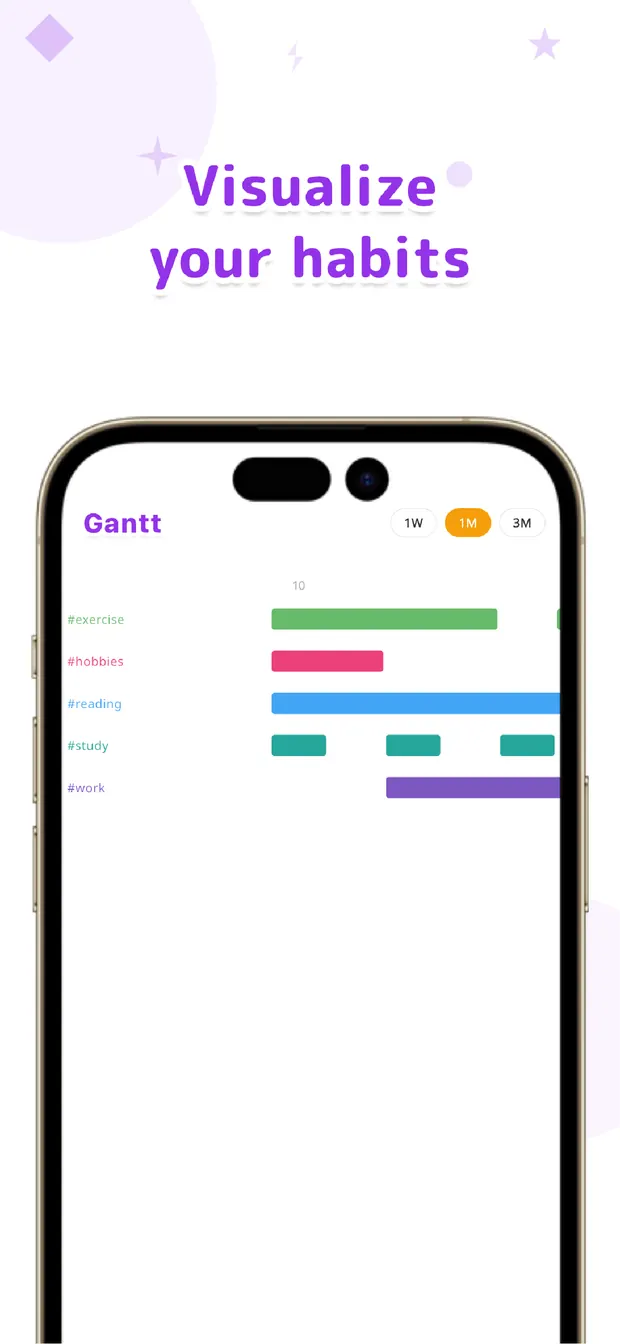
Then there's "you can't see the payoff." For this, instead of the calendars or stamps that habit trackers usually use, we chose a Gantt chart. Each tag's streak shows up as a horizontal bar.
We went with a Gantt chart because it makes continuity and gaps intuitive. Switch between one week, one month, and three months, and you see at a glance which habits have a growing bar and which weeks are empty. People want to fill a gap they can see — and we wanted to turn that into motivation to keep going.
Practical tips you can start today
Beyond the tool, here are tips we tried ourselves that actually worked. The common thread is: don't overdo it.
First, start with one or two tags. Pile on #workout #reading #wakeup #study from day one and everything ends up half-baked. Pick a single habit you want to keep, and focus on growing that one bar — it lasts longer in the end.
Second, lower the bar drastically. Not "#workout = run 3km" but "#workout = 1-minute stretch." The higher the recording bar, the less it lasts. Keeping the bar unbroken — however small — is what matters most. A loose 30 days beats a perfect 3.
Finally, glance at the bars once a week. Not to scold yourself for the days you missed, but to notice "oh, this one's still going." In OneTapLog the Gantt chart catches your eye while you look back on your diary. Recording, visualizing, and reflecting all sitting on the same surface — that, we believe, is the real key to making it stick.

OneTapLog
A 1-second diary that tracks habits as you write. #tags and a Gantt chart make your streak visible. No account, works offline, free.
Learn more about OneTapLogFrequently asked questions
Can a diary app track habits too?
In OneTapLog, just type a tag like #workout in your diary entry and it becomes a habit record. There's no separate checklist to open — you record it in the flow of writing — and the Gantt chart shows each tag's streak.
My habits never last — what should I do?
Reduce the effort to record, and make your progress visible. Limit yourself to one or two tags, lower the bar so it takes a minute, and glance at the Gantt chart once a week. A loose 30 days beats a perfect 3.
What does the Gantt chart show?
Each tag's habit appears as a bar for the period it has continued. Switch between one week, one month, and three months to see at a glance which habits are going and when a streak broke.
Is habit tracking free?
Yes. Both #tags and the Gantt chart are free. Cloud sync, automatic backup, and 13 theme colors come with Pro (monthly or yearly).