We're the team behind OneTapLog. We're also a group of people who downloaded one diary app after another and deleted every one of them. In a real sense, we built this app for our past, three-day-quitter selves.
In this article we break down why diaries don't stick, and then walk through how we solved each cause as a deliberate design decision in OneTapLog. If you struggle to keep a diary going, we hope the thinking behind each feature is as useful as the features themselves.
We treated "diaries don't stick" as a design problem, not a willpower one
Before building anything, we started by mapping out why we ourselves had failed to keep a diary. User interviews echoed almost exactly what we felt. It isn't about weak willpower — the problem is structural.
The biggest one: people quit before writing. Open the app, find today's page, check the date, finally tap the input field — and somewhere in those few seconds of friction, people drop off. They don't dislike writing; the cost to start writing is simply too high. That was the very first thing we wanted to eliminate in the UX.
The other two: the pressure to "write it properly," and no sense of progress. Friction, pressure, and no feedback — solving these three with the product itself became OneTapLog's design brief. Here's how we approached each.
Zero friction: the keyboard is up the moment you open it
Our top priority was "launch straight into writing." Open the app and the keyboard is already up, cursor blinking. We deliberately don't insert a page to find, or a date picker. Shrinking the gap between launch and first keystroke to a literal one second, we believed, maps directly to retention.
We considered showing a home list or onboarding first, but every one of those is "friction before writing," so we cut them. Being able to leave a line during a few seconds at a crosswalk — that, to us, is the first real step out of the three-day curse.

No pressure: we made it a chat, not a diary
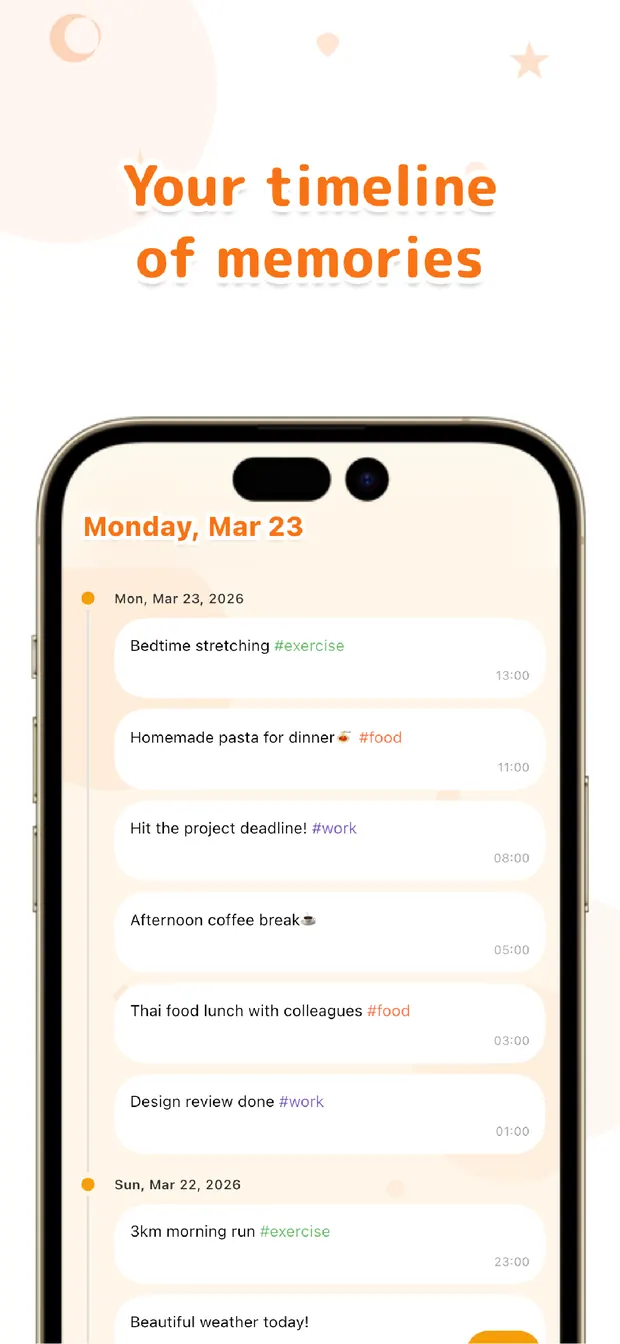
How do you remove the pressure to "write something proper"? Our answer was to make the UI a chat, not a notebook. What you write flows into a timeline like messages to yourself.
A blank page makes people freeze; a chat input lets you fire off a single line. "Sleepy" works. "Had ramen" works. Pairing the low bar of one-line journaling with a familiar chat UI is an intentional choice in service of consistency.
A sense of progress: #tags and a Gantt chart make habits visible
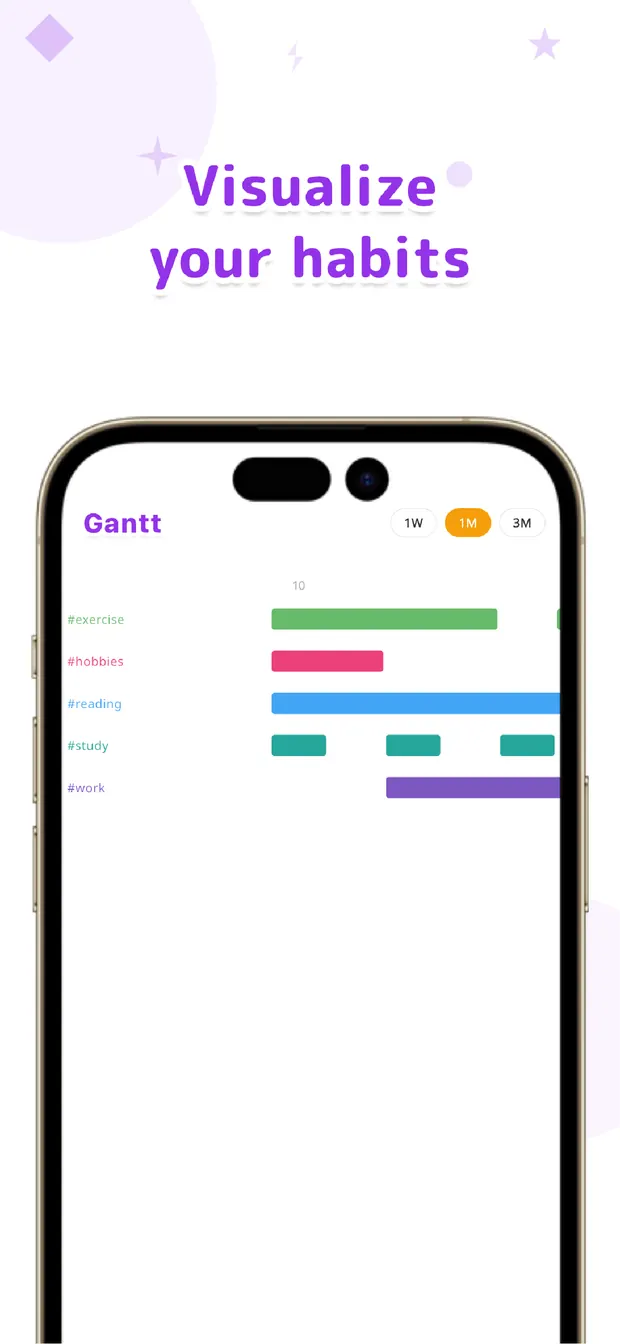
For the third problem — no feedback — we built in a way to see that you're keeping it up. Write a #workout or #reading in your text and it auto-becomes a tag, then the Gantt chart shows that tag's streak as a bar.
What we were really after was "showing the gaps." Look at the bars over a week, a month, or three months and the empty weeks stand out. People want to fill a gap they can see — we wanted to turn that instinct into motivation to continue. Your diary becomes a habit tracker just by writing. The calendar and full-text search for looking back come from the same idea.
Lowering the barrier to start: no sign-up, local-first
Before consistency, there's the wall of never starting at all. So we chose not to require an account. Download, open, and you can already write. Removing the usual "enter your email, wait for the confirmation" gate noticeably changes the odds of getting that first entry written.
We made it local-first, storing data on your device by default. You can write on a subway with no signal, and your entries aren't quietly sent off somewhere. A diary is about the most private record there is, so this was a line we wouldn't cross in the design. Photos, videos, audio, and files can be attached as well.
What we changed versus existing diary apps
The design decisions we made for "stickability," lined up against a typical diary app:
| Typical diary app | OneTapLog | |
|---|---|---|
| Getting to writing | Open a page, pick a date… | Keyboard up on launch |
| How much to write | Tends to assume real entries | One line is fine |
| Seeing your streak | Rarely | #tags + Gantt chart |
| Getting started | Often needs an account | No sign-up, works offline |
What we set out to do with OneTapLog
We've walked through the features one by one, but the design philosophy underneath is simple: keeping a diary means not making people try hard. So rather than piling on features, we built OneTapLog by removing three obstacles one at a time — the friction before writing, the pressure to write well, and the lack of any sense of progress.
If you're hovering over the delete button on yet another diary app, we'd love for you to make this the next one you try. As former three-day quitters ourselves, we shaped it into something we could finally keep going. Today's one line is enough to start.

OneTapLog
A 1-second diary that's ready to write the moment you open it. No account, works offline, free to start.
Learn more about OneTapLogFrequently asked questions
What should I write in a diary?
Anything. What happened today, how you felt, what you ate, or just a one-word mood is plenty. Because OneTapLog lets you write from a single line, there's no pressure to compose something "proper."
Can I keep it up even if I'm a serial quitter?
Our team were textbook serial quitters ourselves, which is exactly why we designed OneTapLog to strip the friction before writing down to almost nothing. People who could never keep a diary tend to feel the difference most. Daily reminders can nudge you to write, too.
Is it free?
Yes. Core features — 1-second input, timeline, #tags, calendar, Gantt chart, search, and attachments — are free. Cloud sync, automatic backup, and 13 theme colors come with Pro (monthly or yearly).
Does it work offline? Do I need an account?
No account required, and it works fully offline. Your data is stored on your device first, so you can write even with no signal. The cloud is only used for backup when you enable Pro.