We're the team behind OneTapLog. We make a diary app — but before that, we were the kind of users who tried just about every diary app out there. In fact, the order was: we couldn't stick with any of them, so we decided to build our own.
So this isn't a "ours is the best" piece. It's an honest attempt, from the people who build these things, to lay out what actually matters when you pick a diary app — lining up the classics (Day One, Journey, Daylio) next to our own OneTapLog.
Choosing by "most features" usually backfires
Roundup articles love to compare on feature count. But after switching apps over and over, we landed on the opposite conclusion. The more features an app has, the more steps before you can write — and eventually you stop opening it. For a diary, "how easily you can start writing" matters more than "what it can do."
So the comparison should pivot on stickability, not feature lists. Four things, specifically, keep you from choosing wrong: speed from launch to typing, the bar for how much you have to write, how visible your progress is, and the effort to get started (like account sign-up). Let's look at what type each app is.
The classics each have a different philosophy
To be clear up front: Day One, Journey, and Daylio are all excellent, polished apps. We used them a lot. What differs isn't quality but what they choose to prioritize.
Day One / Journey are "notebooks for writing properly" — add photos, write long entries, look back on them beautifully later. Great for serious journaling, but a touch heavy for jotting a quick line on impulse. Daylio goes the other way: its strength is tapping a mood stamp, ideal if you'd rather record without writing. But the feeling of "leaving it in your own words" is lighter.
What we wanted fit none of those. We wanted to write words, but without bracing ourselves — not a long-form notebook, not stamps only, but a diary as light as firing off one line in a chat, still in your own words. We couldn't find it, so we built it. That's OneTapLog.
The two design calls we committed to
First: launch straight into writing. The keyboard is up the instant you open the app — no date picker, no list screen in between. We obsessed over deleting the few seconds between "I'll write" and actually writing, because we think that gap is usually what decides whether you keep going.
We also made the UI a chat, not a notebook. It feels like messaging yourself, so a single "sleepy" counts. The pressure to write something proper is removed structurally.

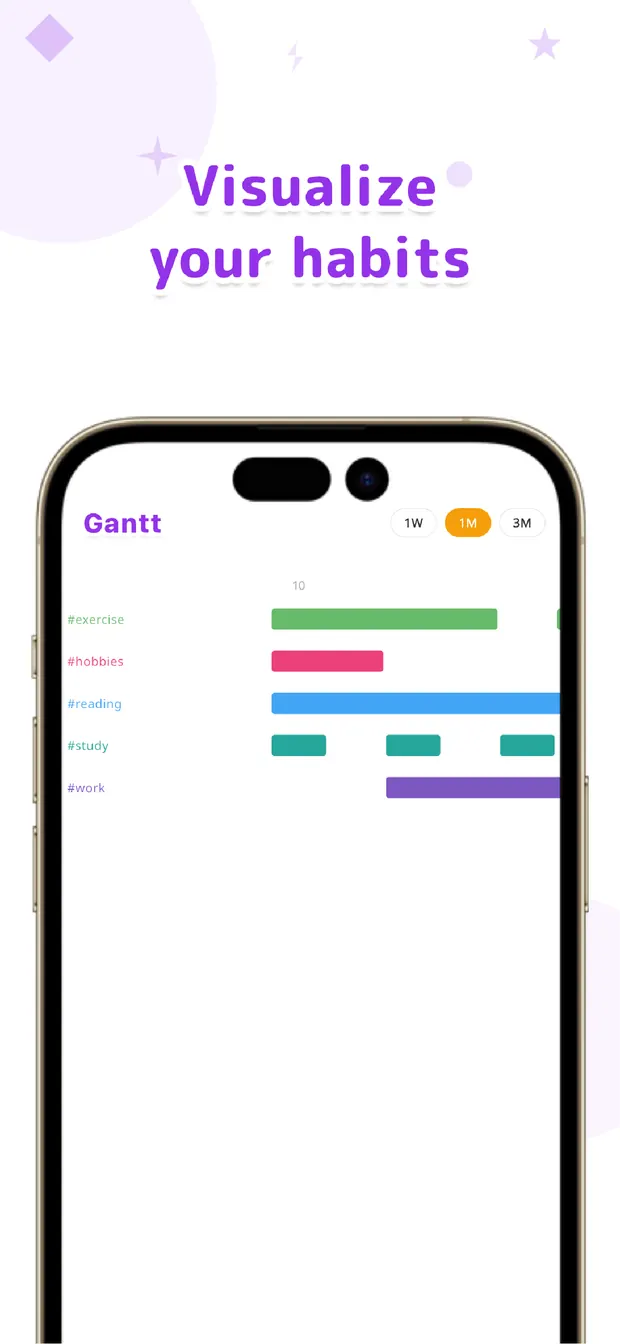
Second: make habits visible with #tags and a Gantt chart. Write a #workout in your text and it becomes a tag automatically, with its streak shown as a bar.
As far as we found, not many diary apps visualize habit streaks this directly. Your diary becomes a habit tracker just by writing — and that turns out to be the clearest difference in the comparison table.
A by-type comparison
Here's what type each app is, through the lens of stickability. Read it as "different people, different fit," not better-or-worse (and note specs can change with each app's updates).
| Day One / Journey | Daylio | OneTapLog | |
|---|---|---|---|
| Best for | In-depth notebook | Mood-stamp logging | One-line chat diary |
| Getting to writing | A few taps | Fairly quick | Keyboard up on launch |
| How much to write | Long-form | Text is secondary | One line is fine |
| Habit visualization | Limited | Mood graphs | #tags + Gantt chart |
| Getting started | Often needs an account | No sign-up | No sign-up, offline |
The takeaway: match it to how you keep going
Rather than crown a single winner, pick by how you want to keep at it. If you'll sit down, write long, and revisit entries like a finished piece, go with Day One or Journey. If writing feels like a chore and you just want to capture a mood fast, Daylio fits.
And if you're the "I want to write words, but I've never managed to stick with it" type — the same type we used to be — OneTapLog, with zero friction before writing, might be the one. No sign-up required; you can try it with today's one line.

OneTapLog
A 1-second diary that's ready to write the moment you open it. No account, works offline, free to start.
Learn more about OneTapLogFrequently asked questions
How should I choose a diary app?
Choose by stickability rather than feature count. Look at speed from launch to typing, the bar for how much you have to write, how visible your progress is, and the effort to get started (account or not). Matching those four to yourself cuts down on quitting and switching.
Are there free diary apps?
Most diary apps offer a free tier. OneTapLog's core features — 1-second input, timeline, #tags, calendar, Gantt chart, and search — are free. Cloud sync, automatic backup, and 13 theme colors come with Pro (monthly or yearly).
Which diary apps work without an account?
Daylio and OneTapLog both let you start without signing up. OneTapLog in particular is local-first and works with no account, fully offline. You only sign in (Google or Apple) if you want cloud sync.
Which diary app also tracks habits?
OneTapLog uses #tags and a Gantt chart to visualize each tag's streak over one week, one month, or three months — so just keeping a diary doubles as a habit tracker.