We're the OneTapLog team. The reason we built a tweet-style diary app is simple: we loved the act of tweeting, but we didn't always want an audience. Some thoughts aren't for followers — they're just thoughts. We wanted the ease of posting without the pressure of being seen.
If you've searched for a way to "tweet to yourself," you've probably tried a few workarounds already. In this article we compare the common approaches honestly — including where ours fits and where a workaround might be enough for you.
Short version: OneTapLog is a private timeline where only your posts appear. Free, no sign-up.
What "tweet-style journaling" actually means
Social media invented something genuinely useful: the low-friction, timestamped, one-line post. A blank notebook page asks you to write something worthy of it. A chat-style input box accepts "so tired" as a complete entry. Tweet-style diary apps take that posting experience and remove the audience — a social feed with exactly one member: you.
The three common workarounds, compared
Before dedicated apps, most people improvise with one of these. Each works — with a catch.
| Approach | What's good | The catch |
|---|---|---|
| Notes app | Completely private, always available | No timeline feel; entries pile up as a wall of text |
| Locked / alt social account | The real posting experience | Privacy depends on settings; other people's feeds pull you in |
| Drafts folder | Nothing gets published | Drafts are a to-do list, not a diary you re-read |
| Tweet-style diary app | Posting experience + guaranteed privacy | One more app on your phone |
How we designed OneTapLog for this
We optimized for one thing above all: speed to the first character. Open the app and the keyboard is already up, cursor blinking. No page picker, no date selector. The urge to jot something down fades in seconds, so the app has to be faster than the fading.
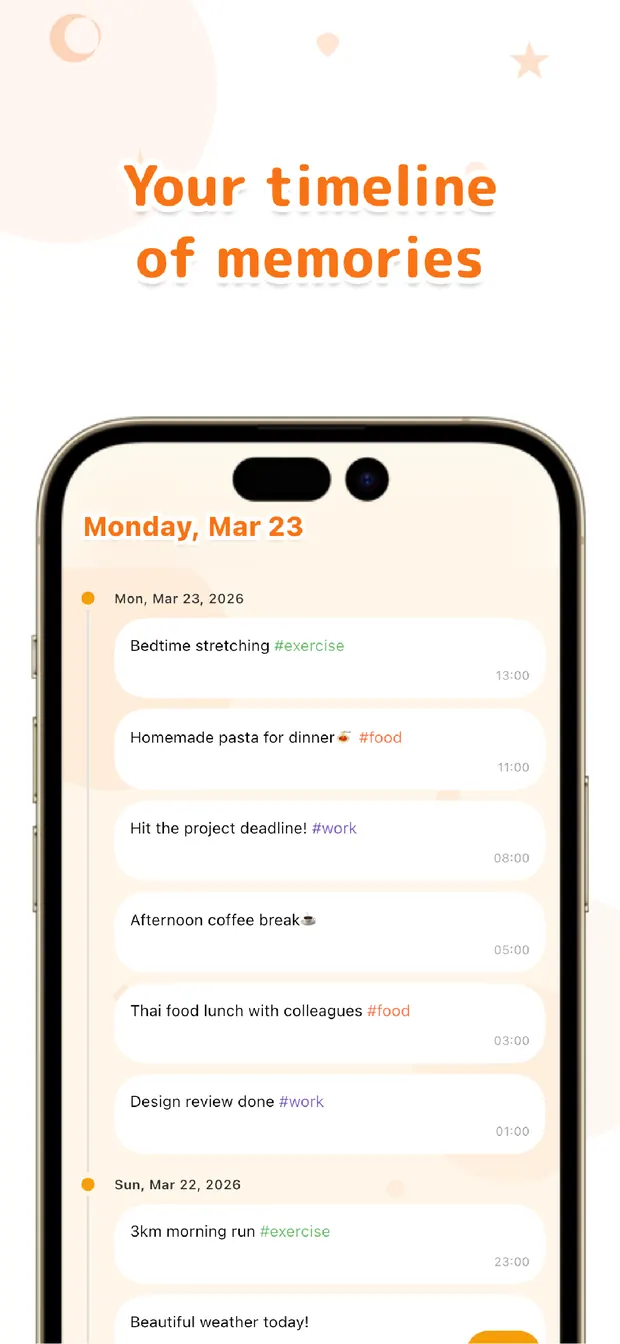
Your posts flow into a chat-style timeline — the familiar posting experience, minus followers, likes, trends, and everyone else's opinions. Privacy isn't a setting you configure; there is simply no publishing mechanism to worry about.

And because the feed is yours alone, posting can do something public social media can't: write #run or #reading in a post and OneTapLog turns it into a habit chart, showing your streaks as bars over weeks and months. On a public feed, posts perform for others; on your own feed, they quietly track your life.
Everything is local-first — entries are stored on your device, no account required, and it works fully offline.
The bottom line
If a locked account or notes app already works for you, keep it — the best system is the one you use. But if you've noticed the catch in your workaround (the accidental scroll sessions, the wall of unstructured notes), a dedicated tweet-style diary removes it by design. We wrote more about the "private Twitter" idea in this article, and about having a social feed just for yourself.

Tweet for an audience of one
OneTapLog is a private, tweet-style timeline. Keyboard up the instant it opens. No account, works offline, free.
Learn more about OneTapLogFrequently asked questions
Can anyone see my posts?
No. OneTapLog has no followers, sharing, or publishing mechanism — the timeline exists only for you. Entries are stored on your device first, and nothing is sent anywhere without your action.
Is it free?
Yes. Instant input, the timeline, #tags, the calendar, habit charts, search, and attachments are all free. Cloud sync and automatic backup are available with Pro.
Does it work on both iPhone and Android?
Yes, OneTapLog is available on both the App Store and Google Play. No account is needed, so you can start posting right after downloading.
Why not just use a locked social media account?
A locked account gives you the posting feel, but privacy rests on settings, and opening the app exposes you to everyone else's feed. A dedicated private timeline removes both concerns structurally.