We're the OneTapLog team. You think of a reply you owe, a bill to pay, or something you need to bring tomorrow — and then it slips your mind right when it matters. We know the feeling well. The problem usually isn't a bad memory; it's that the moment you remember and the moment you can act are never the same moment. In this article we'll talk about why errands keep slipping, and how to close that gap with a single line.
Task apps are too heavy for the moment you remember
A reminder hits you while you're walking, cooking, or half-asleep. To capture it in a task app you have to open it, create an item, maybe set a due date and a list. By the time you've done all that — if you bother at all — the thought has already gone. The structure that makes task apps powerful for planning is exactly what makes them too slow for the instant a small errand pops up.
So we stopped treating a fleeting errand like a project. The goal isn't to organize it perfectly; it's to get it out of your head before it evaporates. The fastest possible capture beats the most structured one you never actually make.
One line plus a tag, the instant it comes to you
With OneTapLog, the input field is already open when you launch the app, so you type Reply to Mika #errand and send with one tap. The time is saved for you automatically. There's no list to pick, no due date to fill in — just the thought, captured in a couple of seconds while it's still in your head.
Because #errand becomes a tag on its own, you can pull up everything you still need to do whenever you have a spare minute. It isn't a strict to-do system, but for the kinds of small things you simply forget, this lightness is what keeps the habit alive.

The timeline keeps it in view until it's done
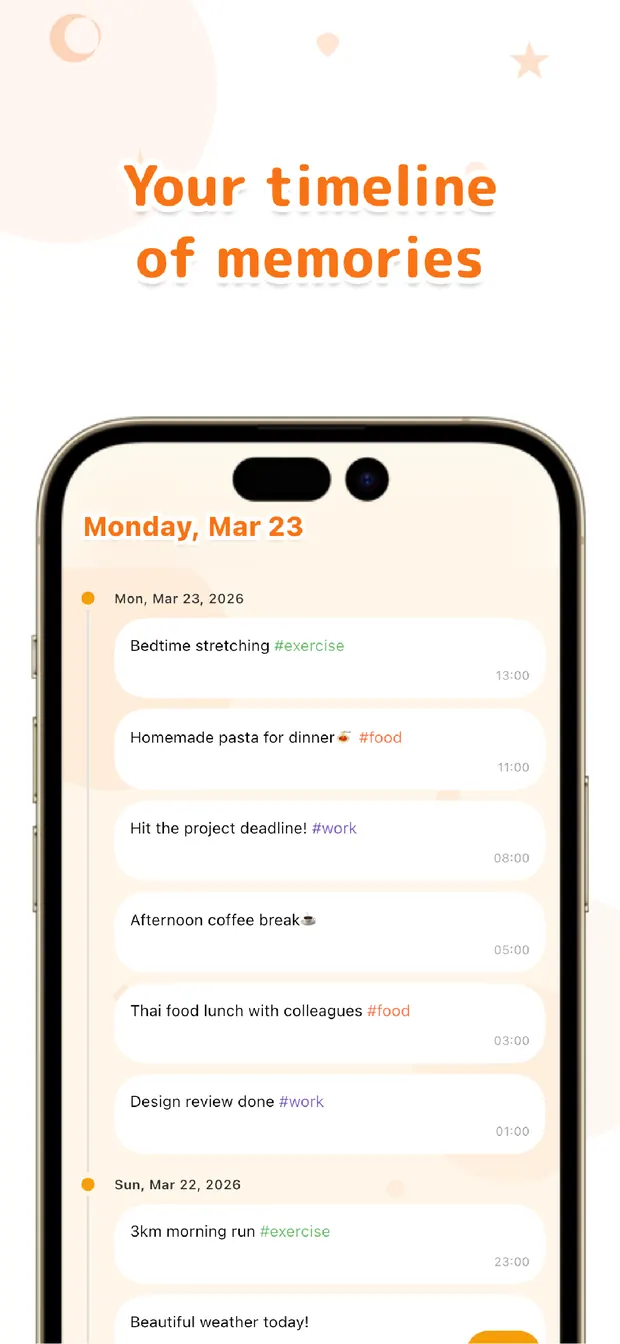
Once it's written, the note sits on your timeline, so when you open the app later the things you meant to do are right there in front of you. Scanning the recent entries — or filtering by #errand — is enough to catch what hasn't happened yet, without trusting it all to memory.
It won't nudge you with a notification, and that's by design — the point is to break the cycle of remember, fail to write it down, forget. Make capturing the easy part, and looking back becomes a habit you can actually keep.
The more often small errands have slipped past you, the more this might fit. Write it the instant you remember, check it when you have a moment — that order, we believe, is the simplest way to stop forgetting the little things.

OneTapLog
One line, one tap. Capture errands the instant you remember and find them later with #tags, the timeline, and search. No account, free to start.
Learn more about OneTapLogFrequently asked questions
I keep forgetting small errands. What helps?
Capturing the thought the instant it occurs to you is the most reliable fix. A task app often feels too heavy in that moment, so writing a single line and sending it in one tap makes it far more likely you'll actually record it before it slips away.
Does OneTapLog send reminders?
No, there are no reminder notifications. The idea is to capture errands quickly and keep them in view on the timeline, then check them when you have a moment. If you need scheduled alerts, we suggest pairing it with a dedicated reminder app.
How do I separate errands from other notes?
Add a tag like #errand in your text and it becomes a tag automatically. Filtering or searching by that tag pulls up only the things you still need to do, kept apart from everything else you've logged.
Can I check what's still undone later?
Your notes stay on the timeline, so opening the app shows your recent entries at a glance. Filter by #errand or use search to surface what hasn't been handled yet, without relying on memory.