We're the OneTapLog team. You think of a great idea, reach for your phone to jot it down, and somewhere in the hunt for the right app it just — vanishes. "Wait, what was it?" We've done this to ourselves countless times. The problem isn't your memory. It's the few seconds between having the thought and starting to write — there's simply too much friction in there. In this article we'll talk about how to cut those seconds, with a bit of design thinking along the way.
Why ideas vanish "before you even open the app"
A passing thought is held only briefly in your short-term (working) memory. That memory is astonishingly fragile — the moment your attention shifts to something else, it gets overwritten. Pull out your phone, find the notes app, wait for it to launch, open a new note — and in those ten-odd seconds, a snippet of nearby conversation or a single notification is enough to send the original idea flying.
In other words, you're not "forgetful" — the entrance to recording is just too far away. We came to see this as the real problem. Rather than powering through with willpower or memory tricks, physically shortening the distance to "start writing" is far more reliable.
Zero friction: ready to write the moment you open it
The instant you open OneTapLog, the input field and keyboard are already up. We deliberately don't insert a screen to find today's page, or a menu. Open equals write. Shrinking the gap between the thought and your first keystroke to a literal one second was our top priority.
Once you've written, one tap sends it. After that it's saved automatically with a timestamp. "Sleepy" works. "Buy milk" works. "That app's name" works — a single phrase is enough. The ease of leaving a line in the few seconds at a crosswalk, or while walking, is to us the surest way to stop letting thoughts slip.

How is this different from paper, the stock Notes app, or voice?
For quick captures there are plenty of options — paper, your phone's built-in Notes, voice input. Each has its merits, but the real question is whether it can do both: be instant to write and reliably findable later. Here's the table we lined up when designing OneTapLog.
| Method | Time to start writing | Finding it later |
|---|---|---|
| Paper / sticky notes | Need the tools on hand | Easy to lose |
| Stock notes app | Launch, then create a note | Buried as notes pile up |
| Voice input | Only where you can speak | Have to listen back |
| OneTapLog | Write the instant you open it | Timeline + search |
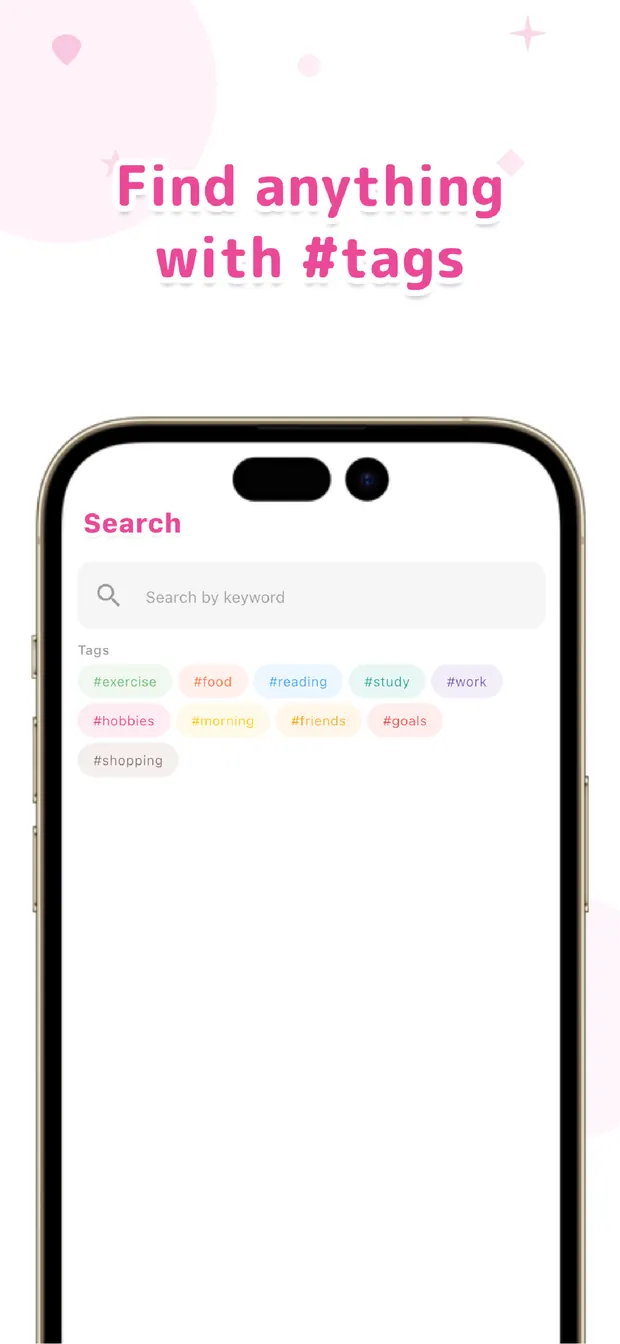
The notes you leave flow into a chronological timeline, and you can pull them up later with full-text search. Because "that thing I thought of back then" is traceable by keyword, once you write it, it won't get buried. Write sloppily, let the app handle finding it — that division of labor is what makes quick capture actually useful.
Add #idea or #shopping in your text and it auto-becomes a tag, so you can later revisit just one theme at a time.
The more often you drop ideas and errands, the more you'll feel the difference. Don't try harder at recording — build a state where things get captured without trying. That, we believe, is the trick to never losing a passing thought.

OneTapLog
A 1-second memo that's ready to write the moment you open it. Save a thought with one tap and find it again later with search. No account, works offline, free to start.
Learn more about OneTapLogFrequently asked questions
Why do I forget before I even write it down?
A passing thought is only held briefly in short-term memory and disappears the moment your attention shifts. The longer it takes to open an app and reach the input field, the more likely you'll forget in the meantime. The fix is to reduce the effort before you start writing.
How fast can you write in OneTapLog?
The input field and keyboard appear the instant you open the app, so you can start typing right away. Once you've written, one tap sends it, and it's saved automatically with a timestamp.
Can I find a specific note later?
Your notes sit in a chronological timeline and can be pulled up with full-text search. Add a #tag in the text and you can also revisit just one theme at a time.
Does it work offline?
No account is required, and your data is stored on your device first. You can write even with no signal. Cloud sync and automatic backup are available with Pro.