To hide a face in an Instagram photo: open the photo in MozFace and every face is detected and covered automatically. Pick Gaussian blur (the most natural), mosaic or an emoji sticker and adjust the strength, tap only the faces you want to show (usually your own), then save the image and post it. It works on iPhone and Android, and everything runs on your device.
That one shot you want to post. But someone else's face is in it, or you'd rather not show a child's face as-is. And yet a hard, blocky mosaic slapped on top ruins the whole mood of the photo. "I want to hide it, but hide it stylishly." That's a common bind.
This article shares how to hide faces on Instagram naturally and stylishly, from the perspective of the team that makes the face blur app MozFace. We'll cover choosing how to hide, and showing only yourself while hiding the others.
 Download MozFace for free
 Pick a photo and every face is blurred automatically. Tap to reveal only the people you want to show.
How you hide changes the whole impression
There's more than one way to hide a face, and your choice changes the photo's impression a lot. A Gaussian blur is soft like frosted glass and hides without breaking the mood — a good fit for style-conscious Instagram posts.
For a firm cover, the classic mosaic. For something cute, hiding with emoji stamps like smileys and hearts is popular. MozFace lets you switch between all three and adjust the strength.

3 tips to keep it stylish
Even the same "face hiding" looks different with a few small choices. Here's what we'd suggest.
- When in doubt, use Gaussian blur. Softer than a blocky mosaic, it blends into the overall mood. It pairs well with scenery, cafe, and travel photos.
- Start with a gentle strength. Over-hiding tends to look unnatural. Dialing it down to just "unreadable" keeps the result natural.
- Match stamps to your aesthetic. For casual posts, emoji stamps pop. You can even set a different stamp per face.
Show only yourself, hide the others naturally
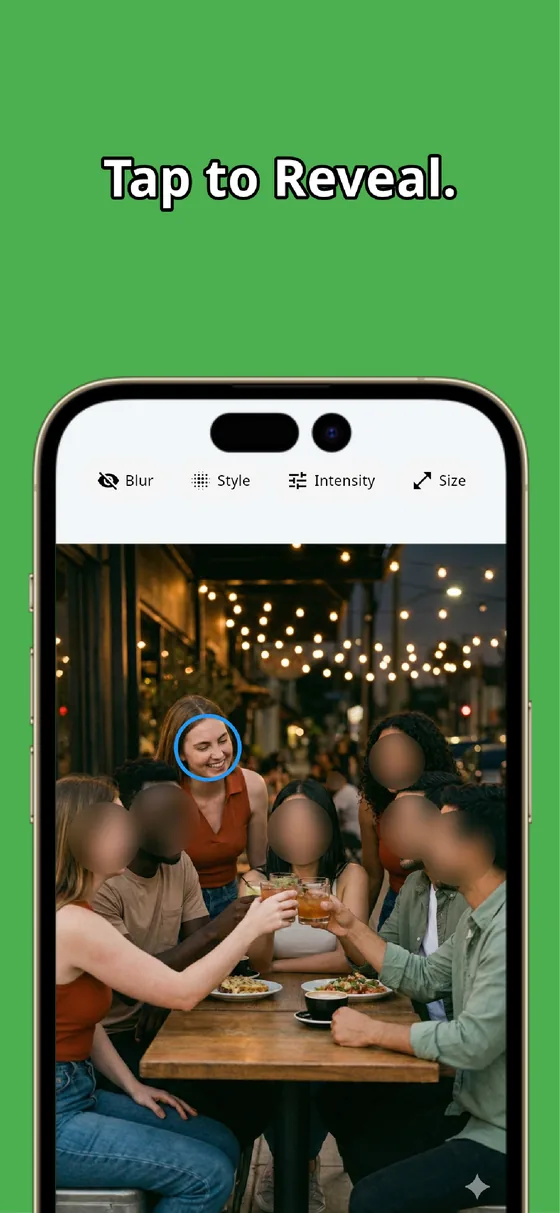
A common Instagram situation: "I'm fine showing my face, but I want to hide the friend next to me." When you pick a photo in MozFace, everyone starts hidden, and you tap just your own face to reveal it.
No hiding others one by one, and no missed faces. If a friend is okay with it, tap them to show them too. The more people in the photo, the more this ease pays off.
Before posting, check the background too
Once the faces are hidden, take a last look at the background. Instagram photos often catch a license plate, nameplate, or name tag without you noticing. In MozFace, along with automatic face blur you can hide that personal info with the manual brush — keeping it both stylish and safe.
Summary: hide it well, post with ease
On Instagram, how you hide a face decides the photo's impression. Natural with Gaussian blur, cute with stamps, only yourself revealed with a tap. That combination lets you post with peace of mind while keeping the mood. From your next shot, try hiding stylishly with MozFace.
MozFace
Auto-blur every face just by picking a photo. Choose Gaussian, mosaic, or stamps, and tap to reveal only who you want to show.
Learn more about MozFaceFrequently asked questions
What's the most stylish way to hide a face?
To keep the photo's mood, a frosted-glass Gaussian blur works well. Lowering the strength a little makes it more natural. For casual posts, emoji stamps pop nicely.
Can I show my own face but hide a friend's?
Yes. MozFace hides every face first, so tapping only your own face to reveal it leaves friends hidden. You can also reveal someone who's okay with it.
Can I choose the stamp type?
You can pick from emoji stamps like smileys, hearts, and stars. You can even set a different stamp per face, so it matches the look of your post.
Is it free?
It's free to download. It works on both iPhone and Android, and you can start right away with no account sign-up.