We are the MozFace team. A new-home or moving-day photo is one of the most popular things to share — but a shot of your front door or building entrance often carries a nameplate, a house number, or a unit sign in plain view. Combined with a recognizable street, those details can point a stranger right to your door. This article walks through how to hide the parts of a house photo that reveal where you live, while keeping the photo worth sharing.
What reveals your home in a photo
Several things in a house or apartment shot can be pieced into a location: a nameplate or family name by the door, a house or unit number, a mailbox label, and the building's name on a sign. None of these feel like personal data while you are framing the photo, but together they narrow down an address quickly — especially with a distinctive façade or a street sign in the background.
The hard part is that these details are part of what makes the photo feel real and welcoming, so they end up dead center. You cannot crop the door out of a photo of your new door.
Cover nameplates and numbers with the manual brush

In MozFace, you hide these details with the manual brush you trace with your finger. Pick mosaic or blur, size the brush to match a small nameplate or a house number, and trace over it. Raise the strength until the name or number can’t be read, and the door still looks like a door — just without the address attached.
You can cover several spots in one pass — the nameplate, the number, the mailbox, a sign — with no limit on how many you trace. Because you blur only those small areas, the rest of the photo stays crisp. The edited version saves as a separate file, leaving your original intact.
Faces of neighbors and passersby, handled automatically
A house photo taken outside often catches more than the building — a neighbor on the sidewalk, a child in the yard, someone passing by. The moment you pick the photo, MozFace detects every face and opens with everyone already blurred, so you do not have to spot each one yourself. Tap to reveal only the people who are fine to show, such as your own family.
Because hiding is the starting state, the task becomes choosing what to show rather than remembering to hide — which is exactly why the person in the background slips through far less often.
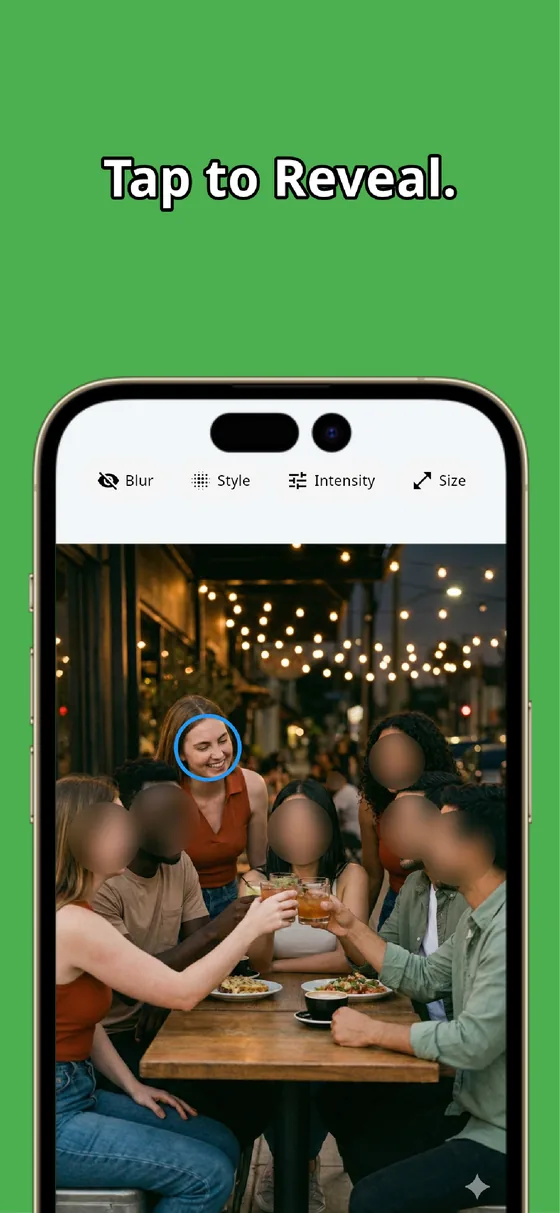
A house photo can reveal where you live through small details you barely notice while shooting. Trace the nameplate, number, and signs with the manual brush and raise the strength so they can’t be read, and let auto-detect cover the people around. In tens of seconds you can share the photo without sharing your address — and it all runs offline, on your device.

MozFace
Auto-mosaic or blur every face just by picking a photo. Cover nameplates, house numbers, and signs with the manual brush. Everything runs on your device, fully offline.
Learn more about MozFaceFrequently asked questions
What should I hide in a photo of my home?
A nameplate or family name by the door, the house or unit number, a mailbox label, and any building or street sign. On their own they seem harmless, but together with a recognizable façade they can point to your address, so cover them all.
Can I keep the door looking nice while hiding the nameplate?
Yes. Because the manual brush covers only the small area you trace, the door and façade stay crisp. You hide just the name or number and raise the strength until it can’t be read, leaving the rest of the photo intact.
What about neighbors or passersby in the shot?
MozFace detects faces automatically the moment you pick the photo and opens with everyone blurred, so neighbors and passersby are covered. You tap to reveal only the people who are fine to show, like your own family.
Are my photos sent over the internet?
No. In MozFace, face detection and editing happen entirely on your device, and your photos are never sent to any external server. It works even with no signal.