The short answer: the best face blur app is one that detects every face automatically and starts with everyone blurred, so you reveal who you want to show instead of hunting for who to hide. Blur quality is rarely the problem. The privacy incidents we hear about almost always come from one face that got missed in a crowd, and that risk is decided by how an app is designed, not by how carefully you use it.
Search "blur faces" or "mosaic" on the App Store or Google Play and the options all look the same. Once you actually use them the differences are striking: some claim "auto detection" yet still need manual work, others are free but so packed with ads they're barely usable. We're the team behind MozFace, a face blur app, but while building it we put the others through their paces too. Below we compare 6 face blur and mosaic apps across four criteria: auto face detection, ads, ease of use, and platform availability, and then map each one to the situation it actually fits.
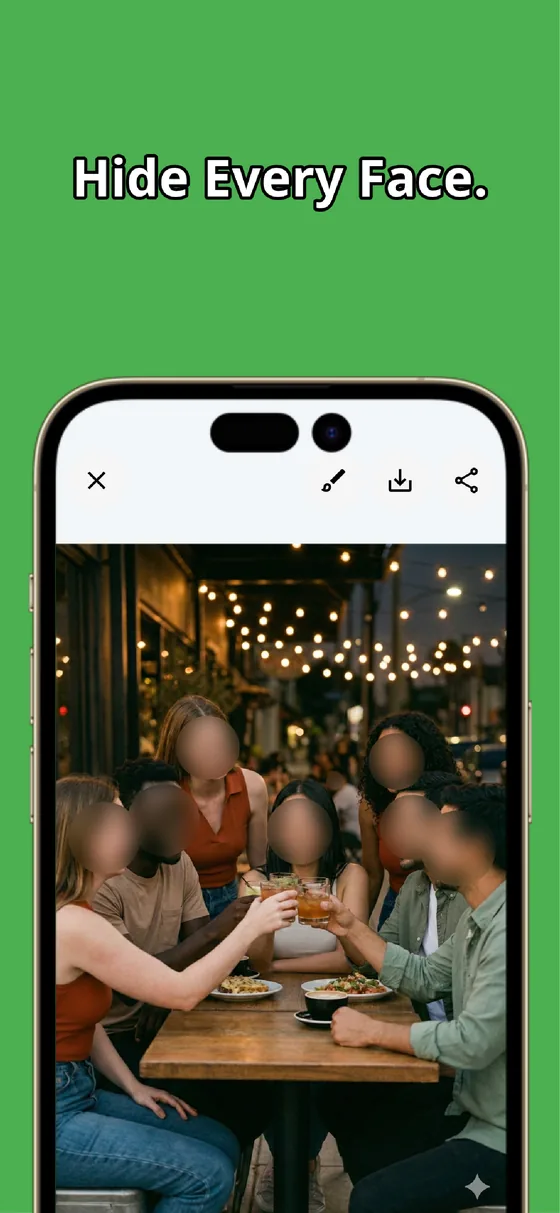
To give away part of the conclusion: among the six, the only app with a built-in safeguard against missed faces — "blur everyone, then reveal only who you want to show" — is MozFace. That said, others shine in areas like artistic effects or sheer style variety. Each one fits different needs, so let's start with what actually matters when choosing.
 Download MozFace for free
 Blur everyone automatically, then tap to reveal only the faces you want shown. The surest way to never miss a face.
3 things to look for in a face blur app
Before the comparison, here are the three things worth checking. Just looking at these will narrow down the app that fits you.
1. Detection method. How faces get detected varies dramatically. Manual means you trace over faces with your finger — flexible but slow. Semi-automatic means AI detects faces, but you confirm or apply blur one by one. Fully automatic means all faces are detected and blurred the instant you load a photo. For 2–3 people, manual is fine; for group shots and crowded scenes, fully automatic saves enormous time.
2. Ads and pricing. Most free apps rely on ads. "A 30-second video ad every time you save" or "a banner blocking the bottom of the screen" directly affects your experience. Completely free with no ads, free with ads, freemium with a subscription, or a one-time purchase — knowing which model an app uses upfront saves you from unpleasant surprises.
3. Does it prevent missed faces? This is the most overlooked criterion. When you blur faces one by one, the more people in the photo, the higher the chance you miss someone. Some apps take a reversed approach — blur everyone first, then tap to reveal — which structurally eliminates the risk of forgetting someone. If privacy matters before you post, check whether the app has this safeguard.
Manual vs. automatic: where a missed face comes from
The third criterion is easier to see than to explain. Most apps, manual or automatic, work in the same direction: the photo starts fully visible and you pick who to hide. Every face you don't touch stays visible. With three people that is trivial. With twelve, the one at the back edge of the frame, half-turned, is the one you skip. The alternative direction is to start with everyone hidden and pick who to show. You can still make a mistake, but the mistake is "I forgot to reveal my friend", which you notice instantly, rather than "I forgot to hide a stranger", which you notice after posting.
When we designed MozFace we chose the right-hand direction and accepted its cost: sometimes you tap one extra time to reveal yourself. Of the six apps below, it is the only one built that way. The other five are still worth knowing about, because for a one-person selfie or an artistic effect the direction doesn't matter much, and some of them do those jobs better.
6 face blur apps at a glance
Here are the six apps we're comparing, summarized in one table.
| App | Detection | Pricing | iOS | Android |
|---|---|---|---|---|
| MozFace | Fully auto | Free | ✓ | ✓ |
| Blur Photo & Mosaic | Manual | Free + IAP | ✓ | ✓ |
| PhotoDirector | Semi-auto | Free + sub | ✓ | ✓ |
| FaceBlur Photo Editor | Auto | Free | ✓ | ✗ |
| Blur Face - Censor Image | Auto | Free | ✗ | ✓ |
| Censor: Face Blur & Pixelate | Auto | Subscription | ✓ | ✗ |
Let's look at each one in detail.
1. MozFace — Fully automatic blur + zero missed faces
At the risk of tooting our own horn, we'll start with MozFace. It's built around one concept: "blur every face." The moment you add a photo, AI detects all faces and applies blur to every single one. What makes it unique is a reversed approach compared to every other blur app.
Traditional apps make you select who to hide and blur them — forget someone and it becomes a privacy incident. MozFace blurs everyone automatically, then you tap to reveal who you want to show, so missed faces are eliminated by design. Face detection runs entirely on-device, and your photos are never sent to the internet.
Strengths: all faces auto-blurred the instant you pick a photo; "tap to reveal" prevents missed faces; 3 blur styles for photos (Gaussian, mosaic, emoji stamps); automatic face tracking in video, with blur and pixelation; manual brush for license plates and addresses; fully offline; iPhone and Android.
Watch-outs: with three photo styles and two video styles it offers less decorative variety than all-in-one editors, and there are no collage, text, or filter tools. It's focused squarely on hiding faces reliably.
Best for: posting group or event photos on social media, sharing kids' school photos with family, anyone who needs to be sure no face is left visible.
2. Blur Photo & Mosaic — The most popular manual blur app
With over 267,000 ratings on Google Play (4.7★) and nearly 5,000 on the App Store, Blur Photo & Mosaic is the most downloaded dedicated blur app worldwide. It uses a manual trace-to-blur approach with 9+ mosaic patterns. Beyond blurring, it offers collage tools, text overlays, and filters — making it more of a general photo editor that happens to include blur.
Strengths: massive proven user base; 9+ mosaic and blur patterns; extra editing features (collage, text, filters); iOS and Android.
Drawbacks: no reliable auto detection (the AI feature is paywalled and widely reported as inaccurate — "9 out of 10 faces not detected"); extremely heavy ads in the free version; aggressive upselling; users report blur not matching where they trace.
Best for: people who want a variety of mosaic styles and don't mind manual tracing for small groups.
3. PhotoDirector — Face blur inside a full photo editor
PhotoDirector by CyberLink is a comprehensive photo editor with 200+ tools. Its mosaic/blur feature includes AI-powered face recognition that can automatically detect and blur faces. It's a powerhouse overall — background removal, AI image generation, portrait retouching, and more.
Strengths: AI face detection for automated mosaic; 200+ editing tools in one app; professional-grade editing; iOS and Android.
Drawbacks: massive overkill if you just need to blur faces; the free version has ads and significant limits; full AI features require a monthly subscription; large download size.
Best for: people already using PhotoDirector, or those who want face blur as part of a full editing workflow.
4. FaceBlur Photo Editor — Free, no ads, iOS only
FaceBlur is a lightweight app that stands out for being completely free with zero ads and no in-app purchases. It uses automatic face detection with Metal GPU acceleration for fast processing. At just 13 MB, it's remarkably small, and everything runs on-device with no data collection.
Strengths: 100% free — no ads, no IAP, no watermarks; automatic face detection; fast Metal GPU processing; tiny size; fully offline.
Drawbacks: iOS only; limited style options (no mosaic, stamps, or emoji); no "blur-first, reveal later" approach; no manual brush for non-face content.
Best for: iPhone users who want a simple, free, no-strings face blur tool.
5. Blur Face - Censor Image — Auto detection for Android
Blur Face - Censor Image is one of the few Android-exclusive apps with genuine AI face detection. It automatically identifies faces and lets you choose which to blur, with adjustable intensity. With 1.5 million downloads and 8,600+ ratings on Google Play, it's a proven Android option.
Strengths: automatic AI face detection; selective face blurring; adjustable intensity; offline processing.
Drawbacks: Android only; extremely aggressive ads (users report 15-second ads at nearly every action, many calling it "nearly unusable"); limited style variety; traditional "select who to hide" approach.
Best for: Android users who need auto detection and can tolerate heavy advertising.
6. Censor: Face Blur & Pixelate — Modern UI with a subscription
Censor is a newer entrant (launched mid-2024) with a polished, modern interface. It offers AI-powered auto detection and several blur styles including smooth blur, motion blur, mosaic, and pixelation.
Strengths: AI automatic face detection; multiple artistic effects (motion blur, smooth blur, mosaic, pixelation); clean modern UI; high-quality export.
Drawbacks: iOS only; steep pricing ($4.99/week or $12.99/year after a 3-day trial); small user base; users report no zoom for precise editing; no "blur-first" missed-face prevention.
Best for: iPhone users who want artistic blur effects and don't mind a subscription.
Which type of app fits your situation?
Rather than ranking the six, we find it more honest to start from what you are about to do. The situation decides which of the three criteria matters, and that in turn narrows the list to one or two apps.
| Your situation | What actually matters | From this list |
|---|---|---|
| Posting a group or event photo with 5+ people | Fully automatic detection plus blur-first, tap-to-reveal, so no one is missed | MozFace |
| Hiding one or two faces now and then | Manual tracing is fine; the ad load is what you'll notice | FaceBlur (iPhone), Blur Photo & Mosaic |
| Faces in a video | Automatic face tracking that follows a moving face across frames | MozFace |
| License plates, addresses, name tags | A manual brush in addition to face detection | MozFace, PhotoDirector, Blur Photo & Mosaic |
| Blur as one step in a larger edit | A full editor that happens to include a mosaic tool | PhotoDirector |
| Artistic blur effects on iPhone | Several effect styles; expect a subscription | Censor |
| Auto detection on Android, free | Genuine AI detection; ads are the trade-off | MozFace, Blur Face - Censor Image |
The right choice depends on what you're doing. For safely posting group photos to social media, MozFace's fully automatic detection plus zero-missed-faces design is the safest pick. If you just need something free on iPhone, FaceBlur is hard to beat. To get face blur inside a full editing suite, PhotoDirector integrates it into a pro workflow. For auto detection on Android, Blur Face - Censor Image fills the gap, though the ads are rough. And for artistic effects with a subscription, Censor is an option.
Need reliability, speed, and peace of mind?
Looking at the full picture, the app most focused on the core task of "hiding faces safely" is MozFace. We're the makers, so take it with a grain of salt — but the reasoning comes down to three points.
First, fully automatic + reversed UX means zero missed faces. "Blur everyone first, then reveal who you want to show" is an approach only MozFace takes among the six. Every other app uses "select who to hide," so more people means a higher risk of missing someone. Second, it stays simple. Editing begins the instant you pick a photo, and you just tap who to reveal — no extra steps to wade through. Third, fully offline — photos never leave your device. All detection happens on your phone. FaceBlur also works this way, but MozFace adds Android support and the "blur-first" safety net.
| Comparison | MozFace | FaceBlur | PhotoDirector |
|---|---|---|---|
| Auto face detection | ✓ | ✓ | ✓ |
| Blur all faces at once | ✓ | ✗ | △ |
| Missed-face prevention | ✓ | ✗ | ✗ |
| Manual brush | ✓ | ✗ | ✓ |
| Offline processing | ✓ | ✓ | △ |
| Android support | ✓ | ✗ | ✓ |
MozFace
Blur everyone's face just by picking a photo. Tap to reveal only who you want to show. Fully offline.
Learn more about MozFaceFrequently asked questions
Does it work even with a lot of people in the photo?
Yes. MozFace detects and blurs every face the moment you pick a photo, so the more people there are, the more time it saves over manual tracing — and the less likely you are to miss someone. Trace-by-hand apps get slower and riskier as the headcount grows.
Which apps work on both iPhone and Android?
MozFace, Blur Photo & Mosaic, and PhotoDirector support both. FaceBlur and Censor are iOS-only; Blur Face - Censor Image is Android-only.
Which apps automatically detect faces?
MozFace, PhotoDirector, FaceBlur, Blur Face - Censor Image, and Censor all offer AI auto detection. Blur Photo & Mosaic is primarily manual (its paid AI feature is widely criticized for poor accuracy).
Which app prevents me from leaving a face visible?
Only MozFace uses the "blur everyone first, then reveal" approach, so you can't accidentally forget to blur someone — every face starts hidden. All other apps require you to select which faces to hide.