We are the MozFace team. A holiday or greeting card with a photo of the kids is a lovely thing to send to family and close friends. The complication comes later: that same card photo often gets reused on social media, in a group chat, or on a year-in-review post — and a picture meant for grandparents suddenly has a much wider audience. This article is about keeping the version you mail to close family as-is while preparing a separate version, with your child's face covered, for anywhere it might travel further.
The printed card and the shared version are not the same
It helps to think of two versions of the same photo. The printed card goes to a small, known list of people — that is a choice you make for your own family, and it is entirely yours to make. The shared version is the one that ends up online or forwarded around, where you no longer control who sees it. The same card photo can serve both, as long as you treat the two differently.
What matters is that you do not have to give up the photo you love. Keep the original for the printed card, and make a separate copy with the face covered for anything that leaves your hands. Whether and how widely to share a child's photo is a personal decision, and the final call is always yours — this is about giving you an easy way to act on it.
Auto-detect your child's face in one step
The moment you pick the photo, MozFace runs on-device AI that detects every face and opens with everyone already covered. With several kids in a group card shot, no one is missed — there is no hunting for the smallest face in the back row. If you want to show some faces, a single tap reveals one again.
All processing stays on the device, and your photos are never sent anywhere. The original family photo never leaves your phone, which is the kind of guarantee you want for pictures of your children.
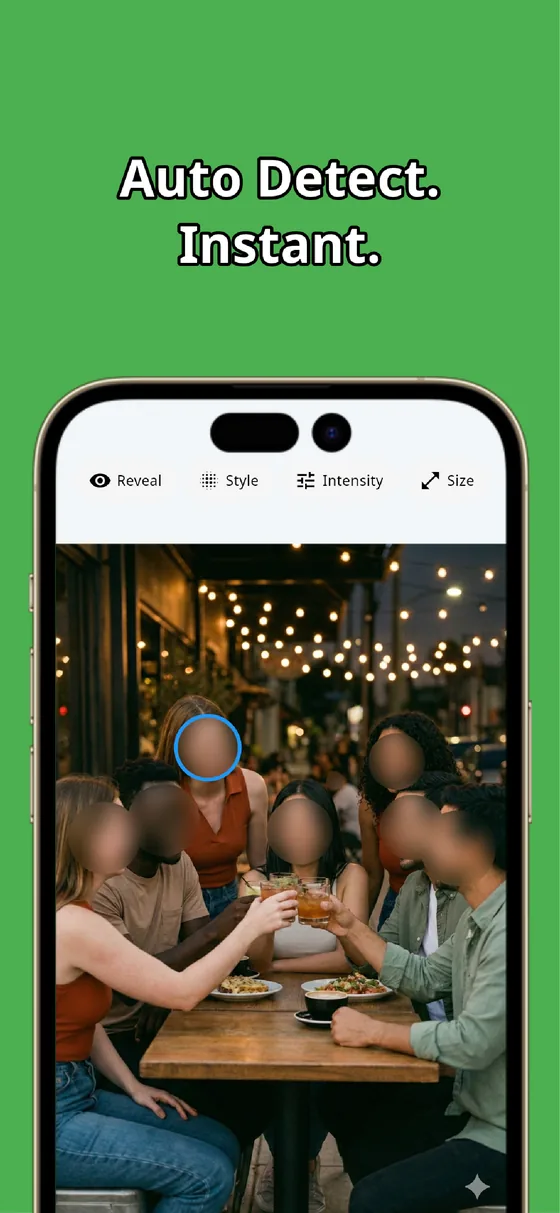
Pick a style that still feels warm

A greeting card is meant to feel warm, so a hard black box can feel out of place. MozFace lets you choose mosaic, blur, or a cute stamp, and adjust the strength. A soft blur keeps the cheerful mood, while a sticker over the face can fit the festive look. The card still reads as a card — it just does not put your child's face out in the open.
When it looks right, save it. The finished image is written as a separate file, so your original stays untouched and ready for the printed card. You end up with two clean versions from one photo.
A holiday card photo can do double duty: keep the original for the people you mail it to, and auto-cover your child's face on the version that goes online. How widely to share a child's image is your decision to make — MozFace just makes the careful version quick to produce.

MozFace
Auto-mosaic or blur every face just by picking a photo. Pick a soft style for cards and save a separate version. Everything runs on your device, fully offline.
Learn more about MozFaceFrequently asked questions
Do I have to cover the face on the printed card too?
No — that is up to you. Many people keep the original for the printed card they mail to close family, and make a separate covered version only for anywhere it might be shared online. The final call is always yours.
Can it cover several children at once?
Yes. Every detected face opens covered, so a group card shot has no one missed. A single tap reveals any face you do want to show.
Will it look harsh on a warm card?
Not unless you want it to. You can choose a soft blur or a cute stamp and adjust the strength, so the card keeps its cheerful mood while the face stays hidden.
Are my photos ever sent over the internet?
In MozFace, face detection and editing happen entirely on your device, and your photos are never sent to any external server. It works even with no signal.