To hide a child's face in a photo before posting: open the photo in MozFace and every face is covered automatically, your child's and any other kids' in the frame. Choose blur, mosaic or an emoji sticker, and tap to unblur only the faces you are comfortable sharing (or none). Use the manual brush to cover anything else that gives away who or where, such as a name tag, a house number or a license plate. Everything runs on your device.
Sports day, a recital, a family outing. Capturing how your child is growing and sharing it with family and friends is the most natural thing in the world. But when it comes to putting that photo on social media, more and more parents pause: "Is it okay to show their face as-is?"
This article covers what to watch for before posting your child's photo online, and a way to safely hide faces — your own child's and other kids who happen to be in the frame — just by picking a photo. We're the team behind the face blur app MozFace.
Risks worth knowing before you post
Publishing a photo with a child's face clearly visible carries a few well-documented risks. One is "digital kidnapping" — where someone saves and reposts a child's photo and passes it off as their own.
And it's not only the photo itself. Details caught in the background can reveal where a child spends their time: a name on a uniform or name tag, a nameplate on a house, a car's license plate, a local sign. Pile up enough small clues and a child's daily area can be inferred. Hiding the face and keeping an eye on this personal information go hand in hand.
Easy to overlook, too, are the other children besides your own. Event photos include kids from other families. More and more, parents agree on a rule: "Hide the other children's faces before sharing."
You have options for how to hide a face
There's more than one way to hide a child's face. To cover firmly, use a mosaic or blur. To keep things cute, hiding with emoji stamps is popular. Being able to pick by situation is handy.
In MozFace you can choose from Gaussian, mosaic, and stamps, and adjust the strength. Cute stamps for a family-only share, a firm mosaic for anything public — you can use them differently as needed.

"Show my child, hide the others" — reliably
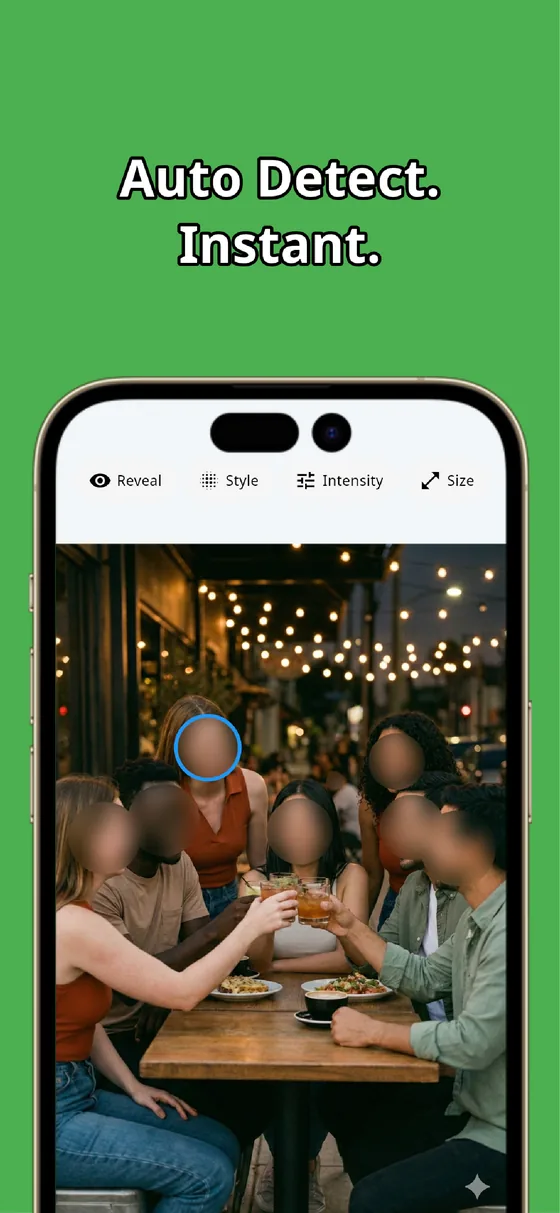
A common situation at events: "I want to show my child, but hide the kids around them." Hiding the others one by one by hand, it's easy to miss a child at the back or edge — and that can lead to friction between parents.
MozFace flips it: it auto-hides every face first, and you tap to reveal only your own child. Even with dozens of kids in frame, all you do is tap yours. The rest are hidden from the start, so no one gets missed.
Don't forget name tags, addresses, and plates
To keep a child safe, it's worth minding not just the face but the details that can identify them: a name tag on a uniform, a house nameplate, a car's license plate, a sign that reveals their school or daycare. Those can all be hidden with MozFace's manual brush — just trace over them with your finger.
Combine automatic face detection with the manual brush, and you can clear away everything you don't want to show in a single photo. All editing happens on the device, and your photos are never sent over the internet — so you can edit something as sensitive as a child's photo without handing it to anyone.
Summary: one quick step before posting protects your child
Sharing your child's photos isn't a bad thing in itself. What matters is one quick step before you post: hide the face, mind the personal details in the background, and hide other people's children too. Make those three a habit and you cut the risk significantly.
With the "auto-hide everyone first, then reveal only your own child" approach, you can do all three easily at once. As a first step toward sharing your child's photos with peace of mind, give MozFace a try.

MozFace
Mosaic or blur every face just by picking a photo. Tap to reveal only who you want to show. Fully offline.
Learn more about MozFaceFrequently asked questions
Should I hide my child's face?
If you're posting somewhere without a limited audience, it's worth considering. It lowers risks like reposting and having your child's daily area inferred from background details. For a family-only share, you might hide it cutely with a stamp instead — pick by situation.
Can I hide other kids in the photo too?
Yes. MozFace auto-hides every face the moment you pick a photo, so your child and the other children all start hidden. Tap only your own child to reveal them, and the rest stay hidden.
Can I hide name tags and license plates?
With the manual brush, trace over any area of the photo to hide it — uniform name tags, nameplates, license plates, and other details that could identify a child.
Are my child's photos sent anywhere?
No. Detection and editing happen entirely on your device, so you can edit something as sensitive as a child's photo without handing it to any external service.