We're the LiteFolio team. "What were my realized gains this year, actually?" — if you trade stocks, that question has probably crossed your mind. Realized gains are easy to confuse with unrealized gains, and without tracking them, you can't get an accurate picture of your annual P&L. In this article, the LiteFolio team walks through the difference between realized and unrealized gains with worked numbers, and how to track realized gains by year and by ticker.
See your realized gains and cumulative results simply by logging your trades
See LiteFolioRealized gains vs unrealized gains, with numbers
A realized gain (or loss) is profit or loss that's locked in only once you actually sell a stock. The reason it's locked in is that selling turns the difference between your cost basis and the sale price into cash in your account, at which point the number stops moving. An unrealized gain, on the other hand, is an unconfirmed figure for stock you're still holding — "what would this be worth if I sold right now" — and it changes every time the share price moves, potentially every day.
Let's walk through actual numbers. Say you hold 100 shares with an average cost basis of $18, and you sell 50 of those shares at $22.
In this example, the +$200 from the 50 shares you sold is a locked-in realized gain that won't change again. The remaining 50 shares, though, keep moving as long as you hold them — if the price drops to $20, your unrealized gain shrinks to +$100; if it drops to $17, you're sitting on an unrealized loss. Without separating realized gains from unrealized gains, your sense of "how much am I actually up right now" gets muddled between these two numbers.
Getting realized gains right depends on having an accurate average cost basis at the time of sale. If you bought a stock across several separate purchases, you'll need to average those purchase prices together — a concept we cover in detail in our average cost basis calculation guide.
What tracking realized gains by year and by ticker reveals
Realized gains only become meaningful once you add them up by year and by ticker, rather than looking at each sale on its own. A single sale can't tell you "how did I do this year overall" or "which ticker moved the needle the most." Tracking by year and by ticker surfaces things like this:
Once your realized gains for the year are totaled up, you can review your trading based on numbers instead of a vague feeling. Seeing it by ticker gives you a way to check afterward which investment decisions actually paid off. Your annual realized gains can also be a starting point when you're thinking about tax filing or offsetting gains and losses, but always confirm the exact tax figures using your broker's official statements. The numbers in this article are simplified examples meant purely to illustrate the concept of realized gains.
Comparing ways to track realized gains
Broadly, there are three ways to track realized gains: your broker's dashboard, a spreadsheet, and an app. In short, your broker's screen is enough while you're using a single account with few tickers, but the more accounts and tickers you have, the more you need a method that takes over the combining and totaling for you. Let's look at each.
Your broker's dashboard
Most brokers have a realized gains screen where you can filter by date range or ticker. If you're only using one account, this is plenty. But once you split your holdings across multiple brokers, Broker A's realized gains and Broker B's realized gains live on separate screens, and you have to add them together yourself to get an annual total. We cover the work of consolidating multiple accounts in our guide to tracking investments across multiple brokerage accounts.
Spreadsheet
Enter your cost basis, sale price, and share count for each sale, and a formula can calculate realized gains automatically. But you still have to copy figures over from each broker manually, and copy-paste formula errors and typos are an ongoing risk. We cover exactly where spreadsheet-based portfolio management hits its limits in our stock portfolio spreadsheet template guide.
Investment tracker apps
The advantage of an app is that realized gains, annual totals, per-ticker totals, and cumulative results all recalculate automatically the moment you log a sale. Trades across multiple accounts can all be recorded into the same ledger, so you never have to bounce between broker screens and add things up yourself. The next section shows exactly how this works in LiteFolio.
Track realized gains and cumulative results with LiteFolio
LiteFolio is a manual-entry investment portfolio tracker that never connects to any brokerage account — you log your buys, sells, dividends, deposits and withdrawals, fees, stock splits, taxes, and notes yourself. Log a sale, and realized gains and cumulative results are automatically visualized. Here's what it looks like.
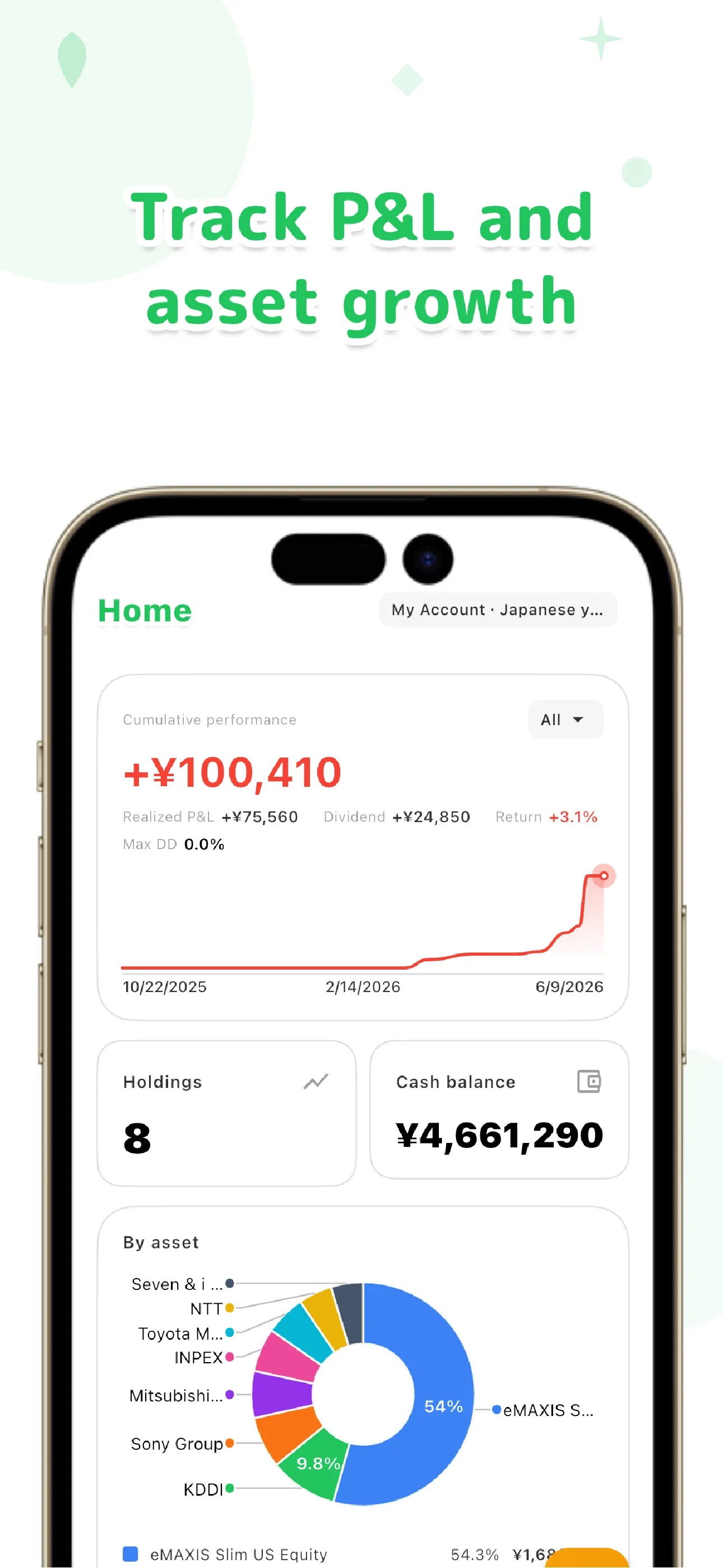
Because share count, average cost basis, and total cost per holding are tracked right alongside your sales, you never need to keep the cost basis figures for a realized gains calculation in a separate spreadsheet. Even if you trade across multiple brokerage accounts, LiteFolio treats everything as one ledger, so there's no need to re-combine annual or per-ticker realized gains account by account.
Leaving a reason or observation with every trade gives you something to work from later when you're reviewing your realized gains. See our guide to trading journal apps and what to log for more on building the habit of recording each trade as it happens.
Track realized gains, cumulative results, and portfolio value all in one place
See LiteFolio's featuresEverything you log is local-first, saved on your device first. If you want to sync across multiple devices, the Pro plan's cloud sync sends your data over an encrypted connection. We cover the design decision to never link brokerage accounts in more depth in our guide to portfolio trackers without account linking.
For exact tax figures, check your broker's official statements
The realized gains shown in LiteFolio are a simplified calculation meant for tracking and review purposes. For the exact figures used in tax filing or offsetting gains and losses, always confirm with the official statements issued by your broker.
Tracking realized gains and unrealized gains separately keeps you from mixing up "results that are locked in" with "an estimate that's still moving." Log each sale as it happens, and your realized gains by year and by ticker, along with your cumulative results, naturally come into view. LiteFolio is a record-keeping and visualization tool and does not provide investment advice.

LiteFolio
A manual-entry investment portfolio tracker that never connects to your brokerage account. Log buys, sells, dividends, and deposits, and see realized gains, cumulative results, portfolio value, and more, visualized automatically. Data is stored local-first. Available now on iOS and Android.
Learn more about LiteFolioFrequently asked questions
What's the difference between realized and unrealized gains?
A realized gain is profit or loss locked in by selling a stock, and it never changes afterward. An unrealized gain is an unconfirmed figure for stock you're still holding — "what would this be worth if I sold right now" — and it changes every time the price moves.
Where can I see my annual stock P&L?
Your broker's realized gains screen lets you check a specific date range. If you're split across multiple accounts, though, each account shows its own figure, so you'll need to add them up yourself for an annual total. For exact tax figures, confirm with your broker's official statements.
Does LiteFolio connect to my brokerage account to auto-calculate realized gains?
No. LiteFolio never connects to any brokerage account — it's a manual-entry app. Log your buys and sells yourself, and realized gains and cumulative results are automatically recalculated and visualized.
Is LiteFolio free to use?
LiteFolio is available now for iOS and Android. Check the App Store or Google Play for current features and pricing.