A lot of people looking for an investment tracking app specifically want one that doesn't link to their brokerage account. Maybe you don't like handing your login credentials to a third-party service, maybe a sync error once showed a wrong balance and shook your confidence, or maybe it's simply a security concern — whatever the reason, it's a perfectly reasonable instinct. In this article, the LiteFolio team walks through how to track your investments without linking accounts, and where a manual-entry app fits into that picture.
LiteFolio is a manual-entry investment tracker that never connects to your brokerage account.
See LiteFolioIt's completely normal to be wary of linking your brokerage account
To be clear up front: hesitating to link a brokerage account isn't unusual — it's a completely normal reaction that a lot of investors share. The reason is simple. Account-linking apps require you to hand over your brokerage username and password to an outside service, and every extra place your credentials live is one more thing to worry about.
It's common to hear things like "the sync broke and my balance was wrong for days," "the app's connection to my broker just stopped working," or "I have accounts at three different brokers and none of them can be linked together." If you're specifically looking for a way to track investments across multiple brokerage accounts, you're even more likely to run into both the hassle and the risk of linking.
The fix for that unease is simply not linking accounts at all. If there's nothing to authenticate, there's no login to leak, and no sync error that can throw your numbers off. Choosing not to link is, on its own, a legitimate way to reduce risk.
Three ways to track investments without linking accounts
In broad terms, there are three ways to manage your portfolio without brokerage-account linking: a paper notebook, a spreadsheet, and a manual-entry app. The reason there are three, not one, is that while all of them require you to type in your own trades, they differ a lot in how much work it takes to total everything up and see the big picture.
Keeping records on paper
The simplest option is a plain notebook. Jot down the date, ticker, share count, and price, and you're done — no account information required. The catch is that you're the one calculating your average cost basis and asset allocation by hand, and that gets unmanageable fast as your holdings grow.
Managing your portfolio in a spreadsheet
Formulas can automatically total your holdings and calculate your average cost basis, and there's still no account linking involved. On the other hand, you have to design your own layout for stock splits, dividends, and fees, and entering data from your phone and keeping the layout tidy takes real effort. We cover exactly how to build one — and where it breaks down — in our stock portfolio spreadsheet template guide.
Recording trades in a manual-entry app
This is an investment tracker that never connects to your brokerage account — you enter each trade by hand instead. Like a notebook or spreadsheet, it requires no account linking, but the key difference is that the app automatically rolls up your holdings, realized gains, and asset allocation for you.
Why manual-entry apps combine "no linking" with real visibility
Manual-entry apps are popular because they keep the peace of mind of not linking accounts while taking over the tallying work that made notebooks and spreadsheets tedious. You enter each buy, sell, dividend, and fee one at a time, and your share counts, cost basis, and portfolio value over time are all rolled up and displayed automatically.
For example, calculating average cost basis after buying the same stock several times is more fiddly than it looks. As explained in our guide to average cost basis calculation, the more purchases you make, the easier it is to make a mistake doing it by hand — but a manual-entry app calculates it automatically the moment you log the trade.
Another advantage is that you control exactly what gets recorded. A linked app is limited to whatever data it can pull from your broker, but a manual-entry app lets you add your own notes or combine trades from several accounts into a single record, so it can adapt to however you like to track things.
LiteFolio never connects to your brokerage account — it's built purely for recording and visualizing
LiteFolio is a manual-entry investment portfolio tracker that never connects to any brokerage account. The reasoning is straightforward: by removing account linking entirely, there's no login information to hand over in the first place, and the app can focus entirely on its real job — recording and visualizing your portfolio.
You can log buys, sells, dividends, deposits and withdrawals, fees, stock splits, taxes, and notes. Once you enter these, LiteFolio automatically rolls up your holdings (share count, average cost basis, and total cost), realized gains, cumulative performance, portfolio value over time, and cash balance.
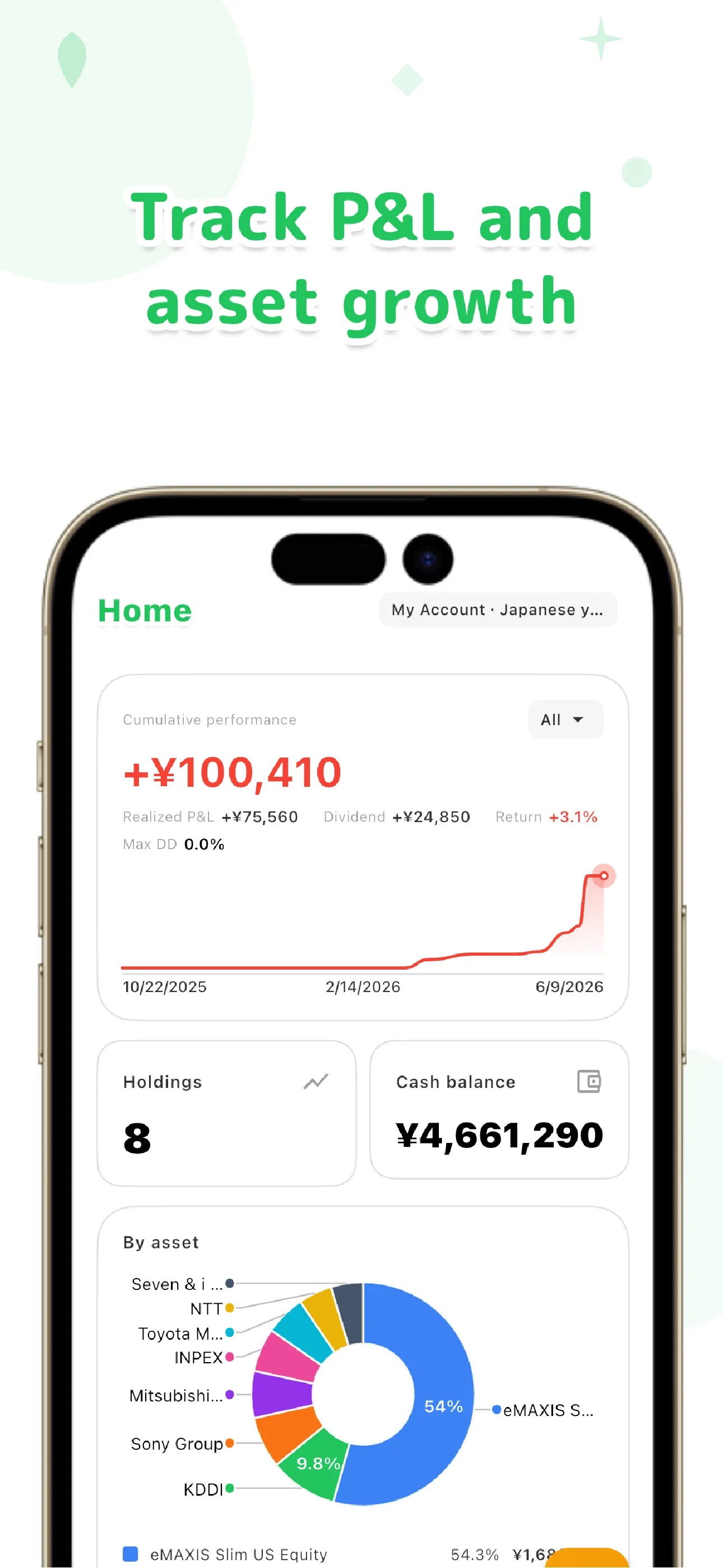
Dividends and asset allocation are visualized automatically too
You can check dividends received, projected annual dividend income, and yield on cost (YoC), plus asset allocation by ticker, sector, or custom list. A transaction timeline lets you scroll back through everything you've recorded. We go deeper on the dividend side in our dividend tracker app guide.
Your data is local-first, meaning it's saved on your device first. Cloud sync is only used if you choose the paid Pro plan, and even then it's sent over encrypted connections. Not linking to your brokerage account is, by design, the simplest way to minimize what you share.
What to check when choosing an app that doesn't link accounts
Finally, here's what to look for when picking a portfolio tracker that skips account linking. "Doesn't link accounts" on its own isn't a strong enough bar — you also need to weigh how much manual entry it takes against how good the resulting visualization is.
Specifically, check three things: (1) can you log every transaction type you care about — buys, sells, dividends, fees, and so on; (2) does it automatically calculate rollups like average cost basis and asset allocation; and (3) where is your data stored, and can you choose whether or not to use cloud sync? If an app checks all three boxes, you'll get real visibility even without ever linking an account.
Skipping account linking is a practical way to keep tracking your investments while cutting down on what makes you uneasy. Whether you end up with a notebook, a spreadsheet, or a manual-entry app, the decision not to link accounts is itself a solid risk-reduction move. Pick whichever method balances the effort you're willing to put in against the visibility you want, and stick with it.
LiteFolio is a record-keeping and visualization tool and does not provide investment advice.
LiteFolio
A manual-entry investment portfolio tracker that never connects to your brokerage account. Log buys, sells, dividends, and fees, and your holdings, realized gains, and asset allocation are visualized automatically. Your data is stored local-first. Available now on iOS and Android.
Learn more about LiteFolioFrequently asked questions
Does LiteFolio link to my brokerage account?
No. LiteFolio never connects to any brokerage account — it's a manual-entry app where you log buys, sells, dividends, and other transactions yourself so they can be recorded and visualized. You never need to hand your login credentials to an outside service.
If it doesn't link accounts, does that mean no automatic rollups?
Not at all. Once you log a transaction, LiteFolio automatically calculates your holdings (share count, average cost basis, total cost), realized gains, portfolio value over time, and asset allocation. Skipping account linking only affects how transaction data gets in — it doesn't add any extra work for rollups or visualization.
Where is my data stored?
It's saved locally on your device first. Only if you choose the paid Pro cloud sync feature is it sent to a server, and always over an encrypted connection. Combined with never linking your brokerage account, this keeps the amount of data you share to a minimum.
Is LiteFolio free to use?
LiteFolio is available now for iOS and Android. Check the App Store or Google Play for current features and pricing.