We're the LiteFolio team. Most people searching for a trading journal app have had the same experience: trying to recall last week's trade and realizing they can't say for sure why they bought at that price. Human memory is far less reliable than we like to think, and because buy and sell decisions are tangled up with the emotions of gains and losses, they tend to get rewritten favorably in hindsight. In this article, the LiteFolio team explains what to log in a trade journal, how to keep the habit going, and how to manage that record with a trading journal app.
Log your trade timeline and reasoning notes together
See LiteFolioWhy reviewing trades from memory and emotion doesn't work
Trying to review your trades from memory alone almost never works out. The reason is simple: people tend to underweight their losses and remember their wins more favorably than they actually were. Even the reason you bought gets swapped out for a different story once you already know the outcome, replacing the logic you actually used at the time. This isn't a matter of willpower — it's a structural problem, because memory and emotion themselves aren't built for accurate review.
That's exactly why you need a record that captures your thinking at the moment you made the decision. With a record in hand, you can look back later and see close to what you were actually thinking when you made the trade — before you knew how it would turn out. The point of a trade journal isn't some magic formula for a higher win rate — it's keeping your decisions reproducible. The next section breaks down exactly what to write in a trade journal.
The 7 fields every trade log should include
One reason trade journals often get abandoned is that the fields aren't fixed, so every entry becomes a fresh decision about how much detail to include. Locking in a set list of fields you can fill out without hesitation is the shortcut to sticking with it. At a minimum, aim to capture these seven fields:
The first six fields — date/time, ticker, buy/sell, quantity, price, and fees — can all be pulled after the fact from your broker's trade history. Only the reason notes can be written by nobody but you, in the moment. A short phrase is enough: "earnings beat expectations," "broke above the moving average," "the price action spooked me." Capturing the context behind the decision right then is what determines how much value the entry has when you look back later. We cover how to write and review these reason notes in more depth in our investment journal template for why you bought a stock.
How to actually keep a trading journal going
The most common way a trade journal habit fails is aiming for a perfect record from day one. Pasting in price charts, writing detailed analysis, and piling on extra fields all make each entry take longer, and on a busy day you skip logging one trade — and the habit quietly falls apart. The trick is keeping the fields minimal and building the habit of logging the trade the moment it happens.
Timing matters too. Right after a trade, your reason notes take only a few seconds to write; try to recall the same thing a few days later and it becomes a chore, and the logging stalls. Don't just write and forget, either — set a fixed cadence, like once a month, to actually reread your entries, and the log turns from a task into material for genuine review. Reviewing your reason notes alongside your confirmed realized gains and losses makes the connection between your decisions and their outcomes much easier to see. We cover how to log and track that in our guide to tracking realized gains and annual totals.
Comparing paper notebooks, spreadsheets, and apps
Broadly, there are three ways to keep a trade log: a paper notebook, a spreadsheet, and an app. There's no single right answer — it comes down to the balance between how easy it is to keep going and how easy it is to review. Let's look at each.
Paper notebook
A paper notebook's strength is that you can start immediately and write down your train of thought exactly as it happens. The downside is that it's not built for searching past entries or sorting by ticker. Once you pass a few dozen entries, just finding "when did I trade that stock" starts eating up real time.
Spreadsheet
Recording trades in a table makes searching and sorting far easier than a paper notebook. But you have to design the date, ticker, quantity, and price columns yourself ahead of time, and quickly logging a trade from your phone while you're out isn't very convenient. We cover exactly where spreadsheet-based portfolio management hits its limits in our stock portfolio spreadsheet template guide.
Trading journal apps
With an app, the date, ticker, quantity, and price fields are already set up for you — you just fill them in, and they stack up automatically into a chronological log. Reviewing past trades by ticker, or quickly adding a reason note on the spot, is where an app has the edge. The next section walks through exactly how this works in LiteFolio.
Log your trade journal with LiteFolio's transaction timeline
LiteFolio is a manual-entry investment portfolio tracker that never connects to any brokerage account — you log your buys, sells, dividends, deposits and withdrawals, fees, stock splits, taxes, and notes yourself. Log a trade, and the date/time, ticker, buy/sell, quantity, price, and fees line up chronologically in a transaction timeline, with a note attached to each entry. Here's what it looks like.
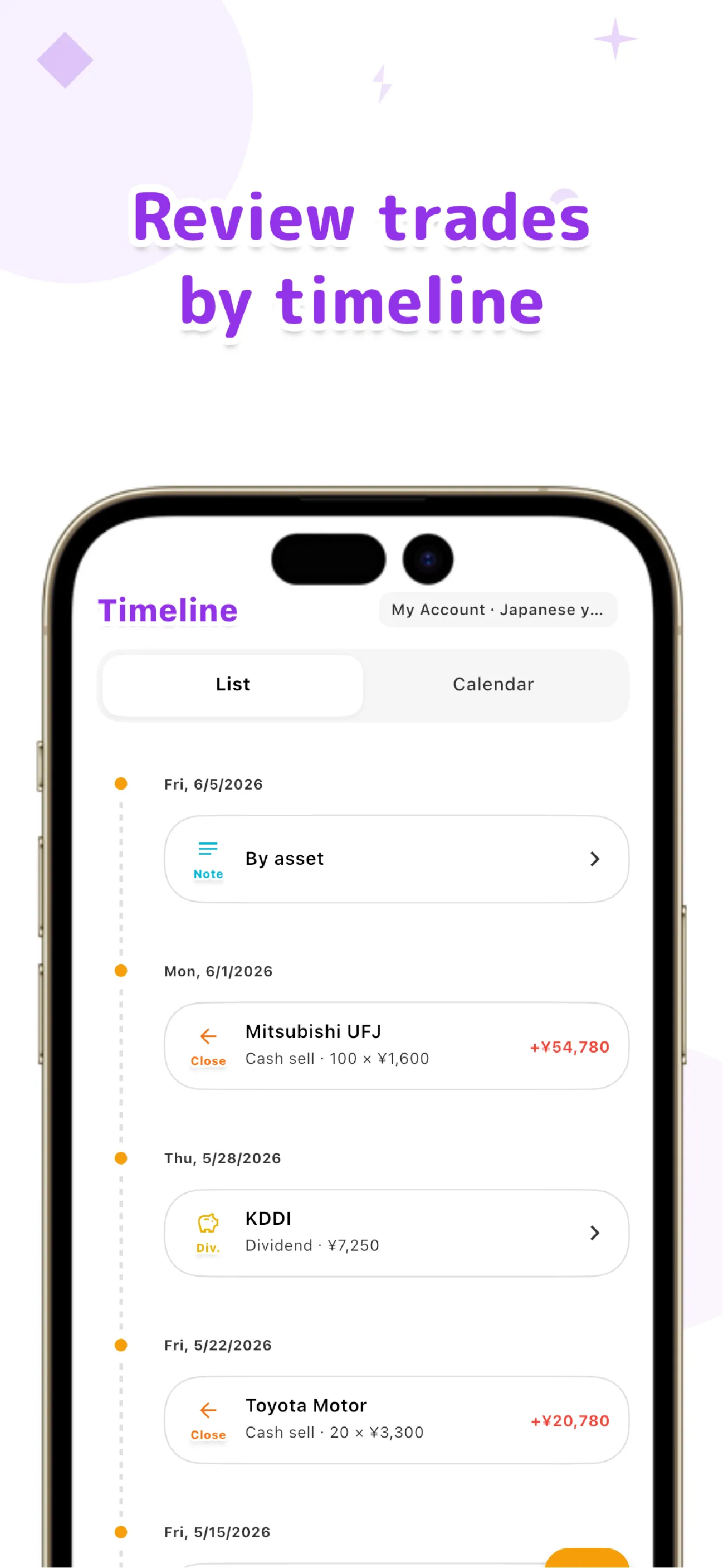
Unlike a paper notebook or spreadsheet, you never have to design the fields yourself — just enter the quantity, price, and fees each time you trade, and the log builds itself. Share count, average cost basis, and total cost per holding are tracked automatically alongside it, so you can follow "how did I decide on this trade, and what happened as a result" on a single screen. Everything you log is local-first, saved on your device first, and if you want to sync across multiple devices, the Pro plan's cloud sync handles that.
Log trades and reason notes together on one timeline
See LiteFolio's transaction timelineThe point of a trading journal app isn't to boost your win rate — it's to make your decision-making process something you can check later, without relying on memory or emotion. Build the habit of logging date, ticker, buy/sell, quantity, price, fees, and a reason note the moment you trade, and the quality of your review will steadily improve. LiteFolio is a record-keeping and visualization tool and does not provide investment advice.

LiteFolio
A manual-entry investment portfolio tracker that never connects to your brokerage account. Log trades, dividends, and deposits, and see your transaction timeline, realized gains, asset allocation, and more, visualized automatically. Data is stored local-first. Available now on iOS and Android.
Learn more about LiteFolioFrequently asked questions
Is LiteFolio free to use?
LiteFolio is available now for iOS and Android. Check the App Store or Google Play for current features and pricing.
What's the bare minimum I should write in a trade journal?
The basics are date/time, ticker, buy/sell, quantity, price, fees, and a reason note. The first six can be pulled from your broker's history afterward, but only you can write the reason note, so it's worth capturing right after the trade.
Logging every trade feels like a chore. Any tips for sticking with it?
The biggest tip is keeping the fields minimal and logging the trade right when it happens. Detailed analysis can always come later, so prioritize the habit of jotting down date, ticker, quantity, price, and even a one-line reason note in the moment.
Will it work on both iOS and Android?
Yes. LiteFolio is available now on both iOS and Android.