We're the LiteFolio team. A taxable brokerage account at one firm, a retirement account at another, and a small leftover position at a third broker you barely use anymore — once you end up managing investments across multiple brokerage accounts, you can usually still see each account's balance, but "how much do I actually have in total" and "am I up or down overall" suddenly become hard to answer. This article breaks down how to get one combined view of assets spread across several brokers, including where each method works well and where it doesn't.
LiteFolio, an investment portfolio app that combines holdings from multiple brokerage accounts into one view, is available now on iOS and Android.
See LiteFolio →Why multiple brokerage accounts make your whole portfolio hard to see
When your money is spread across several brokers, your overall gain/loss and asset allocation become hard to track. The reason is simple: each broker has its own app and its own login, and there's no standard way for them to automatically add everything up across accounts.
Say you have a taxable account at Broker A, a retirement account at Broker B, and a small position left at Broker C from an old plan you don't actively use anymore. Even if you own the same stock in both Broker A and Broker C, you have to check each app separately to see your combined share count and average cost basis. Dividends just show up as separate notifications from each broker, so adding up how much you received for the year takes yet another manual step.
Having multiple brokerage accounts in the first place is often a perfectly reasonable choice — different account types, rewards programs, or product lineups all matter. The real problem isn't having several accounts; it's that once you have them, there's no easy way to see the combined total.
Four ways to get one combined view across accounts
Broadly speaking, there are four ways to pull together assets held across multiple brokers. Which one fits you depends on how much linking hassle you'll tolerate and whether there's information you don't want shared across accounts, so let's look at each option fairly.
Checking each broker's app separately
This needs no extra tools and is the easiest option to start with. The catch is that the more accounts you have, the more "open app, jot down the number, open the next app" cycles you go through, and you'll need a calculator or a scratch note to get a total. It's fine if you have two accounts and don't need a precise overall gain/loss, but it becomes a real chore once you want to see your full asset allocation.
Combining everything in a spreadsheet
The strength here is total flexibility for tallying and charting. Add a row per ticker and an "account" column, and you can combine multiple accounts easily enough. On the other hand, you have to type in every trade yourself and build your own formulas for average cost basis and realized gains, and formula mistakes are easy to miss. We cover the specific steps and where this approach hits its limits in our stock portfolio spreadsheet template guide.
Account-linking portfolio apps (automatic sync)
Enter your username and password for each broker, and the app automatically pulls in balances and trades and combines them. Requiring almost no manual entry is a big advantage, making this a strong option if you have many accounts and don't mind linking. The downside is you have to hand your brokerage login credentials to an outside service, and some brokers or products may not be supported at all. Whether you're comfortable trading "linking" for "automation" is really what decides this one.
Manual-entry portfolio trackers
These never connect to any brokerage account — you record buys, sells, and dividends yourself. There's no login to hand over and no list of supported brokers to worry about. The effort is concentrated in data entry, but because only what you record becomes part of your portfolio, this fits people who don't want to link accounts but still want a combined view. We cover this option in more depth in our guide to portfolio trackers without account linking.
How to combine multiple accounts into one portfolio by hand
The key to manually combining multiple accounts is organizing your records by ticker, not by account. Even if you hold the same stock at Broker A and Broker C, rolling them up by ticker in your tracking app naturally merges your combined share count and average cost basis into a single number.
Concretely, just enter each buy and sell from every account in the order they happened, and your total share count, average cost basis, and total cost get calculated for you. Add fees, stock splits, and taxes too, and you can track accurate realized gains across every account combined. We walk through exactly how average cost basis is calculated in our average cost basis calculation guide.
If you don't want to lose the distinction between accounts entirely, custom lists let you tag trades as, say, "Retirement" or "Taxable — Broker A." That way you can see everything combined by default, but filter down to a single account whenever you need to.
Tracking multiple brokerage accounts in one place with LiteFolio
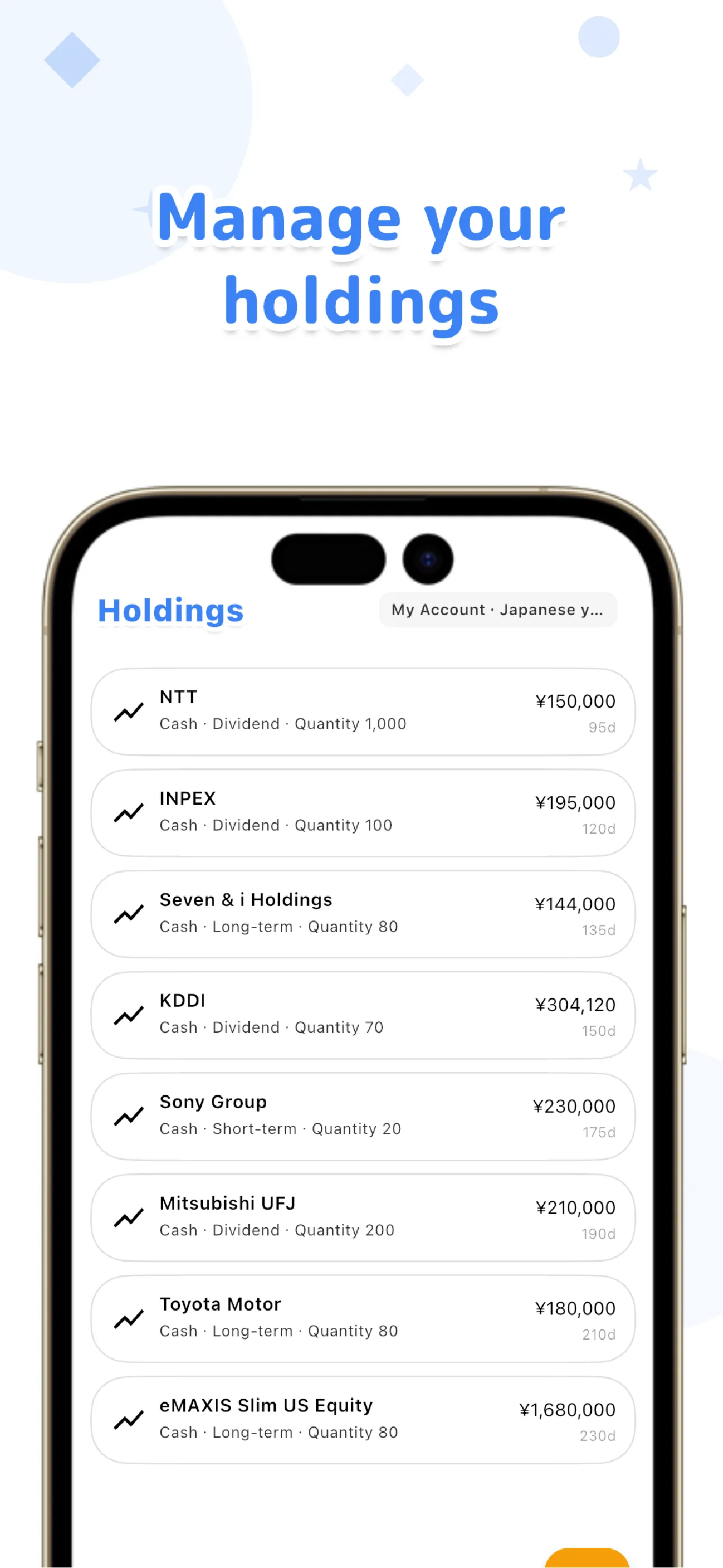
LiteFolio is a manual-entry investment portfolio tracker that never connects to any brokerage account. Log your buys, sells, dividends, deposits and withdrawals, fees, stock splits, taxes, and notes, and your holdings (share count, average cost basis, total cost), realized gains, cumulative performance, portfolio value over time, and cash balance all show up as a single portfolio. The same stock held across several brokers gets combined automatically by ticker.
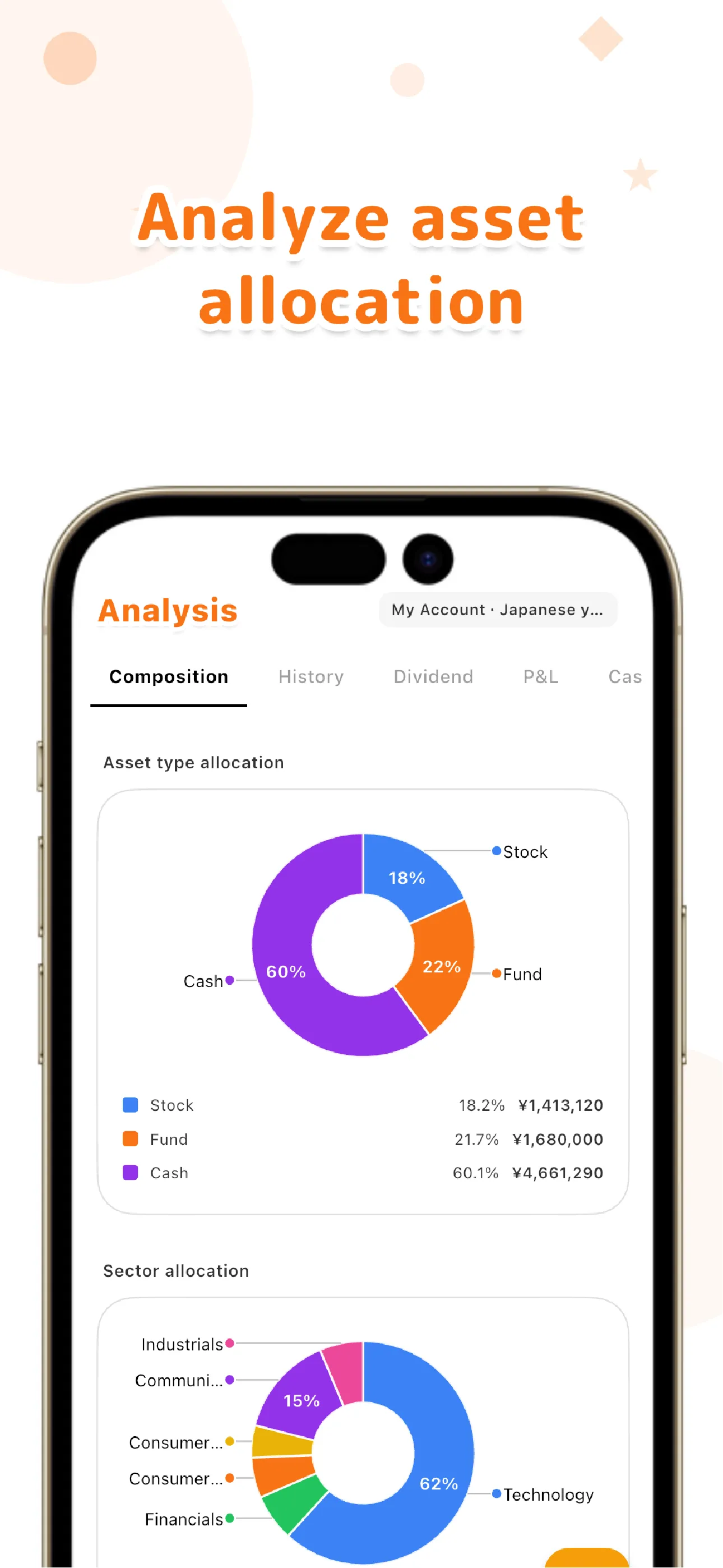
For dividends, you can see dividends received, projected annual dividend income, and yield on cost (YoC). We cover the hassle of totaling dividends that arrive separately from multiple accounts in more detail in our dividend tracker app guide. Asset allocation can be viewed by ticker, sector, or custom list, so you can see both your overall allocation across accounts and the breakdown by individual account.
Your data is local-first, saved on your device first. Only if you choose the paid Pro plan's cloud sync is it sent to a server, and always over an encrypted connection. There's no screen anywhere that asks for your brokerage username or password.
Learn more about LiteFolio →The headache of managing multiple brokerage accounts isn't solved by having fewer accounts. Re-recording everything into a single portfolio organized by ticker means you never lose sight of the big picture, no matter how many accounts you open. LiteFolio is a record-keeping and visualization tool and does not provide investment advice.
LiteFolio
An investment portfolio app that records buys, sells, dividends, and deposits by hand — never connecting to any brokerage account. Assets spread across several brokers are combined by ticker into one clear view. Available now on iOS and Android.
Learn more about LiteFolioFrequently asked questions
Does LiteFolio link to my brokerage accounts?
No. LiteFolio never connects to any brokerage account at all — it's a manual-entry app where you log your own buys, sells, dividends, deposits and withdrawals, and fees. There's no screen anywhere that asks for a brokerage username or password.
Can I combine trades from multiple brokers into a single portfolio?
Yes. Regardless of which broker a trade happened at, logging buys and sells by ticker automatically combines your total share count and average cost basis. If you want to keep accounts distinct, you can tag trades using custom lists.
Is LiteFolio free to use?
LiteFolio is available now for iOS and Android. Check the App Store or Google Play for current features and pricing.
Where is my recorded data stored?
It's saved locally on your device first. Only if you choose the paid Pro plan's cloud sync is it also saved to a server, over an encrypted connection. If you don't use sync, your data stays on your device only.