We're the LiteFolio team. A dividend tracker spreadsheet needs just two tabs: a log with one row per payment, and a holdings tab with shares, total cost and annual dividend per share. Yearly totals, monthly totals and yield on cost are all formulas on top of those two tabs, and it costs nothing in Google Sheets or Excel. Below are the exact columns, the formulas, and the point where keeping the sheet up starts to cost more time than the dividends are worth tracking.
 Prefer to log dividends from your phone?
 LiteFolio records each dividend, shows estimated annual dividends and yield on cost, and never connects to your brokerage account.
Tab 1: a dividend log with one row per payment
The log is the only place you type. Keep one row for each payment that lands in your account, not one row per stock, because the per-year and per-month views come from adding rows up later. Seven columns are enough.
| Date received | Ticker | Account | Gross | Tax withheld | Net received | Note |
|---|---|---|---|---|---|---|
| 2026-03-14 | AAA | Broker 1 | 36.00 | 5.40 | 30.60 | Q1 payment |
| 2026-04-02 | BBB | Broker 2 | 52.00 | 7.80 | 44.20 | Q1 payment |
| 2026-06-13 | AAA | Broker 1 | 36.00 | 5.40 | 30.60 | Q2 payment |
Net received is a formula (gross minus tax withheld), so you only type three numbers per row. Keeping gross and net side by side matters because your account balance grows by the net figure, while a stock's quoted dividend is the gross figure. The account column earns its place the first time you hold the same ticker at two brokers.
Tab 2: holdings, with the numbers the log cannot give you
Yield on cost needs what you paid, and "estimated income" needs how many shares you hold and what each share pays per year. That is a second, much smaller tab with one row per ticker.
| Ticker | Shares | Total cost | Annual dividend per share | Pays |
|---|---|---|---|---|
| AAA | 120 | 3,000.00 | 1.20 | Quarterly |
| BBB | 100 | 5,000.00 | 2.08 | Quarterly |
The formulas that turn the log into answers
These are the four you will actually use. Column letters assume the log tab is named Log with the layout above (date in A, ticker in B, net received in F), and the holdings tab has the ticker in A, shares in B, total cost in C and annual dividend per share in D.
With the sample rows, AAA works out to 120 × 1.20 = 144.00 a year, and 144.00 ÷ 3,000.00 gives a yield on cost of 4.8%. BBB comes to 100 × 2.08 = 208.00, or 4.16% on 5,000.00. If 15% is withheld at the source, AAA's 144.00 arrives as 122.40. The numbers are made up to show the arithmetic; they are not a suggestion of what any stock pays. For a quick check without building anything, the dividend calculator does the same shares-times-dividend math in the browser.
Where a spreadsheet starts to get in the way
A sheet is the right tool while you hold a handful of tickers and open the file once a quarter. The friction shows up in three places, and none of them is the formulas.
Total cost moves every time you buy. Holdings needs the current total cost, so each purchase means updating that cell by hand, or keeping a third tab of buys and averaging it yourself. Our average cost guide covers the arithmetic, and it is the step people skip first. Typing on a phone is slow. Dividends arrive on random days, and a row that needs a date, ticker, gross, tax and account gets postponed until the log is three months behind. Ranges break quietly. Add a ticker below the last row, forget to extend a SUMIFS, and the yearly total is short with no error to tell you.
Skip the formulas Log a dividend in a few taps and see yearly income and yield on cost update.
The same job in LiteFolio
LiteFolio is a manual-entry portfolio tracker, so you still record every payment yourself. What changes is that the tabs and formulas are built in. A dividend record takes the asset, the amount and the received date, plus an optional note. Each asset also has an annual dividend per share field in Settings, where you enter it once.
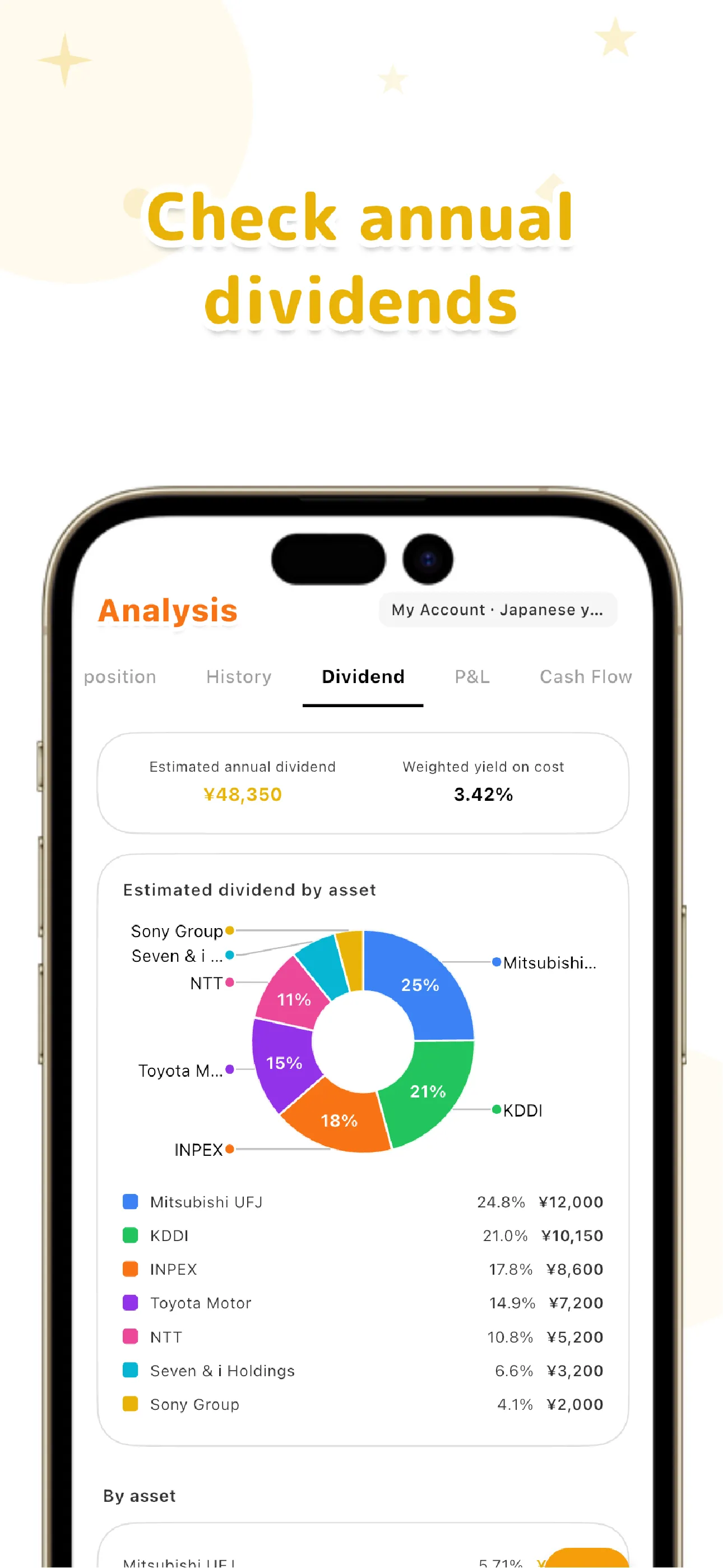
From those two inputs, the Dividend tab under Analysis shows estimated annual dividend, a weighted yield on cost, and a per-asset breakdown. Holdings keep quantity, average cost and cost basis from your recorded buys, so the cost that yield on cost needs is already there. Dividends received are also summed by asset on the P&L tab and sit on the timeline next to your trades.
There are limits worth knowing before you switch. LiteFolio does not connect to a brokerage, does not fetch dividend announcements, ex-dividend dates or share prices, and has no import for an existing sheet. If you want a spreadsheet next to it, you can export your trade history and per-asset results as CSV from Settings and open them in Sheets or Excel. Data is saved on your device first, and syncing across devices is a Pro plan feature; check the store listing for the current plans. LiteFolio is a record-keeping tool and does not give investment advice.
Spreadsheet or app: a side-by-side
| Task | Spreadsheet | LiteFolio |
|---|---|---|
| Log a payment | Add a row: date, ticker, gross, tax, account | Record a dividend: asset, amount, received date |
| Yearly total per ticker | SUMIFS over the log | Dividend income by asset on the P&L tab |
| Estimated annual income | Shares × annual dividend per share | Dividend tab, from the per-share figure on each asset |
| Yield on cost | Formula using a total-cost column you maintain | Weighted yield on cost from your recorded buys |
| Entry from your phone | Possible, but fiddly | Designed for it |
| Cost | Free | See the store listing for current plans |
If you hold three or four tickers and enjoy owning the formulas, build the two tabs above and you are done. If you are already behind on the log, or the same ticker lives at two brokers, the logging is what to make easier, and that is the part an app is for.
LiteFolio
A manual-entry portfolio tracker that never connects to your brokerage account. Record dividends, buys and sells, and see estimated annual dividends and yield on cost. Data is stored local-first. Available on iOS and Android.
Learn more about LiteFolioFrequently asked questions
What columns should a dividend tracker spreadsheet have?
On the log tab: date received, ticker, account, gross amount, tax withheld, net received and a note. On a small holdings tab: ticker, shares, total cost and annual dividend per share. Yearly totals and yield on cost are formulas built on those two tabs.
Should I record dividends gross or net of tax?
Record both. Your account balance grows by the net amount, while the dividend a company quotes per share is the gross figure. Keeping the two columns side by side lets you report either one, as long as you stay consistent when you compare years.
Is there a free dividend tracker that is not a spreadsheet?
LiteFolio is an iOS and Android app for logging dividends, trades and cash flows by hand. Check the App Store or Google Play for the current plans; syncing across devices is part of the Pro plan.
Does LiteFolio show upcoming dividend dates or pull dividends from my broker?
No. It never connects to a brokerage and does not fetch announcements, ex-dividend dates or prices. You record each dividend when it arrives, and the app shows the totals, the estimated annual dividend and the yield on cost.