We're the LiteFolio team. Most people searching for a dividend tracker app start from the same nagging thought: "how much did I actually get paid in dividends this year?" With two or three stocks, memory alone can carry you. But once your holdings grow and dividends start arriving quarterly, at different times, from different tickers, you simply can't track your annual dividend income without writing it down. In this article, the LiteFolio team explains which metrics become visible once you start recording dividends, and how to record them.
Track and visualize your dividend income with simple manual entry
See LiteFolioLeft untracked, "how much this year" becomes impossible to answer
Dividend income is hard to keep in your head because it isn't built for memory in the first place. Every ticker pays on its own schedule, some pay once a year and others quarterly, and the amount that lands in your account is always after taxes. Multiple tickers, multiple payment dates, and after-tax amounts all stacking together is exactly the combination that breaks any attempt to remember your annual total.
It gets even more complicated if you hold accounts at more than one broker. Your "total dividends this year" only exists once you add up what Broker A paid and what Broker B paid, and there's rarely a natural moment to do that math across accounts. As covered in our guide to tracking investments across multiple brokerage accounts, the more accounts you have, the easier it is to skip the step of adding everything up.
In other words, the first thing dividend tracking actually requires isn't a savings trick or an investing strategy — it's a system for recording each dividend payment as it happens. The next section covers three metrics that only become visible once you do that.
Three metrics that appear once you start tracking
The point of tracking dividends is turning a vague feeling into a number. Once you log dividends one payment at a time and let them accumulate, trends and ratios emerge that a single payment could never show you on its own. Specifically, tracking gives you these three metrics:
Once you can see dividends received, you can tell at a glance whether your income is trending up. Once you know your projected annual income, you get a sense of "if I hold what I have now, this is roughly what next year looks like." And yield on cost (YoC) shows, ticker by ticker, how efficiently your investment is generating dividends relative to what you paid. Put all three together, and dividends stop being "money that shows up and disappears" and start becoming a running record of a growing asset.
What is yield on cost (YoC)? A worked example
Yield on cost (YoC) is annual dividend income expressed as a percentage of the price you actually paid. Because your cost basis doesn't change even as the share price moves, YoC shows the real dividend efficiency of your investment from the moment you bought it. This is different from the "dividend yield" you see quoted on financial sites, which is based on the current share price rather than what you paid.
Let's walk through an example. Say you bought a stock at $50 a share, and it pays $2 per share in annual dividends. YoC is calculated like this:
Getting YoC right depends on having an accurate cost basis in the first place. If you bought a stock in several separate purchases, you'll need to average those purchase prices together — a concept we cover in detail in our average cost basis calculation guide. Track both your cost basis and your annual dividends, and you can compare YoC across tickers to see which of your positions is generating dividends most efficiently.
Recording after-tax amounts keeps things closer to what you actually receive
Dividends usually land in your account after tax has already been withheld. Whether you calculate annual income and YoC using the pre-tax (gross) amount or the after-tax amount you actually received depends on what you're trying to measure, but if you want your numbers to match how your account balance actually grows, use the after-tax amount. You don't need to get into the fine details of tax rules — what matters is picking one convention and sticking with it consistently.
Comparing ways to track dividends
Broadly speaking, there are three ways to track dividends: a notebook, a spreadsheet, and an app. In short, any of them works fine while you only hold a few stocks, but the more tickers and brokerage accounts you have, the more you should favor a method that takes over the tallying and visualization for you. Let's look at each.
Notebook
Writing down the payment date and amount as dividends arrive. It requires no setup and you can start right away, but you'll need a calculator to work out your annual total or per-ticker YoC yourself. The more entries pile up, the more that tallying step becomes the real barrier to keeping it going.
Spreadsheet
With the right formulas, you can automatically total annual dividends and calculate YoC. But every new ticker risks a copy-paste formula error, and quickly logging a dividend from your phone the moment it lands isn't very convenient — the more you use it, the more upkeep it demands. We cover exactly where spreadsheet-based portfolio management hits its limits in our stock portfolio spreadsheet template guide.
Investment tracker apps
The advantage of an app is that dividends received, projected annual income, and YoC all recalculate and update automatically the moment you log a dividend. There's no "enter it, then tally it yourself" step like with a notebook or spreadsheet — you can focus purely on recording. In the next section, we'll show exactly how this works in LiteFolio.
Tracking and visualizing dividends with LiteFolio
LiteFolio is a manual-entry investment portfolio tracker that never connects to any brokerage account — you log your buys, sells, dividends, deposits and withdrawals, fees, stock splits, taxes, and notes yourself. Every time you receive a dividend, just log the amount and date, and dividends received, projected annual income, and yield on cost (YoC) per ticker are all visualized automatically.
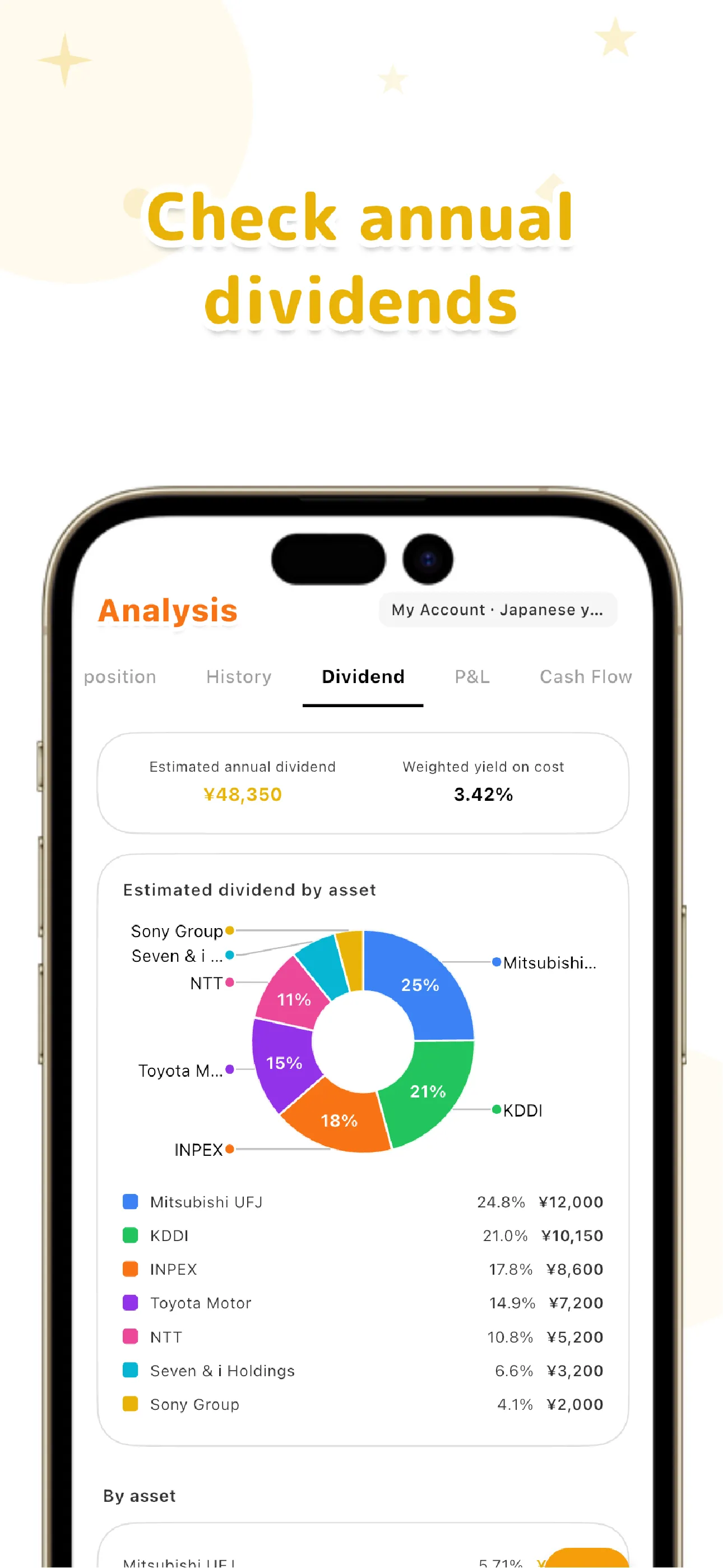
Because share count, average cost basis, and total cost are tracked for each holding right alongside dividends, you never have to maintain a separate spreadsheet just to look up the cost basis you need for a YoC calculation. Asset allocation can be viewed by ticker, sector, or custom list, and alongside realized gains, portfolio value over time, and a transaction timeline, dividends are shown as one piece of your whole portfolio rather than an isolated number.
Everything you log is local-first, saved on your device first. If you want to sync across multiple devices, the Pro plan's cloud sync sends your data over an encrypted connection. We cover the design decision to never link brokerage accounts in more depth in our guide to portfolio trackers without account linking.
Track dividends received, projected annual income, and YoC all in one place
See LiteFolio's dividend tracking featuresKeeping track of dividend income isn't a memory problem — it's a recording problem. Log payments one at a time, and dividends received, projected annual income, and yield on cost naturally come into view. LiteFolio is a record-keeping and visualization tool and does not provide investment advice.
LiteFolio
A manual-entry investment portfolio tracker that never connects to your brokerage account. Log dividends, buys, sells, and deposits, and see dividends received, yield on cost (YoC), asset allocation, and more, visualized automatically. Data is stored local-first. Available now on iOS and Android.
Learn more about LiteFolioFrequently asked questions
Is LiteFolio free to use?
LiteFolio is available now for iOS and Android. Check the App Store or Google Play for current features and pricing.
Can it automatically pull in dividends by linking my brokerage account?
No. LiteFolio never connects to any brokerage account — it's a manual-entry app. Every time you receive a dividend, you log the amount and date yourself.
Should I record dividends pre-tax or after-tax?
You can record either, but if you want your numbers to match how your account balance actually grows, the after-tax amount you actually received is the more accurate choice. You don't need to dig into the details of tax rules — just pick one convention and stay consistent.
Will it work on both iOS and Android?
Yes. LiteFolio is available now on both iOS and Android.