We're the LiteFolio team. Have you ever actually checked your portfolio's sector allocation? While you're picking stocks one at a time, it's easy to end up buying mostly from industries you happen to like, or to watch a winning position's weight quietly balloon without noticing. In this article, the LiteFolio team explains three lenses for catching concentration in your portfolio that's easy to miss.
View your allocation by ticker, sector, and custom list on charts
See LiteFolioPortfolios drift out of balance without you noticing
Concentration in your asset allocation doesn't appear overnight. On top of the natural psychological pull toward picking stocks in industries you already like, a winning position's market value swells over time, and a weighting that didn't bother you when you first bought can shift dramatically without you realizing it. Watching day-to-day price moves alone makes this drift genuinely hard to catch.
If you hold accounts at more than one broker, the concentration is even harder to see. Each broker's screen only shows the holdings inside that one account, so you rarely get a natural moment to think about the full picture across accounts. As covered in our guide to tracking investments across multiple brokerage accounts, the more accounts you split your holdings across, the easier it is to skip the step of looking at everything together.
In other words, catching concentration in your portfolio isn't about following day-to-day price moves — it's about having a system for periodically stepping back and looking at the whole picture. The next section covers three lenses you can use for that.
Three lenses for checking your portfolio's sector allocation
A single lens can miss concentration in your portfolio. That's because a concentration invisible at the ticker level can show up clearly at the sector level, and the reverse happens too — sectors can look diversified while your holdings are still concentrated within your own investment strategy. In practice, checking through these three lenses is the basic approach:
By ticker
The most basic lens: what percentage of your total portfolio does each individual holding make up. It's not uncommon to discover through this lens, for the first time, that a stock which has kept climbing now makes up a far bigger slice than you expected.
By sector
Grouping your holdings by industry — tech, financials, healthcare, and so on. A pattern that's hard to spot looking at ticker names one at a time — "I've actually been buying almost entirely within the same sector" — becomes clearly visible as a number once you roll it up by sector.
By custom list (your own classification)
Sector classification is an objective axis based on industry, but sometimes you want to slice your holdings along a different axis that matches your own investment strategy. For example, you might build your own lists like "dividend sleeve," "growth sleeve," and "defensive sleeve," and see how concentrated your capital is within them. Realizing your sectors are diversified but your actual allocation has drifted away from the balance you intended is a discovery unique to this lens.
Each of the three lenses shows a different angle on the same portfolio. It's not unusual for the numbers to differ sharply from lens to lens, like this:
In this example, no single ticker stands out on its own, but a clear concentration shows up once you look by sector or by custom list. Don't declare yourself "diversified" based on a single lens — checking all three together is the shortcut to actually catching concentration.
Comparing ways to check your allocation
Broadly, there are three ways to check your allocation: your broker's screen, a spreadsheet, and an app. In short, any of them work fine while you're using a single account with a small number of tickers, but the more accounts and tickers you have, the more a method that takes over tallying and charting for you determines how sustainable your checking habit is.
Your broker's trading screen
The most convenient option, but it only shows the holdings inside that broker's account. If you use multiple accounts, you generally can't see a sector breakdown or an overall weighting across accounts.
Spreadsheet
Manually tag each holding with a sector or custom list category, and a formula can calculate the allocation percentages. But every new ticker means more manual tagging and formula updates, and the upkeep grows the longer you keep at it. We cover exactly where spreadsheet-based portfolio management hits its limits in our stock portfolio spreadsheet template guide.
Investment tracker apps
The advantage of an app is that logging your holdings automatically charts your allocation by ticker, sector, and custom list. There's no re-tallying the categories yourself like a spreadsheet — you can focus purely on checking. The next section shows exactly how this works in LiteFolio.
Check your sector allocation with LiteFolio
LiteFolio is a manual-entry investment portfolio tracker that never connects to any brokerage account — you log your buys, sells, dividends, deposits and withdrawals, fees, stock splits, taxes, and notes yourself. From the holdings you log, allocation by ticker, sector, and custom list is automatically charted for you. Here's what it looks like.
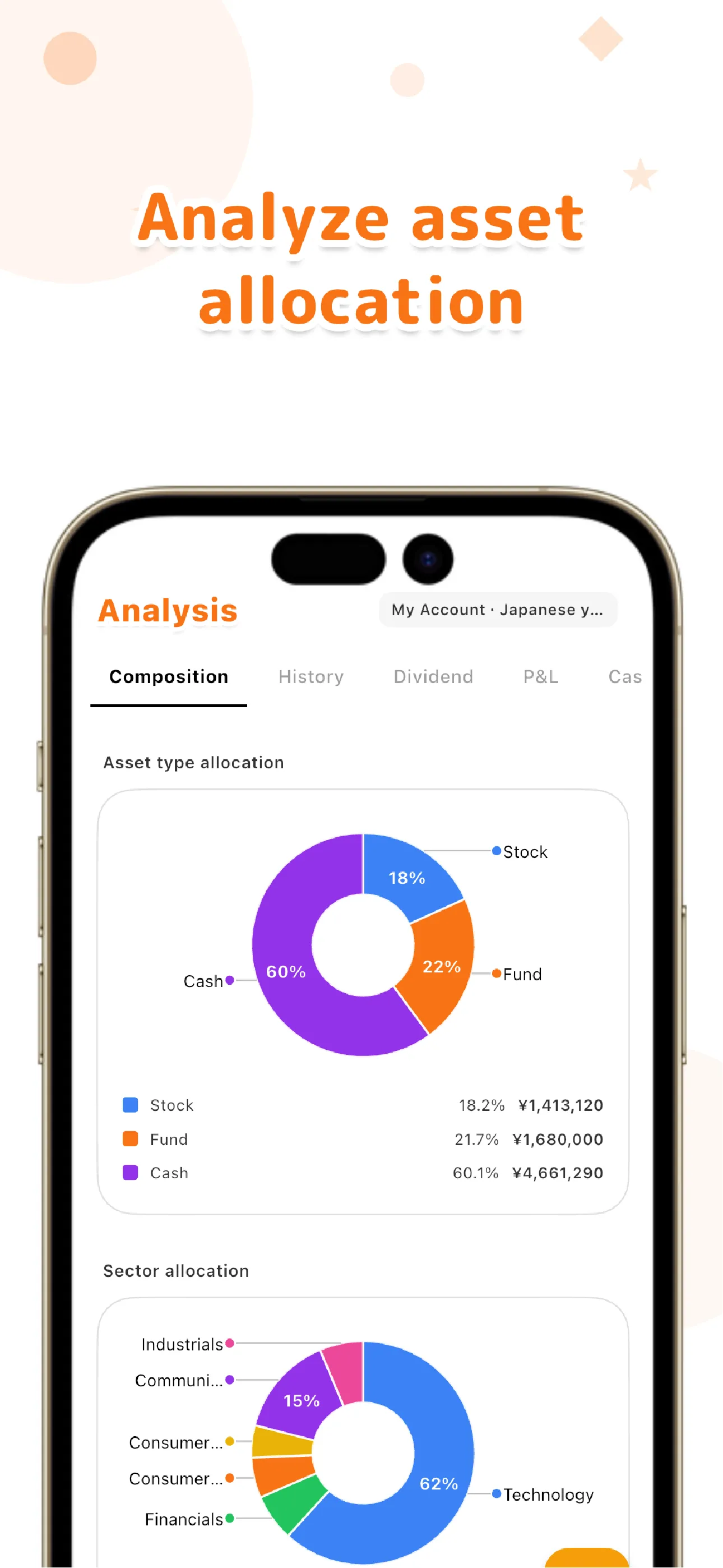
Beyond sector categories, you can build your own custom lists — "dividend sleeve," "growth sleeve," "defensive sleeve" — to catch concentration invisible to sector classification alone, like being diversified by industry but concentrated within your own strategy. Because portfolio value over time and cash balance are tracked too, combining this with our guide to tracking portfolio value over time lets you see how your allocation has shifted over time as well.
Even if you split your holdings across multiple brokers, the positions you log in LiteFolio are rolled up into a single portfolio across accounts. Without bouncing between different broker screens, you can check the by-ticker, by-sector, and by-custom-list allocation of your total holdings in one place — a benefit specific to manually recording your holdings across accounts.
Everything you log is local-first, saved on your device first. If you want to sync across multiple devices, the Pro plan's cloud sync sends your data over an encrypted connection.
Check your allocation by ticker, sector, and custom list on charts
See LiteFolio's allocation featuresConcentration in your portfolio creeps in without you noticing, unless you deliberately watch for it. Check by ticker, by sector, and by custom list on a regular basis, and you can see exactly where your own portfolio has drifted out of balance. LiteFolio is a record-keeping and visualization tool and does not provide investment advice.
LiteFolio
A manual-entry investment portfolio tracker that never connects to your brokerage account. Log buys, sells, dividends, and deposits, and see your allocation by ticker, sector, and custom list, along with portfolio value, realized gains, and more, visualized automatically. Data is stored local-first. Available now on iOS and Android.
Learn more about LiteFolioFrequently asked questions
Is LiteFolio free to use?
LiteFolio is available now for iOS and Android. Check the App Store or Google Play for current features and pricing.
Can it connect to my brokerage account and calculate sector allocation automatically?
No. LiteFolio never connects to any brokerage account — it's a manual-entry app. From the holdings you log, allocation by ticker, sector, and custom list is charted automatically.
What is a custom list?
A feature that lets you freely group holdings by your own investment strategy — for example, "dividend sleeve," "growth sleeve," or "defensive sleeve." It gives you a lens for spotting concentration that's separate from sector classification.
Does LiteFolio tell me when to rebalance?
No. LiteFolio is a record-keeping and visualization tool that helps you notice concentration in your allocation — it doesn't advise on whether or when to rebalance.