The LiteFolio team here. Most people searching for a stock management app aren't actually confused by a long feature list — they're confused by which type of app they're even looking at. Stock management apps generally fall into three types: an "account-linked" app that connects to your brokerage account and pulls in holdings and gains automatically, a "manual-entry" app that never connects to your broker and instead has you log each trade yourself, and a "read-only" app built for checking stock prices and charts rather than recording what you personally own. All three get called a "stock management app," but they differ completely in how much typing they take and how much of your data leaves your hands — so it's worth figuring out which type actually fits what you're trying to do.
LiteFolio is a manual-entry investment tracker that never connects to your brokerage account.
See LiteFolioThree types: account-linked, manual entry, and read-only
To put it plainly, stock management apps split into three types based on where the transaction data actually comes from. The reason it matters is that whether an app talks directly to your brokerage, relies on you typing everything in, or doesn't track your holdings at all changes the effort involved, what you have to share, and what the app is even for.
Account-linked apps
You register your brokerage username and password, and the app automatically pulls in your holdings and gains. It takes almost no manual effort, but you have to hand your login credentials to a third-party service, and any broker the app doesn't support simply won't show up. If you hold accounts at more than one broker, support and sync timing can also vary broker by broker.
Manual-entry apps
These never connect to your brokerage account at all — you log each buy, sell, and dividend yourself. It takes more typing, but because there's no account linking, there's no login to hand over, and you can combine trades from multiple brokers into a single record however you see fit. You also control exactly what and when you record.
Read-only apps
These aren't built to record what you personally own — they're for checking stock prices, charts, and indicators. You can add tickers to a watchlist and follow price moves, but tracking your own cost basis or gain/loss isn't what the app is designed for. If tracking your actual holdings is the goal, you're choosing between an account-linked or manual-entry app instead.
Comparing the three types across six axes
Deciding among the three types gets easier once you line them up against six specific axes: whether account linking is required, how multiple accounts are handled, whether profit history is tracked, whether dividends are recorded, whether notes can be attached, and privacy — how much data leaves your hands.
| Axis | Account-linked | Manual entry | Read-only |
|---|---|---|---|
| Account linking | Required (username/password) | None | None |
| Multiple accounts | Depends on broker support | You combine them into one record yourself | No concept of an "account" at all |
| Profit history | Pulled in automatically from your broker | Calculated automatically from what you log | Not applicable (no holdings recorded) |
| Dividends | Reflected automatically if the broker supports it | Recorded and totaled once you log them | Not applicable |
| Notes | Varies by app | Often available per trade | Mostly ticker-level notes |
| Privacy | Your brokerage credentials leave your hands | No credentials to hand over | No credentials to hand over |
Which type fits which kind of person
Account-linked apps suit people who want to minimize manual entry and whose broker happens to be supported. If handing over login credentials doesn't bother you, this is the way to skip typing in every trade.
Read-only apps suit people who don't need to track their own holdings at all and just want to research prices and indicators. If a watchlist is all you're after, holdings-tracking features aren't something you need in the first place.
Manual-entry apps suit people who don't want to hand their brokerage login to an outside service, people who want to combine trades from several brokers into a single record, and people who want to attach notes to trades and look back on them later. If the reason is specifically unease about linking, our guide to portfolio trackers that skip account linking goes deeper on that option alone. In short, if you want to organize your own holdings on your own terms without linking an account, manual entry is the type that fits best.
LiteFolio
A manual-entry investment portfolio tracker that never connects to your brokerage account. Log buys, sells, dividends, and fees, and your holdings, realized gains, and asset allocation are visualized automatically. Your data is stored local-first. Available now on iOS and Android.
Learn more about LiteFolioWhat LiteFolio does, as a manual-entry app
LiteFolio is a manual-entry investment portfolio tracker that never connects to any brokerage account. You can log buys, sells, dividends, deposits and withdrawals, fees, stock splits, taxes, and notes. Once you enter these, LiteFolio automatically rolls up your holdings (share count, average cost basis, total cost), realized gains, cumulative performance, portfolio value over time, and cash balance.
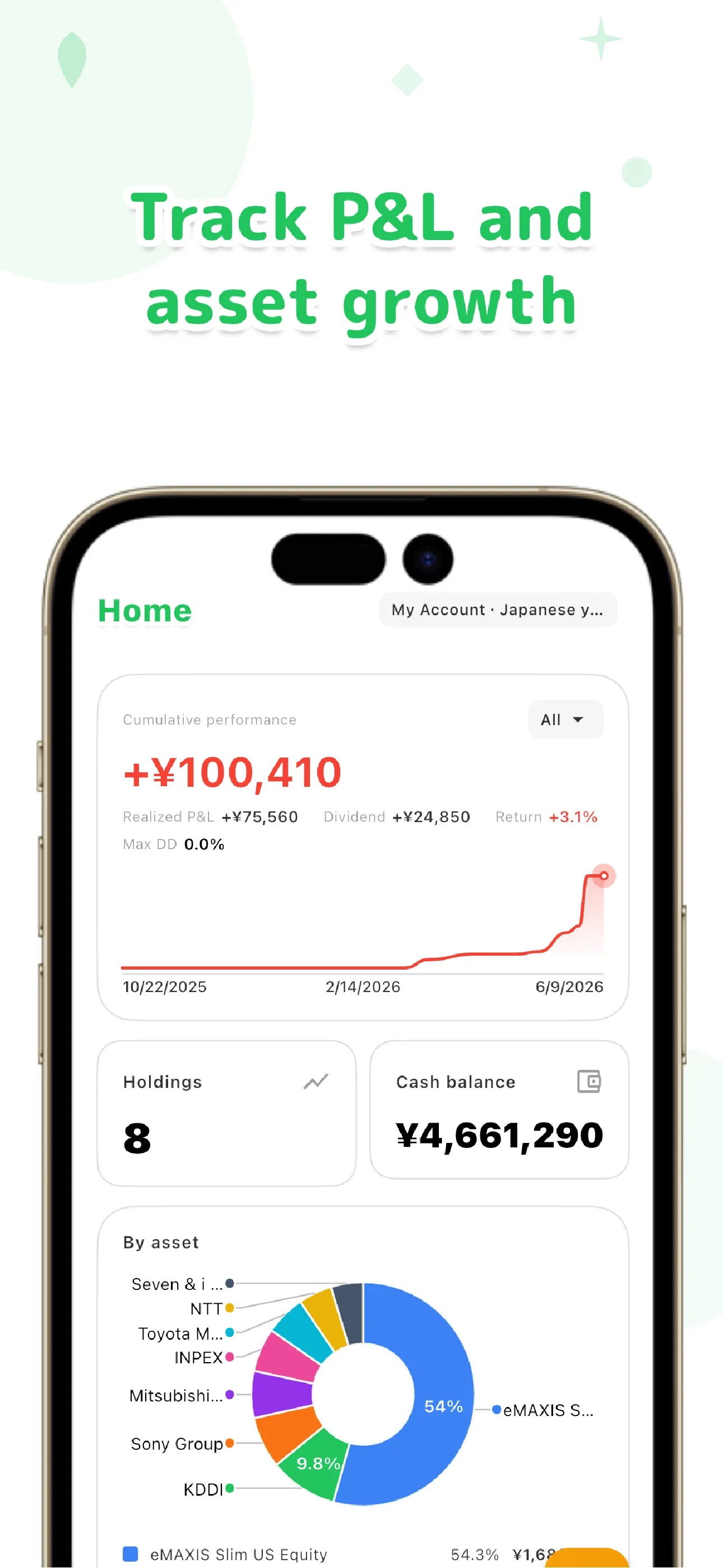
Dividends are visualized as received dividends, projected annual dividend income, and yield on cost (YoC) per holding — we go deeper on that in our dividend tracker app guide. Asset allocation can be checked by ticker, sector, or custom list, and the approach for combining trades across multiple brokerage accounts into one record is covered in our guide to tracking multiple brokerage accounts. A transaction timeline lets you scroll back through everything you've recorded.
Your data is local-first, meaning it's saved on your device first. Cloud sync is only used if you choose the paid Pro plan, and even then it's sent over encrypted connections. Not linking to your brokerage account is, by design, the simplest way to minimize what you share.
LiteFolio is a record-keeping and visualization tool and does not provide investment advice.
Frequently asked questions
Should I choose an account-linked or manual-entry app?
If you want to minimize typing, an account-linked app is the better fit. If you don't want to hand your brokerage login to a third party, or you want to combine trades from multiple accounts yourself, manual entry is the better fit. Neither is objectively correct — it comes down to whether you'd rather save effort or keep more control over what you share.
Can a read-only app still track my holdings?
Read-only apps are generally built for checking prices and charts, not for recording your own cost basis or gains. If tracking what you actually own is the goal, you'll need an account-linked or manual-entry app instead.
Does LiteFolio link to my brokerage account?
No. LiteFolio never connects to any brokerage account — it's a manual-entry app where you log buys, sells, dividends, and other transactions yourself so they can be recorded and visualized. You never need to hand your login credentials to an outside service.
Can I combine multiple brokerage accounts in LiteFolio?
Yes. Because it's manual entry, you can log trades from different brokers yourself and keep them in a single record. Unlike account-linked apps, which depend on what each broker's integration supports, tracking across brokers doesn't depend on any app-side integration.