We're the team behind Otto!, and the freezer is where a stock list pays off the most. Here is the short answer to what a freezer inventory app should do: record what each item is, where it lives and when you should use it by, in a few taps, and put the oldest and soonest-to-use items at the top. The freezer is where food goes to be forgotten. It rarely spoils in a way you can see, so the loss is quiet: a bag of chicken from last spring, a tub of soup nobody can identify, a loaf that turned into a block of freezer burn.
One thing worth knowing before you log anything: the USDA says food kept frozen at 0 °F (-18 °C) stays safe indefinitely, and the freezer times you see in charts are about quality, meaning how long the food keeps its taste and texture. So the goal of a freezer inventory isn't to dodge danger. It's to stop paying for food and then throwing it out because you lost track of it.
Add a food, choose Freezer as the place, and Otto! suggests an expiration date. You get one list sorted by what expires first and one reminder each morning.
Learn more about Otto!What a freezer inventory list needs to record
A useful freezer list answers three questions without opening the door. What is it (a name you will recognize at a glance, not just 'freezer bag'), where is it (top drawer, chest freezer, the one in the garage) and use it by when. Most paper lists on a freezer door fail on the third one, because writing a date for every bag is tedious, so the date column ends up blank and the list becomes a list of things you own, not things you should eat first.
Paper and spreadsheets both work if you're disciplined, and a printed list taped to the door is a fine place to start. They break down in two places. Nobody can check them from the supermarket, which is exactly when you decide whether to buy more ground beef. And when you take something out, you have to remember to cross it off. An app that keeps the list on your phone and sorts it by date removes both problems, as long as adding an item takes a few seconds. If it takes longer, you'll stop logging after the first big shop.
Freezer storage times to plan around
To set a use-by date for something you're putting in the freezer, you need a rough sense of how long it keeps its quality. These figures come from the USDA FoodKeeper data, which we use for our free storage-times table. They assume the freezer stays at 0 °F (-18 °C) or colder.
| Food | Freezer time (best quality) |
|---|---|
| Ground beef, pork, chicken or turkey | 3–4 months |
| Beef steaks, roasts and pork chops | 4–12 months |
| Chicken breast (boneless) / whole chicken | 9 months / 12 months |
| Shrimp and scallops | 6–18 months |
| Lean fish / fatty fish | 6–8 months / 2–3 months |
| Bread, rolls and buns | 3–5 months |
| Soups and stews, cooked leftovers with meat | 2–3 months |
| Cooked rice | 6 months |
| Ice cream | 6 months |
The table above is a sample. The full list has 100 foods, opened and unopened, and you can filter it by name in our fridge, freezer and pantry storage times table. A few foods, such as eggs in the shell, cream cheese and lettuce, are marked as not recommended for freezing at all, which is useful to know before you try.
How we set up the freezer in Otto!
When you add a food in Otto!, you type the name and choose where it's stored: Fridge, Freezer or Pantry. Pick Freezer and the app suggests an expiration date from its built-in data, which you can adjust on a calendar. Say you batch-cooked a big pot of chili: you add it once, set the place to Freezer, and move the date to when you'd like to have eaten it by. Everything you add sits in one list, sorted by how soon it expires. Expired items show in red and anything due within 3 days in orange.
Two small design choices matter most for a freezer. First, the morning notification: once a day, Otto! sends one summary of what expires today or soon, so a bag at the back of the drawer doesn't have to wait until you happen to dig for it. Second, the history. After you've added something once, Otto! remembers its category, storage place and shelf life, so re-adding the chicken thighs you buy every other week means picking the name and nothing else. Quantity is optional, so you can note '2 portions' if that helps.
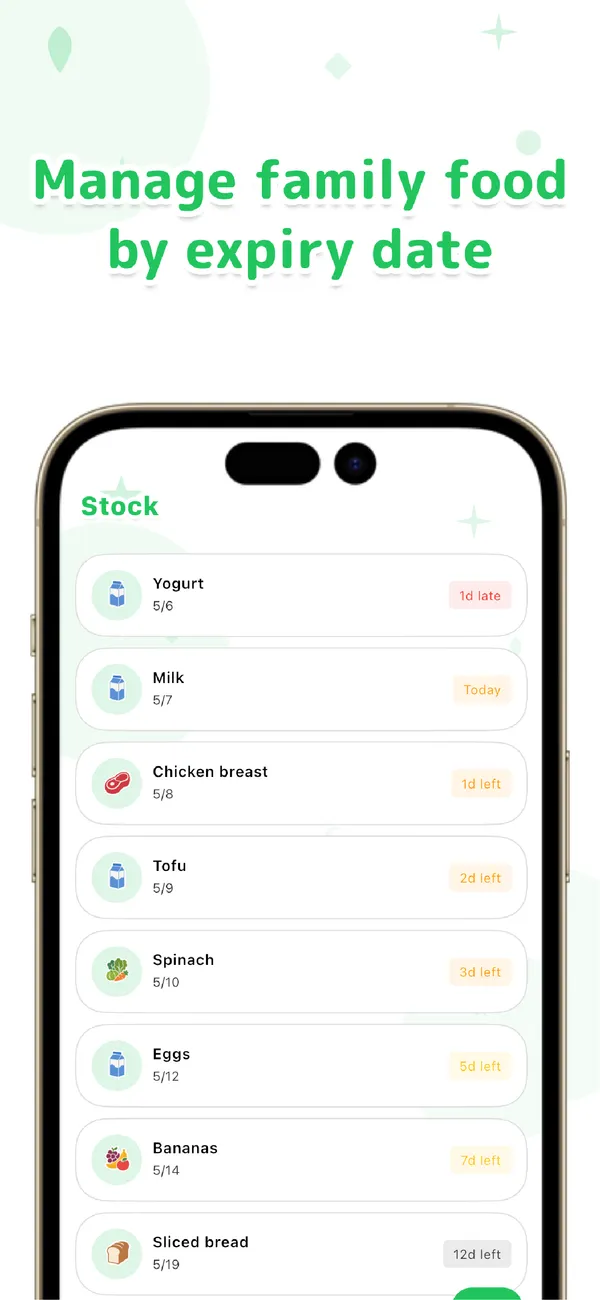
When a bag runs out, swipe it to the shopping list so it's on the list next time you shop. You can share the whole thing with a partner or family: choose 'Share this group' in settings to create an invite code, and they join by signing in with Google or Apple. That matters for freezers, since in most households two people put things in and neither knows what the other froze.
To be upfront about what Otto! doesn't do: it records an expiration date, not the date you froze something, and it has no drawer-by-drawer map of a chest freezer. You can create your own categories, which some people use for shelves or baskets, but if you manage a very large deep freezer with hundreds of items, a dedicated freezer tracker may suit you better. Otto! also has no barcode scanner and doesn't use your camera. It's a deliberately narrow app for food and dates. Using it on your own is free and unlimited, and works fully offline.
Otto!
Pick a food name and where it's stored, and the expiration date is suggested. A list sorted by expiry, one reminder each morning, and a shopping list you can share with your family. Free and unlimited on your own. For iPhone and Android.
Learn more about Otto!A 10-minute freezer reset that makes the list worth keeping
The first time is the hard part. Pick an evening before a grocery run, take everything out, and sort it into what you'll actually eat, what's borderline, and what goes in the bin. Add the keepers to your list with a use-by date. Don't try to log every ice pack and spare ice cube tray: start with proteins, cooked meals and anything you would be sad to lose. After that, the habit is small. New things get logged when they go in. Check the top of the list when you plan dinner, and cook from there.
A tip that saves guesswork: when you freeze leftovers or batch-cooked meals, set the date to the shorter end of the range in the table. Nothing is printed on a container of homemade chili, so the date you choose is your own planning estimate, not a safety guarantee. If you can't tell how long something has been in there, or whether it ever thawed, it's better to let it go.
Frequently asked questions
Do I need to log everything in the freezer?
No. Start with the items that matter most: meat, fish, cooked meals and leftovers. Those are the foods you most want to use in time. You can add the rest later, or skip things like ice and frozen fruit you use all the time.
How long can food stay in the freezer?
For safety, the USDA says food kept at 0 °F (-18 °C) stays safe indefinitely. For quality, FoodKeeper gives times such as 3–4 months for ground beef, 4–12 months for steaks and 12 months for a whole chicken. Our storage-times table lists 100 foods you can filter by name.
Does Otto! work for a chest freezer or a second freezer?
Otto! keeps one list with three storage places: Fridge, Freezer and Pantry. It doesn't map individual drawers or baskets, but you can create your own categories to group things the way your freezer is laid out.
Is Otto! free?
Using Otto! on your own is free and unlimited, with no account needed. You can try family sharing for free, and Pro, a subscription with monthly and yearly plans, makes shared items unlimited.
Stop losing food in the freezer: start with Otto! Fridge, freezer and pantry in one list with expiration dates, sorted by what to use first. Free on your own, for iPhone and Android.