We're the team behind Otto!, and we've tried most of the approaches in this article in our own kitchens. Here is the short answer: what cuts food waste is a system that puts everything you bought on one list, with a date on each item, and nudges you to use the oldest first. Features don't decide whether you keep doing that. Two things do: how much typing it takes to log one item, and whether the reminders arrive in a form you won't mute. An app that needs five minutes to log ten grocery items after every shop is usually abandoned within two weeks, however good its feature list looks.
For a fridge, freezer and pantry that are mostly fresh and mixed food, we think an expiry-first app, where you pick a food name and where it's stored and the app suggests the date, beats a barcode-scanning app. Fresh produce, meat and eggs have no barcode, and a barcode on packaged food doesn't contain its best-by date anyway. Otto! is built this way. It's free and unlimited when you use it on your own, you can try family sharing for free, and Pro makes shared items unlimited.
Pick a food name and where you keep it, and Otto! suggests the expiration date. You get a list sorted by what expires first, one reminder each morning, and a shopping list you can share with your family.
Learn more about Otto!Inventory apps differ mostly in how you add an item
If you compare feature lists, nearly every pantry or fridge inventory app looks the same: an item list, a shopping list, some kind of alert. The real difference is what you have to do to get one item in, and that splits the field into three types.
Barcode and receipt scanning apps read a barcode or a receipt with your camera and fill in the product name. For canned goods, boxed food and drinks this is fast. The catch is the fridge: fresh produce, meat, fish, eggs and deli items have no barcode, and even on packaged food the best-by date isn't encoded in it. So you still type a date, and a large share of a typical fridge falls outside what scanning helps with.
Expiry-first apps are built around one question: what do I need to use up soon? You choose a food name and where it lives (fridge, freezer or pantry), and the app suggests a date from built-in shelf-life data. If the package prints a date, you adjust the suggestion to match. Nothing in the flow asks you to look up a date, which is the step where most people give up. Otto! is this type. We designed it to remove the "find the date and type it in" step entirely.
Meal-planning and recipe apps start from dinner: you pick recipes, and the app builds a grocery list and tracks the ingredients. They suit people who plan the week in advance and want recipe ideas. Expiry tracking tends to be a secondary feature, and if you shop first and decide what to cook later, the inventory only stays accurate if you also log every ingredient you didn't plan around.
| What to compare | Barcode / receipt scanning | Expiry-first (Otto!) | Meal planning and recipes |
|---|---|---|---|
| Effort to add an item | Fast for packaged food. Fresh food and the date are still typed by hand | Pick a name and where it's stored. The date is suggested | Easy for planned recipes, extra work for everything else |
| How expiry shows up | Usually a field on each item | The list is sorted by what expires first, expired in red and the next 3 days in orange | Often secondary to the meal plan |
| Reminders | Varies by app | One notification each morning covering what expires today or soon | Varies by app |
| Sharing with a partner or family | Often a paid feature | Try it free. Pro makes shared items unlimited | Varies by app |
| Link to the shopping list | Often a separate feature | Swipe a used-up item to the list, swipe it back into stock after shopping | Built in, driven by recipes |
| Ads and pricing | Item caps or subscriptions are common | Free and unlimited when used alone | Often subscription-based |
Five checks before you commit to an app
Once you've picked a type, test the specifics. When people we talked to during development told us why they quit their last app, it nearly always came back to one of the points in this table. The first check is one you can run in about two minutes, so do it before you invest in any app.
| Check | What to look for | Why it matters |
|---|---|---|
| Seconds per item | Time yourself adding five items from your last grocery trip, including a fresh one and an opened jar | If logging a shop takes minutes, you'll skip it on busy days, and a half-empty list is worse than none |
| Sorted by expiry | The default view lists items by how soon they expire, with expired items clearly marked | The point is knowing what to eat first. A list grouped only by shelf or category hides that |
| Notification timing | One summary a day rather than one ping per item | Frequent pings get muted, and then the reminder does nothing |
| Sharing | Everyone in the household sees the same stock and list, on iPhone and Android, and you can try it before paying | A common cause of waste is buying something twice because one person didn't know the other already had it |
| Shopping list link | Used-up items go to the list in one gesture, and bought items go back into stock | If stock and list are two separate chores, one of them stops getting done |
One more point on price. Check whether a free plan caps the number of items. The cap tends to arrive right when your fridge and freezer are fully logged, which is exactly when the app was starting to pay off, and that's a common moment to quit.
How we built Otto!
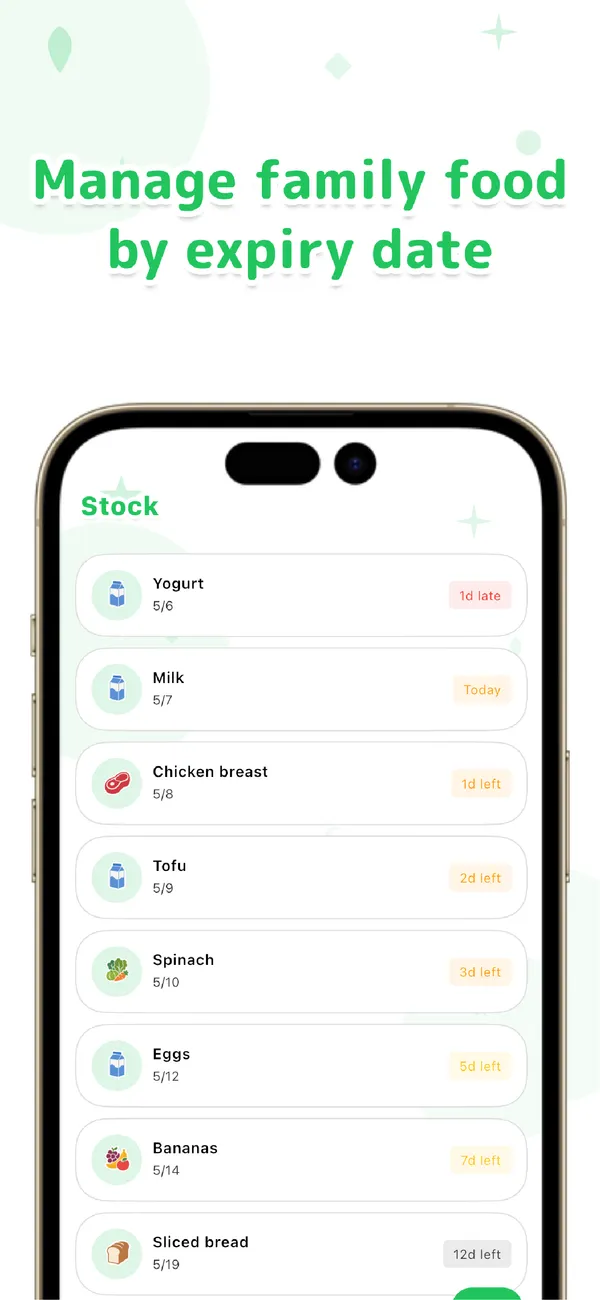
You type a food name and choose where it's stored, which can be the fridge, the freezer or the pantry, and Otto! suggests an expiration date from its built-in data. That makes it as much a pantry app as a fridge app, because the storage place changes the suggested date. Everything you add sits in one list ordered by how soon it expires. Expired items show in red and anything due within 3 days in orange, so what to use first is visible at a glance. Once a day, in the morning, you get a single notification that rounds up what expires today or soon. We didn't want an app that pings so often that people turn it off.
Otto! also remembers. Once you've added a food, it keeps the category, storage place and shelf life, so the next time you only pick the name. For the things you buy every week, that is the difference between logging a shop in a minute and not logging it at all.
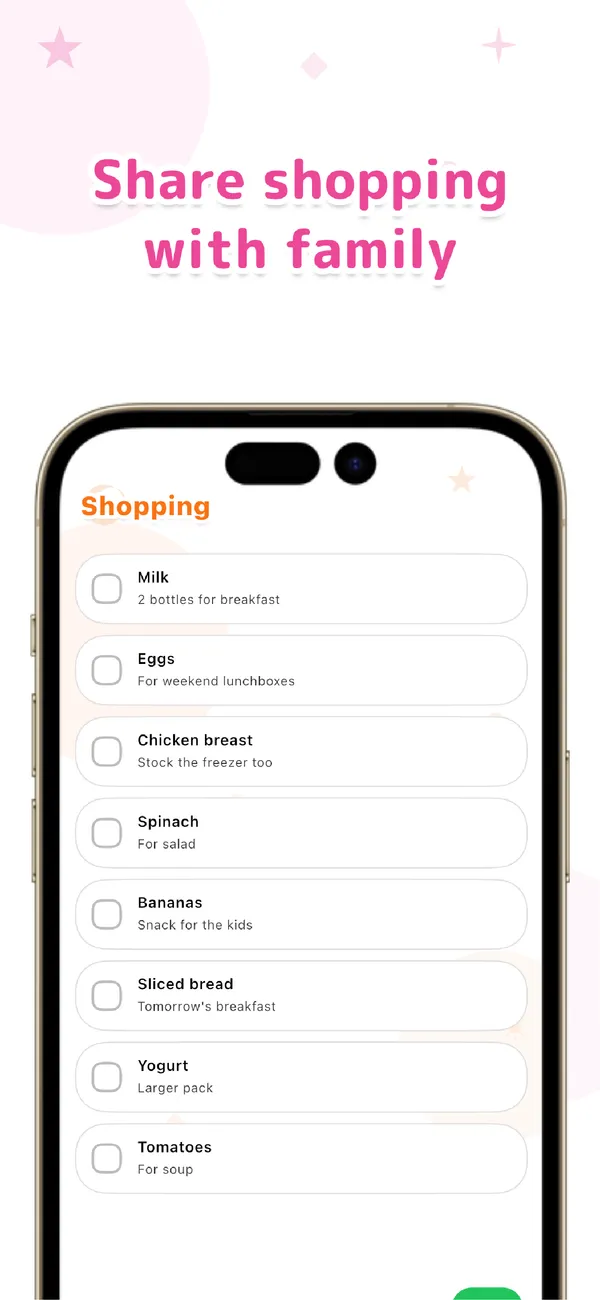
When something is used up, swipe it to the shopping list. After you shop, swipe it from the list back into your stock. You can add a note such as "2 for breakfast". To share with a partner or family, choose "Share this group" in settings to create an invite code. They join by signing in with Google or Apple and see the same stock and shopping list. Inventory and shopping shouldn't be two separate chores, and that's the condition we set for an app that sticks. Day to day, Otto! runs on your device, so it opens and logs quickly. Sync only runs when you share with family.
On pricing: using Otto! on your own is free and unlimited, with no sign-up needed, and it works fully offline. You can try family sharing for free, and Pro, a subscription, makes the shared items and shopping list unlimited. It's available for iPhone and Android. To be upfront about the limits, Otto! has no barcode scanner, and it doesn't use your camera or photo library. It's a deliberately narrow app for food and expiration dates, so if you want recipe suggestions or household supplies tracked in the same place, a different type of app will suit you better.
Otto!
Pick a food name and where it's stored, and the expiration date is suggested. A list sorted by expiry, one reminder each morning, and a shopping list you can share with your family. Free and unlimited on your own. For iPhone and Android.
Learn more about Otto!Three habits that reduce food waste, whichever app you pick
The first week is the hardest, and the app matters less than the routine around it. Don't try to log your whole kitchen on day one. Start with the things that tend to spoil in your house: leafy greens, mushrooms, tofu, ground meat, opened sauces and leftovers. Even those few items, sorted by expiry and surfaced in a morning reminder, make a visible dent in what ends up in the trash.
Use things in expiry order. The list only helps if you act on it. When you're deciding what to cook, look at the top of the list first and build the meal around whatever is closest to its date. The same goes for putting groceries away: newer items go behind older ones.
Do a quick weekly check, and look at your stock before you shop. Pick one moment a week, such as the evening before a grocery run, and scan the list: anything still there that you'll never use gets cooked, frozen or let go. Then check the list again at the store. Seeing that you still have two jars of something is the cheapest way we know to avoid buying a third.
A note on dates: labels like "best by", "use by" and "sell by" don't all mean the same thing, and a suggested date is a planning estimate, not a safety guarantee. When a package prints a date, set the app to match it, and use your own judgment on opened or leftover food.
Frequently asked questions
Is Otto! free?
Using Otto! on your own is free and unlimited, with no account needed. You can try family sharing for free, and Pro, a subscription with monthly and yearly plans, makes the shared food and shopping list items unlimited.
Does it work for a pantry and freezer, not just the fridge?
Yes. When you add a food you choose where it's stored (fridge, freezer or pantry), and the suggested expiration date takes that into account. Everything shows up in one list sorted by what expires first, so you don't have to check three places separately.
Can my partner see the list?
Yes. Choose "Share this group" in settings to create an invite code. Your partner or family joins by signing in with Google or Apple, and everyone sees the same stock and shopping list, on iPhone or Android. You can try it for free.
Do I have to scan barcodes?
No. Otto! has no barcode scanner and doesn't use your camera. You type a food name and choose where it's stored, and it suggests the expiration date. Foods you've added before are remembered, so next time you only pick the name.
Waste less food: start with Otto! Just pick a food name and where it's stored. A list sorted by expiry and one reminder each morning help you stop letting food spoil, buying it twice or forgetting it at the store. Free on your own, for iPhone and Android.