Quick answer: the best memorization app is the one that fits how you study. If you want the app to schedule your reviews with spaced repetition and you don't want to pay, Flips is fully free. If you want maximum control and will invest time in setup, Anki is free on PC and Android (the iOS app is a $24.99 one-time purchase). If you want ready-made study sets fast, Quizlet works, but its free tier is limited.
We're the team behind Flips, a flashcard app. Before we wrote a single line of code, we worked our way through every memorization app we could get our hands on — Anki, Quizlet, photo-based tools, apps with built-in question banks. What we learned along the way is simple: there is no single "best" memorization app, only the one that fits how you actually study.
In this article we compare 11 apps we consider genuinely worth your time, based on pricing and features we verified in July 2026. Since we make one of these apps ourselves, the only honest approach is to tell you plainly which kind of learner each app serves better than the others — including when that app isn't ours.
The short version: if you want the app to manage your review schedule for you, start with Flips — every feature is free.
The comparison table: what "free" actually means
The thing that surprised us most while researching: "free to use" means something completely different in each app. Some are fully free, some limit study sessions, some run on a ticket system. Here's the overview before we go app by app.
| App | Type | Free tier | Paid | Spaced repetition | Platforms |
|---|---|---|---|---|---|
| Flips | Flashcards + quiz | Everything | None (fully free) | ✅ | iOS / Android |
| Anki | Flashcards (power tool) | Full on PC & Android | iOS app $24.99 one-time | ✅ incl. FSRS | iOS / Android / PC |
| Quizlet | Flashcards + games | Limited study rounds | Plus subscription | △ Partial | iOS / Android / Web |
| reminDO | Notification-driven cards | Core features | Subscription or lifetime | ✅ | iOS / Web |
| Monoxer | AI-generated questions | Core features | Paid content packs | ✅ AI-driven | iOS / Android |
| Anki Maker | Self-made quizzes | Core features (ads) | Ad removal / premium | — | iOS / Android / PC |
| Sugoi Ankicho | AI questions from photos | Limited AI usage | Subscription | ✅ | iOS / Android |
| Anki no Kamisama | Built-in question bank | Ticket system | PRO subscription | ✅ | iOS / Android |
| Photo Anki Notebook | Photo × red-sheet | Core features | Small one-time unlock | — | iOS only |
| WordHolic! | Language flashcards | Everything (ads) | Ad-free subscription | ✅ | iOS / Android |
| RepeatBox | Spaced-repetition cards | Core features | One-time premium | ✅ 5-stage cycle | iOS / Android |
Several of these apps (Monoxer, Sugoi Ankicho, Anki no Kamisama, WordHolic!, RepeatBox, Photo Anki Notebook, Anki Maker) come from Japan's unusually competitive memorization-app market. Most offer English or multilingual interfaces; a few are primarily Japanese. We've noted where that matters.
Before you choose: the two ways people pick wrong
From talking to our own users, two failure patterns come up again and again. The first is installing the most powerful app and quitting during setup. Tools like Anki reward mastery, but many people abandon them before understanding deck options and review intervals.
The second is trusting "free" and hitting a paywall after you've built your deck. Nothing kills motivation like adding a hundred cards and then learning that study sessions are rationed. That's why the free tier is the first column in our table. Settle two questions before you pick: do you want to make your study material, photograph it, or use a built-in question bank — and how much of the app is actually free.
1. Flips — let the app decide what to review today
Ours first, so you can calibrate our bias. Flips is built around one idea: flashcards that show up right before you forget them. We started building it because we were tired of deciding, every day, which words deserved review.
Every card gets a retention gauge — a percentage showing how close you are to forgetting it — and the cards that need attention are queued into today's session automatically. You open the app and flip what it hands you. The design goal was to remove study planning entirely.
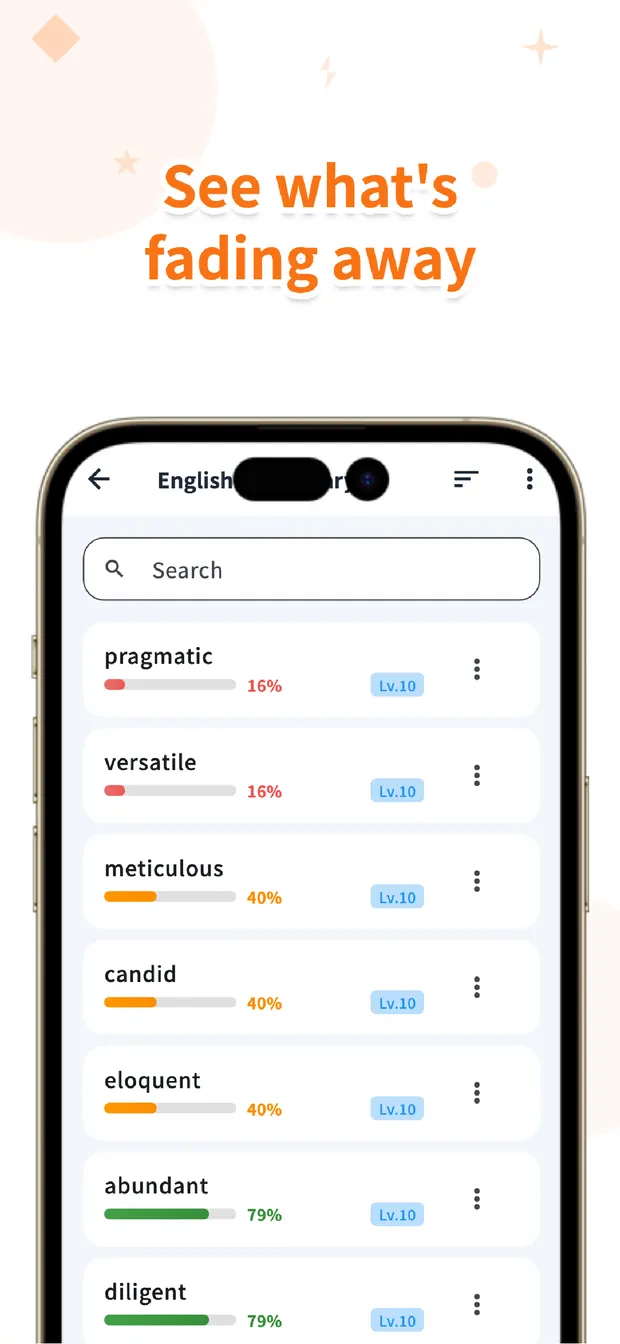
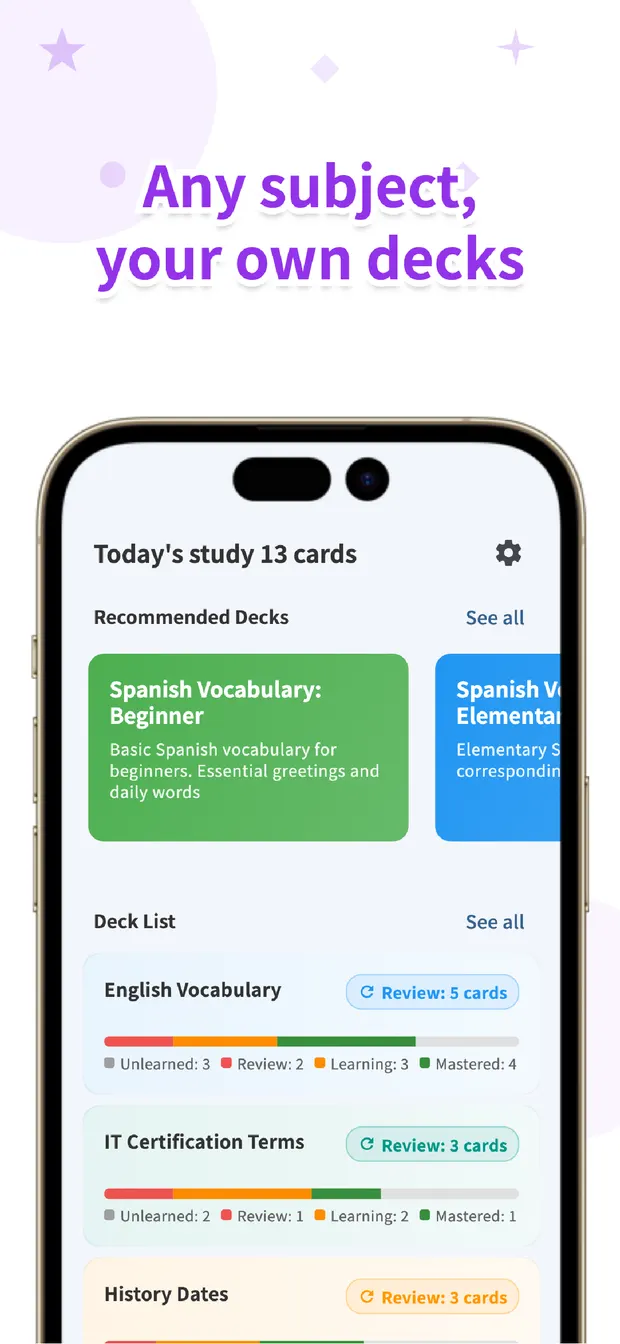
You can study as classic flashcards or as multiple-choice quizzes, build decks for anything from vocabulary to exam terminology to history dates, and import your existing word lists via CSV.
And it's completely free — every feature. We believe cost shouldn't be a barrier to learning, so there's no premium tier to compare. If you want review scheduling handled for you, or you're the type who needs a streak calendar to stay honest, start here.
Try Flips for free
Retention gauges manage your review timing automatically. No premium tier — every feature is free.
Available for iOS / Android · No registration required
2. Anki — unbeatable if you master it, and that's a real "if"
The worldwide standard, and an app we studied closely while building our own. Honestly: nothing beats Anki for customization. Its shared-deck ecosystem covers medicine, law, languages and more, and recent versions support the modern FSRS scheduling algorithm.
The trade-off is a steep learning curve — intervals, deck options, card templates — and a quirky pricing model: the desktop and Android (AnkiDroid) versions are free, while the official iOS app is a $24.99 one-time purchase. For a med student settling in for years of study, that's a bargain. As a first memorization app for a casual learner, it's overkill.
3. Quizlet — instant study material, rationed free tier
Quizlet's superpower is its library: search for your textbook chapter or exam topic and someone has probably already made a study set. The game-like study modes keep things from getting stale. Since 2022, however, the core Learn and Test modes have been limited to a set number of rounds on the free plan, so treat Quizlet as "free to browse and dabble, paid (Quizlet Plus) to study seriously."
4. reminDO — for people who forget to open study apps
reminDO sends your due cards to you as notifications timed along the forgetting curve, which neatly solves the most fundamental problem of all: never opening the app. You review from the notification itself, no willpower required. It's free for core use with subscription and lifetime-license options. Note there's no Android app — it's iOS plus a browser version.
5. Monoxer — skip making questions altogether
Monoxer generates questions from your content with AI and adapts their difficulty to your memory state. It's widely deployed in Japanese schools and cram schools, but individuals can use it free (the web admin console is for organizations; individuals create material in the app). Paid content packs cover standardized tests. If you want both material creation and study planning done for you, this is the strongest option — though the app is primarily Japanese-language.
6. Anki Maker — study in test format, not card format
Despite the name, this is unrelated to Anki. It's a Japanese app (over a million downloads on Google Play) for building your own quizzes — Q&A, multiple choice, fill-in-the-blank — rather than flashcards. If flipping cards bores you and you'd rather drill in exam format, this is the tool. Free with ads; one-time ad removal and premium plans available. No spaced-repetition scheduling, so re-testing is on you.
7. Sugoi Ankicho — photograph your notes, get questions back
Photograph a notebook or textbook page and AI turns it into Q&A cards. It's a clever attack on the most tedious part of studying — making the material — and it has taken off with Japanese students. The free tier caps AI usage; serious use requires a subscription. One heads-up for parents: it includes a social timeline where learners share progress, so if a child is using it, agree on how that part gets used.
8. Anki no Kamisama — 100,000 questions built in
"The God of Memorization" ships with a question bank covering 18 school subjects and over 100,000 questions, so there's nothing to create — install and start drilling. The free tier runs on tickets that recharge over time; the PRO subscription removes the limits. Content targets the Japanese school curriculum, which is exactly what makes it powerful for that audience.
9. Photo Anki Notebook — for handwritten-notes people
Mark up a photo of your notes and the app hides the marked parts like the classic Japanese red-sheet method, then re-quizzes you on just what you missed. If handwriting is how you learn, this preserves that workflow while adding smart review. A small one-time purchase unlocks everything. iOS only.
10. WordHolic! — the language-learning specialist
A flashcard app built purely for language learners, with text-to-speech in 30 languages, unlimited cards, and every study feature free (ad-supported, with a cheap ad-free plan). Auto-advancing cards make it work as a listen-while-commuting tool. Touches like automatic pinyin for Chinese show its specialist focus.
11. RepeatBox — memory science, implemented straight
RepeatBox implements the research one-to-one: spaced repetition plus active recall, as a five-stage review cycle. It adds OCR for importing text from images and an AI tutor for asking questions about what you're studying. Formerly Android-only, it now has an actively updated iOS version too. Free for core use, with a one-time premium unlock.
A note on confusing names
Two things tripped us up during research, so they'll trip readers too. "Noji" (formerly AnkiPro) is not related to Anki — different company, no deck compatibility. If you want Anki, get the official AnkiMobile (iOS) or AnkiDroid (Android). And "Tangocho Maker," a once-popular Japanese flashcard app, scaled down development in 2024 with its Android version suspended — we'd skip it for new projects.
Which one should you actually install?
If someone asked us directly: for language learning, WordHolic! if audio matters most, Flips if review scheduling matters most. For professional exams, Anki Maker to drill in test format, Flips or Anki for terminology cards. For school tests, the built-in bank of Anki no Kamisama or the photo-based apps get you studying fastest.
And if the goal is simply building a memorization habit without spending money — Flips (fully free) or WordHolic! (free with ads). Whatever you choose, the app that wins is the one you open every day. Install two or three, give them three days, and keep the one that disappears into your routine.
Flips
Flashcards that show up right before you forget. Retention gauges manage your review schedule automatically. Completely free.
Learn more about FlipsFrequently asked questions
Which memorization apps are completely free?
Flips is fully free with no premium tier. WordHolic! makes all study features free but shows ads. Anki is free on PC and Android, with the official iOS app sold as a $24.99 one-time purchase. Many "free" apps limit study rounds or AI usage, so check the free-tier column in our table before committing.
Are flashcard apps more effective than paper cards?
Where apps clearly win is review scheduling. Memory research shows recall sticks best when you review right as you're about to forget, and automating that schedule is the core value of a good app. If writing by hand helps you learn, photo-based apps let you combine paper notes with smart review.
Is Noji the same as Anki?
No. Noji (formerly AnkiPro) is made by a different company and has no connection to the original Anki — decks aren't compatible. If you want Anki, use the official AnkiMobile on iOS or AnkiDroid on Android.
What is spaced repetition, briefly?
It's reviewing material at increasing intervals timed to the forgetting curve — right before each piece of knowledge fades. Compared to cramming, it moves information into long-term memory with far fewer total reviews. Apps like Flips, Anki, and RepeatBox automate the timing for you.